Is it time to think about Quicken for ipadOS?
I use Quicken for Mac on a MacBook Pro with the latest macOS software. I also have an iPad Pro which actually uses a newer more powerful processor than my Mac. When I'm on the road for three or four weeks my iPad Pro travels with me and my Mac stays home. I have no way to manually synchronize the laptop with the iPad and therefore trying to use Quicken mobile is useless since it doesn't stay up-to-date, particularly with my brokerage accounts.
With Apple becoming very vague as to whether it considers its computer a laptop or an iPad, I was wondering if it's time to see if Quicken can create "Quicken for ipadOS" as an alternative to Quicken for Mac. I do see many more colleagues opting to travel with an iPad rather than a laptop these days. In fact I find that my iPad does everything my Mac does except run Quicken.
I guess what I would like to see is a Quicken for iOS which can run on a top line iPad as a native standalone program comparable to Quicken for Mac, or an option to allow my laptop to automatically synchronize with Quicken mobile every 30 or 60 minutes so Quicken mobile stays up-to-date when I'm away from my laptop. There's obviously no way I can manually synchronize my laptop with my iPad if I'm not at home for a few weeks.
Are there many others that are in this situation? Would this actually be a viable product? It would sure be useful for me.
Comments
-
If you want a "sort of fully functional iOS" application look to Simplifi or the non-classic Business and Personal.
Note that with either of these you will have to start over, they don't support reading in your Quicken Classic data, and they are more limited than what is supported by Quicken Classic.
But also note that if you use the companion mobile/web it should stay up to date for periods like vacations. The way it works is you sync from the Desktop to create the accounts in the Quicken Cloud dataset and the connections to the financial institutions. The Quicken servers poll the financial institutions periodically (in the web interface you can force and update, and I believe the mobile app update at startup) and updates the Quicken Cloud dataset. The Mobile and Web apps are basically the GUI's for the Quicken Cloud dataset. When you get back to the Quicken Desktop, that is what you are syncing with.
Quicken Classic is never going to be on iOS unless Apple somehow makes it so that Mac programs can run on iOS pretty much unchanged. iOS is a completely different operating system and as such it requires a total rewrite to support it. That is basically what Simplifi and the non-classic Business and Personal is. But clearly, they wanted to start over building something that was more tuned to the newer generations.
Signature:
This is my website (ImportQIF is free to use):0 -
If you look at the change history of the iPhone/iPad app it's pretty clear that it has been in maintenance mode for years with no significant improvements. It seems to me that Quicken would rather you use Simplifi if you want something that's fully functional from multiple devices both at home and away.
There was a Product Idea thread years ago to allow Quicken Mac to automatically sync with the Quicken Cloud periodically but it was rejected, so I wouldn't hold out any hopes of that ever happening.
It's frustrating having to travel with both an iPad and a Mac laptop, especially since Quicken Classic is the only reason I still need the laptop, but I don't see either Quicken or Apple taking any steps that would let me dump the laptop. So at this point my plan is to keep using my Air until it dies and then buy the cheapest possible Mac laptop to replace it.
0 -
I saw someone on a Mac that said what they did is leave their Mac running and then did some kind of Mac scripting that would do the sync every once in a while, but in in reality that shouldn't be needed. Like I said the Quicken Cloud dataset isn't "static data store", the Quicken server is actively updating it.
I do agree though that they have put very little into it in years. And at least on the Windows side none of the SuperUsers trust it not to corrupt their data file.
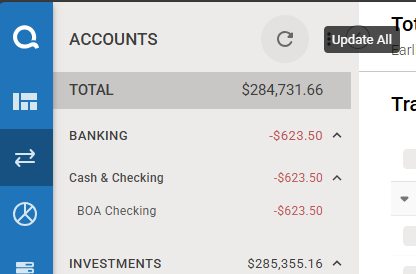
Here is from the Web app in a test file I have:
Of course, though there might be problems in the different ways that the mobile/web apps deal with things like reconciling and such. But just for seeing your expenses come in on a trip should work.
Signature:
This is my website (ImportQIF is free to use):0 -
The cloud may be actively updated, but the only way to get those updates back onto your Mac is to run Quicken & manually sync. Quicken Mac does not automatically sync at startup.
0 -
Yes, I was assuming this like a vacation, and when they get home, they would sync it.
But in reality, I was just point out that this capability as an option, because if the goal is to stay entirely on iOS then the only real options are Simplifi or non-classic Business and Personal.
Signature:
This is my website (ImportQIF is free to use):0 -
I have an iPhone and an iPad (not a nice new one like @R Strax) and I've noticed that most apps are developed for the iPhone iOS and few, if any have an iPad iPadOS version. If the app runs on the iPad, great, but if it doesn't they just say, well, it's iOS, sorry. A few have even refused to install because they detected iPadOS. While the split between iOS and iPadOS is small, it adds another layer of complexity and ongoing maintenance that, apparently, most developers aren't willing to deal with. There has to be a very large demand of iPad usage for an app to create an iPadOS version, and from the posts on this board, I don't think Quicken sees that level of demand.
0
Categories
- All Categories
- 56 Product Ideas
- 36 Announcements
- 223 Alerts, Online Banking & Known Product Issues
- 22 Product Alerts
- 701 Welcome to the Community!
- 671 Before you Buy
- 1.2K Product Ideas
- 53.7K Quicken Classic for Windows
- 16.3K Quicken Classic for Mac
- 1K Quicken Mobile
- 813 Quicken on the Web
- 111 Quicken LifeHub