using tags
for those who use categories to categorize a transaction, how do tags help? for example if you live in two different locations, and atlanta:groceries and Chicago:groceries are both different categories, and you used tag for location, that's no help, or if you used it for 'groceries' thats no help either. so are tags kind of redundant. recent newsletter deals w/ tags but doesnt address this issue
Comments
-
Tags are helpful if you want to track income or expenses that cross Categories, so you don't have to make Subcategories in each affected Category.
For example, say you have Categories for Hotels, Restaurants, and Airfare and you want to track the total cost of a trip to Florida. You could make a "Florida" Tag and use it across all the Categories that relate to the trip.
QWin Premier subscription0 -
As Jim indicates, tags can eliminate somewhat redundant subcategories. You cite Groceries in your examples. Extending that, with other subcategories you might have
- Groceries:Atlanta
- Clothing:Atlanta
- Utiliites:Electricity:Atlanta
- Dining:Atlanta
Even switching to the location first, it is still four distinct categories, or eight with the Chicago location, or 12 with a third location.
Under a Tags approach, you would have the four basic categories and applicable subcategories and combine them as needed with two Tags (Atlanta and Chicago, and a third?). For various reports, you can then include or exclude the tag specification. ying
(Haven't read the newsletter article yet, but) applying tags to children can be another helpful situation. You don't need separate subcategories for each child - just you the basic category (or subcategory) and apply the correct Child's tag as applicable. Clothing/Child1 Gifts/Child2 Education/Child3 What could have been 9 category:subcategory permutations become 3 categories and 3 tags.
I've also used 'year' tags for vacations so that I can record the rental deposit made in 2024 to the 2025 vacation to Florida. I can get all the 2025 Florida vacation expenses reported, and distinct from the 2024 and 2023 trips. Dining/Florida:2025, Vacation/Florida:2025, Auto:Fuel/Florida:2025
0 -
There are Categories and Sub-Categories and Tags. You use a colon in front of a sub-category. The forward slash / designates a Tag, or there is also a TAG column.
Example of Sub-Category….
Auto:Auto Fuel
Auto:Maintance
Example of Tags…
Auto Fuel/Toyota
Auto Fuel/Ford
My husband had a survey business and I used Tags for each job. Then when I run a report I can sort it by job. So an expense entry might look like this…
Business Expense:Supplies/Maple StreetI'm staying on Quicken 2013 Premier for Windows.
0 -
I concur with everyone's helpful comments. I've used tags for a number of years to track expenses for Vacations by creating a tag for the location Italy 2024: and I follow that with other specific tags I wish to include. For food the category would be Restaurant or Groceries and Tag Italy2024. I also used them when we bought a new house and I where I tracked expenses in categories and used tags to indicate which expenses were onetime expenses for renovation and a separate tag to indicate the vendor. I've often used three tags which helps to create granular reports.
I found you can also use tags in investment transactions. There may also be other ways to do this but to add investment tags I simply choose Split and the split table includes a column for tag.
An enhancement that I do not think exists is to give options when creating reports with Tag Totals. For example, in creating a report for a vacation I'll choose Tag Contains Italy2024 and Totals by tag. That gives me all of the subtags related to the Italy vacation. I'd like to be able to Customize that report to summarize just at the primary Tag level or secondary etc. This would allow me to see a single expense for Italy. This helps if I'm looking at multiple vacations simultaneously as this report would just show the vacation total in one line for multiple vacations. There are many variations to the theme of this idea and might be of help in creating budgets
0 -
An enhancement that I do not think exists is to give options when creating reports with Tag Totals.
You should be do that using the Itemized Tags report collapsed to just show the Tags.
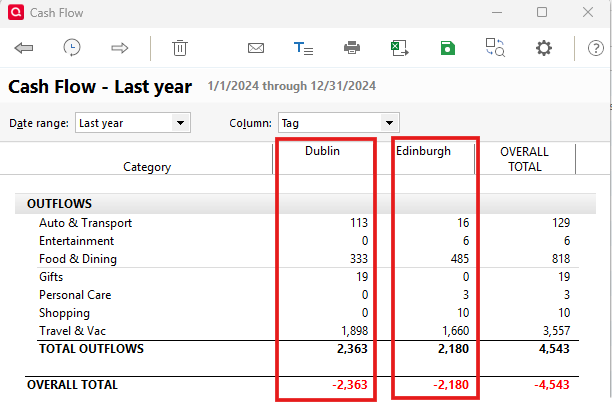
Or you could use the Banking > Cash flow report with the Column set to Tag. In that report, rows could be Categories and columns would be Tags.
QWin Premier subscription1 -
The situation I'm referencing is an itemized Tag report where transactions have multiple tags. Example, Canada:Restaurants, Canada:Entertainment. If I do a report of itemized Tags there are two rows. I'd like the option to create a report of One row. This is helpful if I'm looking for a summary report of multiple Vacations in different locations then the ability to collapse each vacation into its own row allows for easier comparison.
0 -
What @Jim_Harman suggested (Banking > Cash flow report with the Column set to Tag) gives you almost what you want, excluding the collapsing capability. And if you don't want to see your sub-categories since they tend to make the report busy in this case, go to the report's advanced tab and select subcategories=Hide all
In this made-up test example, Dublin and Edinburgh are the Tags
I recognize that visually you want the rows and columns to be reversed, but I'd suggest that perhaps this gives you a better real estate layout.
- Q Win Deluxe user since 2010, US Subscription
- I don't use Cloud Sync, Mobile & Web, Bill Pay/Mgr0 -
thank you. I've not used Cash Flow reports and I'll give it a try
0
Categories
- All Categories
- 56 Product Ideas
- 36 Announcements
- 225 Alerts, Online Banking & Known Product Issues
- 22 Product Alerts
- 703 Welcome to the Community!
- 671 Before you Buy
- 1.2K Product Ideas
- 53.7K Quicken Classic for Windows
- 16.3K Quicken Classic for Mac
- 1K Quicken Mobile
- 812 Quicken on the Web
- 111 Quicken LifeHub