Fix problem where the value shows on another monitor when you hover over the bar on a report graph.
Hello @30yearuser,
Thank you for letting us know you're seeing this. Please provide more information. How many monitors are you using? What display resolutions are they set to? Which monitor does your Quicken program display on, and which alternate monitor is the value displaying on?
I look forward to your response!
I'm not sure if this is just another manifestation of something similar that I have observed for quite some time which is the following:
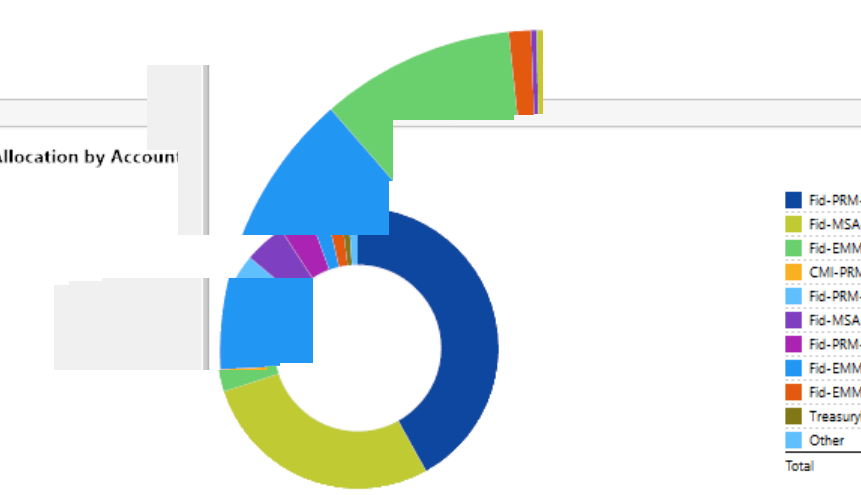
When I hover over a graphic in Quicken, it will often "paint over" fragments of the graphic I am hovering over in an adjacent window of another program, such as a Edge, Chrome, Excel, or whatever. These are only transitory because as soon as I click into the adjacent window, making it active, they disappear. However, I am able to screen capture them and will show a couple of them below (1st and 2nd below).
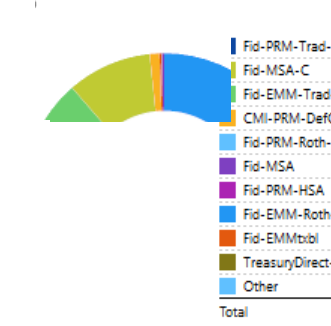
I use a large monitor (32 inch LG Ultra HD running 3840 x 2160 at 150% scale) and also use a second smaller monitor (Dell 24" running 1920 x 1010 at 100% scale). So far, I've not observed the "paint over" phenomenon show up on the second monitor. Being a curious type, I thought I would try maximizing Quicken on the large monitor to see is the paint over may then spill over to the second monitor. I still did not observe it on the second monitor, but much to my surprise, I observed "paint over" on Quicken itself. In other words, hovering over a graphic caused "fragment paint over" on another part of the Quicken screen itself.
My guess is that little or none of this will be easily fixable because of the way Quicken chose to create their entire User Interface in their last major overhaul. I'm sure there were very good reasons for the choices made then, but these kinds of effects, and other behaviors within Windows could be a sign of a fundamental weakness of the UI design.
From another 30+ year user … Quicken Classic Business & Personal - R64.35 … Windows 11 Home Edition
Screenshots (qty 2) showing Paint Over on MS Edge Browser viewing this very Post
Screenshots (qty 2) showing Paint Over on Quicken within itself
There are many posts about this. Usually it is related to the two monitors not having the same scale (one is set to 100% and other to 125%). And given that no other program has this issue, one could say that it might be Quicken related.
Hello All,
I converted this Idea post to a discussion because the change you're asking for was reported as a bug under ticket CTP-12046.
Thank you!
(CTP-12046)
Appreciate the clarification, @Quicken Kristina. It’s helpful to know this behavior is already tracked under CTP‑12046.
You're welcome!
For what it is worth, in another thread we discovered that this problem happens with multiple monitors but they can all be at the same resolution and even have no difference in the scaling. I can see this on my triple (or dual) monitor setup where all the displays are set to the same resolution, 100% Windows scaling and not using Large Fonts.
I recently got Quicken R69.26 and I ran a report today and for the first time in YEARS the hover values are working on my multi-monitor support for some reports but not all. Net Worth over time graph finally puts the tool tip on the actual graph, while spending by category donut graph puts the tool time on the wrong monitor still. Quicken Developers, if you are indeed finally working on this long overdue defect you have made progress but still there is more to do to fix this. Can we get an update if this is actually being addressed or is this just a fluke that I got a few reports to work today?
Hello @Kevinky,
Thank you for reaching out! The Community is primarily a user-to-user platform, so you're unlikely to receive a response from the developers here.
The ticket is currently being worked on, but there are no notes confirming whether the success you're reporting is due to changes they've made.