Default Register Configuration..

JoelC
JoelC Quicken Canada Subscription Member ✭✭✭✭

Apologies in advance should I be missing something.

Is there a way in QMac to configure one checking account, savings account, Investment account, etc. and make it the default configuration for all checking accounts, savings accounts, Investment accounts, etc.

Thanks in advance.

Joel

Tagged:

Comments

  • Jon
    Jon Quicken Mac Subscription SuperUser, Mac Beta Beta

    Sort of. You can select an account, configure which register columns are displayed for that account, and then apply it to all the accounts of that type via the Columns button in the lower right with the "Apply to All" option in the pop-up menu. But that doesn't apply to the arrangement of the columns or the sizing, AFAIK those have to be set one account at a time.

  • jacobs
    jacobs Quicken Mac Subscription SuperUser, Mac Beta Beta

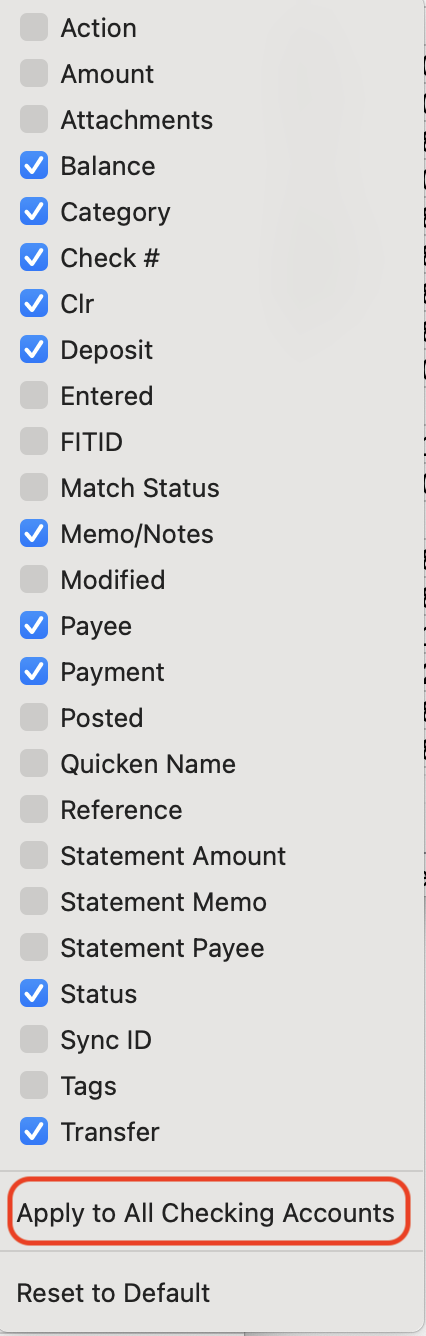
    Yes and no. You can make each register of the same type contain the same fields, but you cannot duplicate the field order and width. When you click the Columns icon in the bottom toolbar under a register, below the list of fields there is the option to "Apply to All [type] Accounts":

    Screenshot 2025-11-03 at 2.06.22 PM.png

    This will hide and show categories in all other accounts of that type so they are the same. But if you want them to look identical, you have to manually reorder and adjust the width in each register. If you'd like Quicken to offer a way to to that automatically, you should add your vote to this Idea topic:

    Quicken Mac Subscription • Quicken user since 1993
  • JoelC
    JoelC Quicken Canada Subscription Member ✭✭✭✭

    @Jacob, appreciated.

    I am / was talking about the order and width (apologies, I should have been clearer).

    I voted for that a long time ago, I had hoped there would have been some progress on this that I missed.

    Once again, much thanks.

    Joel

This discussion has been closed.