Have QuickFill category rules use "Starts With" instead of just "Exact Match"

keenethery
keenethery Quicken Mac Subscription Member ✭✭

Problem: No category assigned to downloaded transactions containing dates in the Payee line. Every downloaded transaction from the same payee has a different payee text as far as Quicken is concerned. Have to manually add every category.

Solution: Instead of using "Exact Match" (since that is never going to be true when dates are added into the payee line) use "Starts With" because the payee company name in the beginning of the dowloaded transaction payee is consistent.

1
1 votes

Reviewed · Last Updated

There is a way to accomplish this that is different from the solution proposed in this idea. See jacobs' post below for more details.

Comments

  • Chris_QPW
    Chris_QPW Quicken Windows Subscription Member ✭✭✭✭

    Doesn't Quicken Mac have something like "Contains" in the renaming rules so that you can normalize the payee's name so that it will match the QuickFill rule?

    Signature:
    This is my website (ImportQIF is free to use):

    http://www.quicknperlwiz.com/

  • jacobs
    jacobs Quicken Mac Subscription SuperUser, Mac Beta Beta

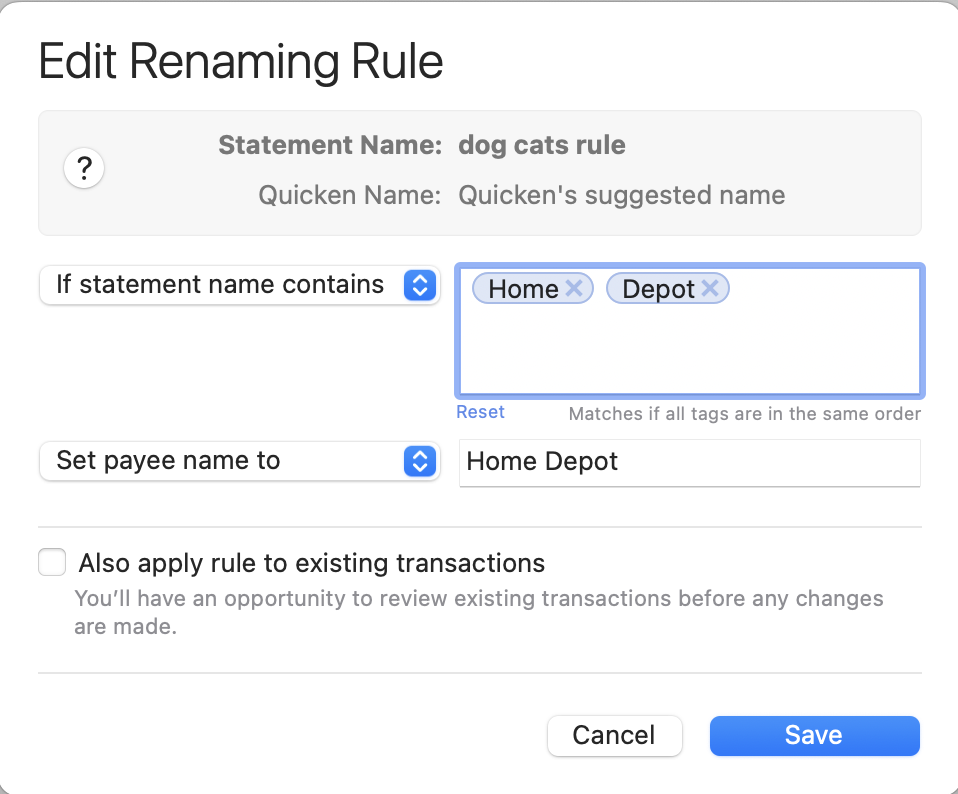
    @keenethery There are two parts to doing what you want, as @Chris_QPW alluded to. The first thin you need to do is create a Renaming Rule. These rules are to standardize the variable names of downloaded payees to a single name: e.g. "Home Depot #1234 Anytown" and "Home Depot #9876 Othertown" should both have the payee renamed to "Home Depot". Renaming Rules have what you were asking for here: "contains" matches. So in my example, I'd create a renaming rule like this:

    Screenshot 2025-11-13 at 5.26.37 PM.png

    Now that you know all the transactions will have the sane-name payee, you can create a QuickFill Rule to categorize that payee's transactions. There aren't wildcards or "contains" searches for QuickFill Rules, because they are uniquely assigned to a Payee in the database.

    So Quicken Mac does already do what you're asking for, just in two steps: (1) a Renaming Rule to standardize the downloaded payee names, and (2) a QuickFill Rule for the payee to categorize transactions.

    Quicken Mac Subscription • Quicken user since 1993