Duplicate Downloaded Bank and Credit Card Transactions
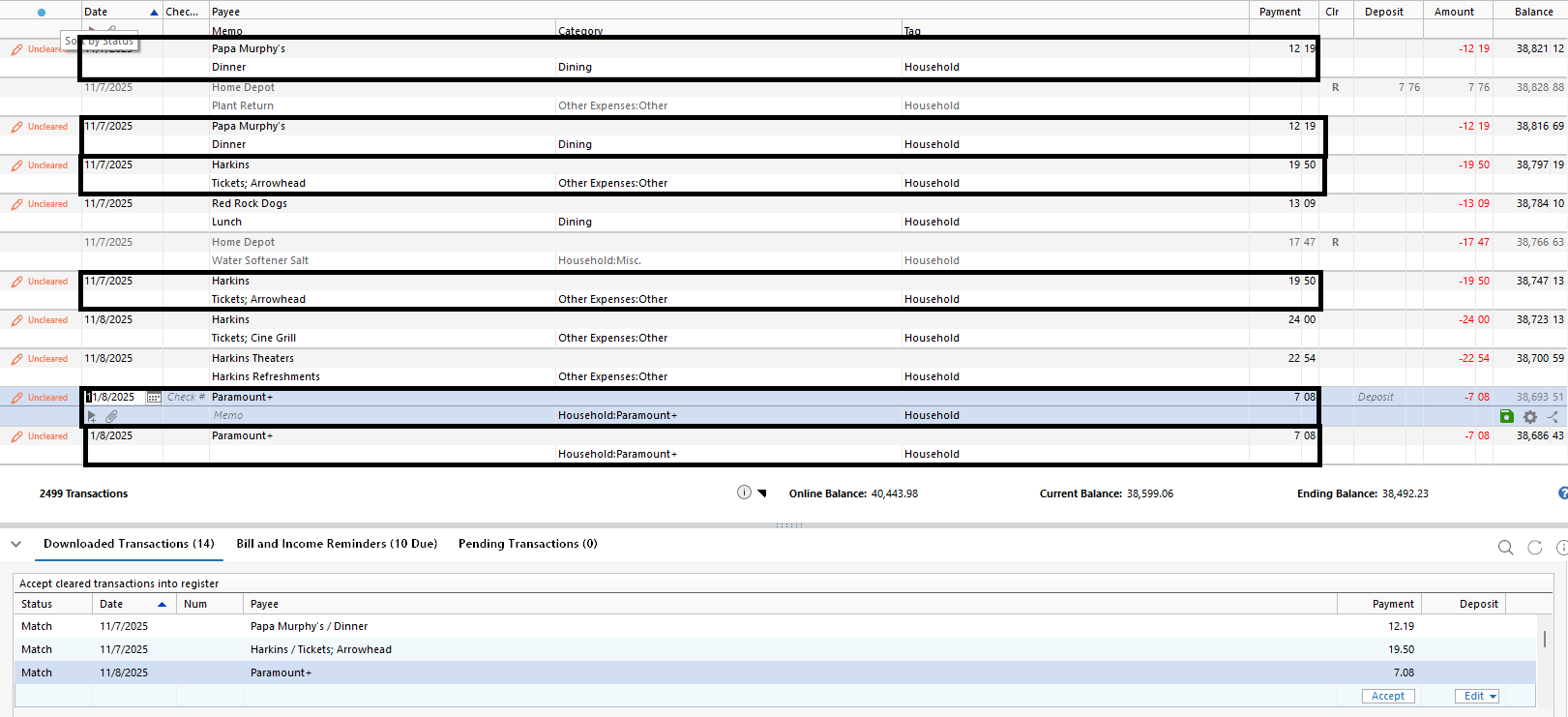
This problem started about a week ago. I typically manually enter bank and credit card transactions before downloading the transactions via Quicken One Step Update. When the One Step Update is finished, the bank and credit card transactions will show as a 'Match' in the 'Downloaded Transactions' section. That's fine and that's how it has been working up until about a week ago. Now, the transaction is also being added in the Transaction Register creating a duplicate entry. I 'accept' the matched transaction, but I have to go back and delete each of the duplicate transactions. [Removed-Beta] This issue only applies to bank and credit card transactions. Investment account transactions I download aren't affected by this issue.
Best Answer
-
Thank you for coming back to let us know the issue has been resolved. If you need more help, don't hesitate to reach back out.
Thank you for following up. Yes, while I do appreciate you reporting the issues you are seeing, there is a team dedicated to everything Beta.
I have also sent you a direct message. Please navigate to the inbox in the top right-hand corner of the Community page and check your inbox.
Thank you both!
Quicken Alyssa
Make sure to sign up for the email digest to see a round up of your top posts.
0
Answers
-
Have you recently changed download methods, between any combination of Direct Connect, Web Connect and Express Web Connect+.
Q uses a "Financial Institution Transaction ID" to identify duplicate transactions, and because the banks and Intuit create those FITID's differently, a single transaction with a different FITID can be re-downloaded and not identified as such by Q.
Such duplication should only happen after you've initially changed download methods, so it should only be a one-time clean-up effort.
Q user since February, 1990. DOS Version 4
Now running Quicken Windows Subscription, Business & Personal
Retired "Certified Information Systems Auditor" & Bank Audit VP0 -
This is happening to me also. It started this week, I believe after I downloaded a new version of Quicken. Duplicate bank and credit card transactions are posting to my register when I do an online update.
1 -
This is happening to me as well with bank and credit card transactions
1 -
This discussion was created from comments split from:
Duplicate Downloaded Bank and Credit Card Transactions
.
0 -
Hello @Geri Price & @lauraannxoxo,
Thank you for letting us know you're seeing this issue. To troubleshoot this issue, please start by following the troubleshooting from this article on duplicate transactions:
Step 1: Add the Downloaded ID column to your register
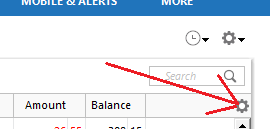
- Click on the Register Columns gear icon at the top right of the account register.
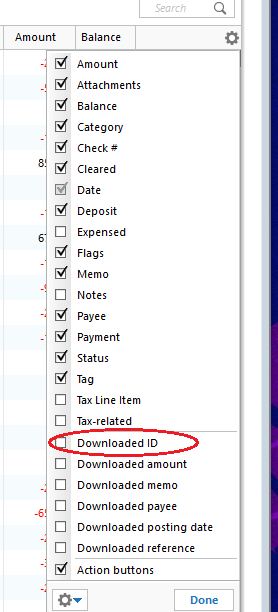
- Place a checkmark next to Downloaded ID, then click Done. (If you use Two-Line Display, you will need to select Downloaded ID and Downloaded reference)
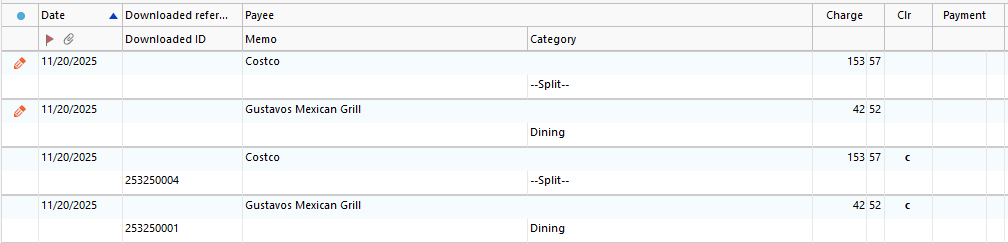
- Review the Downloaded ID. This is the unique identifier for each downloaded transaction. It is used by Quicken to determine which transactions have been downloaded and which ones need to be downloaded.
Step 2: Determine which of the following situations is causing duplicate transactions
Mismatched manual and downloaded transactions appear in the account register.
If the duplicate and manual transactions do not have a Downloaded ID, then the downloaded transaction was not properly matched to the manual entry.
Solution: Delete the manual entry.
- Right-click the manual entry.
- Select Delete.
- Confirm by clicking Yes.
Downloaded transaction appears twice, with the same Downloaded ID.
Solution: Set the register for the affected account to Single-line display.
- Press Ctrl + 2 on your keyboard.
- Delete the duplicate transactions.
- Set the register back to Two-line display by pressing Ctrl+2 again.
Downloaded transactions appear twice, with different Downloaded IDs.
If your bank and/or their service provider is making changes to how they present data to Quicken, there is the possibility that they may transmit the same transaction with two different IDs.
Solution: Contact the Online Banking Support for your bank (Tools menu > Online Center > Contact Info) to request they escalate to their OFX team or service provider in order to resolve this issue for all their Quicken customers.Transactions are downloaded through Quicken AND a manual download from your bank's website, resulting in different Downloaded ID numbers and duplicate data.
Solution: Don't mix your methods for getting transactions from your bank. If you want to download from the website, try to stay with that method. If you decide later that you want Quicken to update automatically rather than manually downloading yourself (or vice versa), be aware that you may encounter duplicate transactions on that first download after the change. You will need to manually delete the duplicate transactions.
Deactivating and reactivating your account to change the connection method has caused downloaded transactions to appear again.
This is typically a one-time event; if you have not deactivated and reactivated your account in Quicken, this does not apply to you.
Transfers are appearing twice.
This occurs when a transfer is downloaded for one account then downloads again for the other account and the transfer transactions do not get matched to each other.
If you find that this is not a one-time event
If duplicates continue to download, you may require the assistance from either the Online Banking Support for your bank or from Quicken Support.
To delete multiple duplicate transactions
If you need to delete numerous duplicate transactions, follow the steps below. Please note, multiple transactions can only be deleted simultaneously in the register. This process cannot be completed in the Compare to Register at the bottom of the Quicken window.
- Make a backup of your data file. This ensures that you have a "fall-back" file you can use to get back to where you were when you started.
- Select the affected account to view the register.
- Click the first duplicate transaction to highlight it.
- While holding the Ctrl key on your keyboard, click each of the duplicate transactions in the register.
- Once all the duplicate transactions are selected, right-click on any one of them and select Delete.
I hope this helps!
Quicken Kristina
Make sure to sign up for the email digest to see a round up of your top posts.
0 -
Same issue, duplicating downloaded transactions on bank & credit card accounts.
0 -
I also have the same issue!
0 -
Have the same issue and thankfully can restore to a 11/19 backup but download IDs are different and not matching in the register so I can't update transactions without recreating a mess. Changed nothing, and this goes way back in transaction history as well, not just new transactions.
0 -
I'm having the same issue, across multiple different accounts and banking institutions.
0 -
Hello All,
Thank you all for reporting the issues you are seeing with duplicate transactions. As @NotACPA, mentioned, duplicates would be expected if any of you have recently changed connection methods.
I have some follow-up questions for you.
- Are you seeing these duplicates with certain financial institutions?
- Which financial institutions are affected?
- Did this problem start two weeks ago for each of you?
- Are these duplicates a one-time occurrence, or have they continued happening with every download?
Please review this Support Article for duplicate transactions and apply the steps therein.
If your issue is specific to a Beta version, please repost what you are seeing in the Beta section of the Community.
Thank you.
Quicken Alyssa
Make sure to sign up for the email digest to see a round up of your top posts.
0 - Are you seeing these duplicates with certain financial institutions?
-
Expect for the OP (who is using Beta), it is frustrating that none of the other users mention which release they are on. That info might be very useful in this particular case. I say that since there is another post about duplicate transactions that seems to be isolated to R65.15 only.
Folks, please include which release you are on. Thank you.
- Q Win Deluxe user since 2010, US Subscription
- I don't use Cloud Sync, Mobile & Web, Bill Pay/Mgr1 -
Hi, the last few days I have had issues with Amex and Chase credit card transactions doubling up because previously entered transactions do not match properly. So I end up with two of each transaction. It was at least 15 transactions and I have not seen anything like this before in my 35 years of using Quicken. Anyone else?
0 -
Hello @iusdcm1,
Thank you for letting us know you're also seeing this issue. To start troubleshooting, please follow the instructions in my earlier post:
Please let me know how it goes!
Quicken Kristina
Make sure to sign up for the email digest to see a round up of your top posts.
0 -
It started with version R65.15. I am on build 27.1.65.15.
It happens on both bank (PNC, Ally) and credit card (Chase, Citi, Barclays) accounts. It happens when I manually enter a transaction and then later do an One Step Update. It happens just like MLB56 describes in the first post to this thread.
0 -
I did what you said and the issue is the downloaded transactions are not being properly matched to the manual entry. What could be causing this for all the credit cards? It is happening on Chase and Amex for me so isn't this a Quicken issue?
1 -
I am having the same issue with Chase and Amex. It seems to me that Quicken is not matching the downloaded transactions to the manually entered transactions. I am on the latest windows version of Quicken Premier.
0 -
Same here.
Quicken Classic Deluxe on Windows 11
Version: R64.35 Build 27.1.64.35
I believe it started last week
But ONLY for Discover credit cards. I have two of them. Now it downloads the SAME transactions and puts them in both accounts. Has done this twice (I don't use the card very often). the other card I use once/year to keep it active.
I have not changed anything on my end (Quicken).
1 -
Thank you for your reply @iusdcm1,
Typically, for Quicken to match transactions, it needs the date, payee, and amount to match. Is that information identical in the downloaded transactions and the manual entries they should be matching to?
Thank you!
Quicken Kristina
Make sure to sign up for the email digest to see a round up of your top posts.
0 -
Yes, everything that was manually entered was the same as the downloaded transactions. By the way, I noticed this is happening on checking accounts too.
0 -
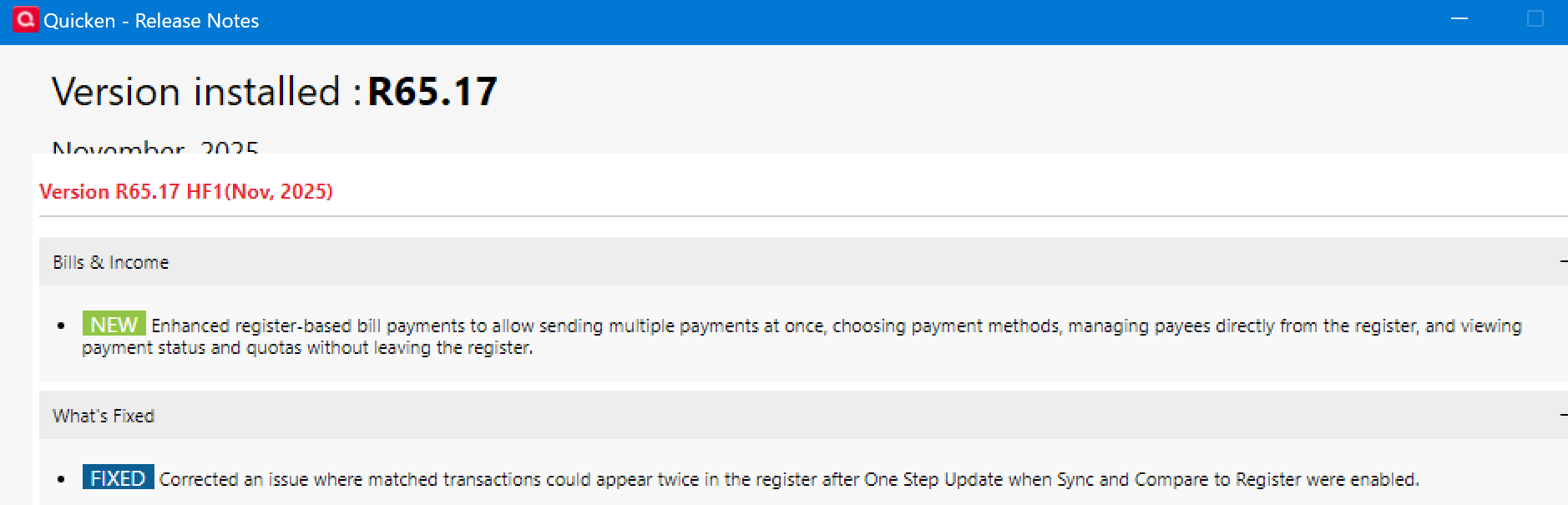
Release Notes from HF1 R65.17 indicate that the update is intended to fix this duplicate transaction issue.
2 -
Thank you for the replies,
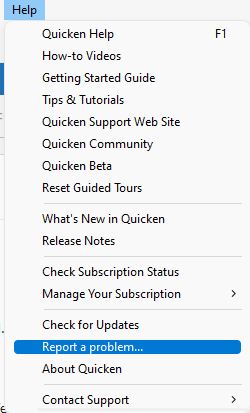
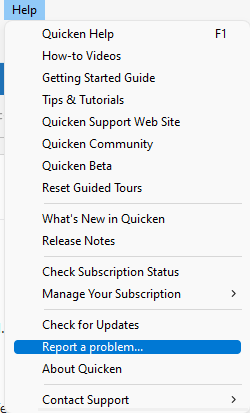
I can see that you're using R65.17. Have you downloaded transactions since your Quicken updated? If you have, and the issue is not fixed, as the release notes say it should be, please navigate to Help>Report a Problem and send a problem report with log files attached. If possible, please also include a screenshot showing the duplicates.
I can see that you updated your Quicken to version R65.17. Is the issue resolved, or is it still persisting?
I look forward to your response!
Quicken Kristina
Make sure to sign up for the email digest to see a round up of your top posts.
1 -
I downloaded the new release today so I will see how it goes tomorrow. Thanks!
0 -
Hello All,
Thank you for reporting this issue.
This issue has been reported, and I have merged this thread with a similar one. Can we please have those of you who are still experiencing this ensure you are on the latest release, and then report back to let us know if you are still seeing duplicate transactions downloading?
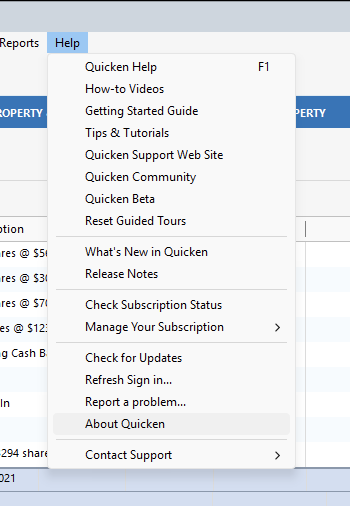
You can see which release you are on by going to Help>About Quicken.
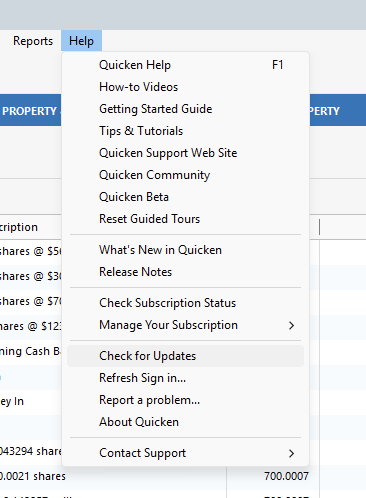
You can update your software to the latest release by going to Help>Check for Updates.
We look forward to your feedback!
Quicken Alyssa
Make sure to sign up for the email digest to see a round up of your top posts.
0 -
Seems to be working now! Thanks so much.
1 -
This response is for 'Quicken Alyssa'.
Thanks, Alyssa. I'll repost my original message on the Beta section of the Community. [Removed-Beta]
0 -
Thank you for coming back to let us know the issue has been resolved. If you need more help, don't hesitate to reach back out.
Thank you for following up. Yes, while I do appreciate you reporting the issues you are seeing, there is a team dedicated to everything Beta.
I have also sent you a direct message. Please navigate to the inbox in the top right-hand corner of the Community page and check your inbox.
Thank you both!
Quicken Alyssa
Make sure to sign up for the email digest to see a round up of your top posts.
0 -
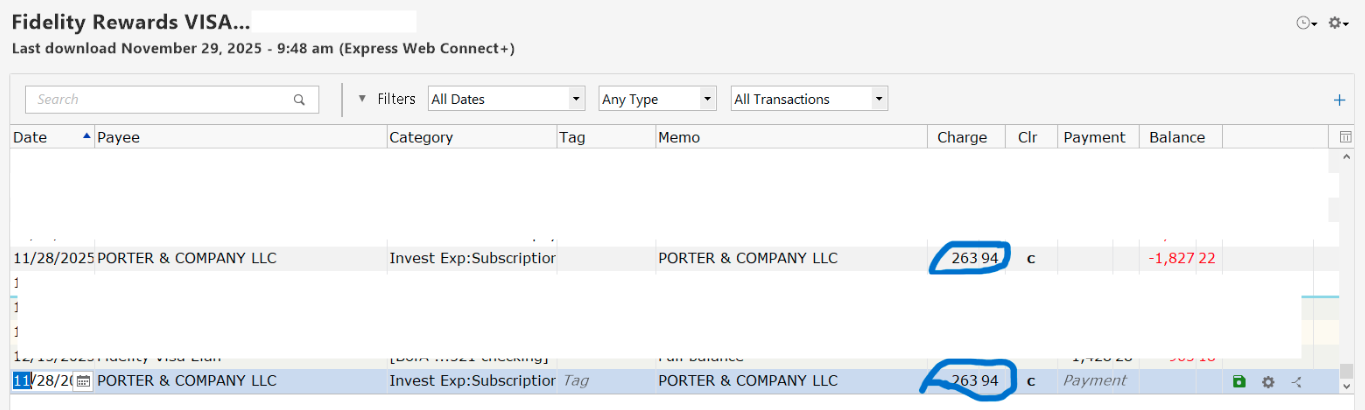
See this example.
[Edited - Removed Personal Information]
0 -
Hello @Carleton Williams,
Thank you for letting us know you're impacted by this issue! The issue has already been reported to our teams for further investigation and resolution. To assist with the investigation, please navigate to Help>Report a Problem and send a problem report with log files attached.
Thank you!
(CTP-15396)
Quicken Kristina
Make sure to sign up for the email digest to see a round up of your top posts.
0 -
Where can I find the log files?
0
Categories
- All Categories
- 56 Product Ideas
- 36 Announcements
- 223 Alerts, Online Banking & Known Product Issues
- 22 Product Alerts
- 701 Welcome to the Community!
- 671 Before you Buy
- 1.2K Product Ideas
- 53.7K Quicken Classic for Windows
- 16.3K Quicken Classic for Mac
- 1K Quicken Mobile
- 813 Quicken on the Web
- 111 Quicken LifeHub