Automatically reconcile my *cleared* downloaded transactions? (Q Mac)
Quicken for Mac 8.3.3—although I don't think this is a new issue.
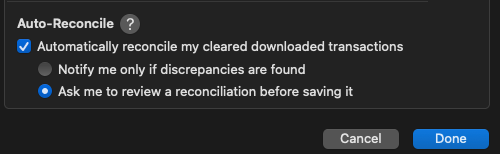
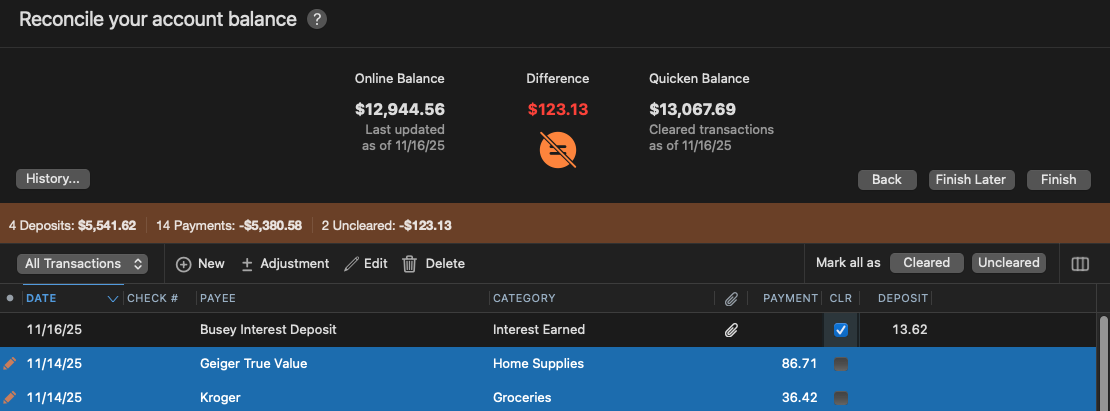
This feature tries to reconcile both cleared and uncleared transactions. In my opinion, either the feature is not described correctly, or it is not working as described. Note that there are two transactions totaling $123.13 which have not cleared that are included in the attempt to reconcile the account. Please advise.
Answers
-
Hello @xingeranium,
Thank you for reaching out! It does show uncleared transactions in the reconcile window, however, they do not count towards the balance unless you mark them cleared (in the checkbox in the CLR column).
Are those uncleared transactions showing pending or posted on the financial institution website?
I look forward to your response!
Quicken Kristina
Make sure to sign up for the email digest to see a round up of your top posts.
0 -
My mistake I read the balances backwards.
Signature:
This is my website (ImportQIF is free to use):0 -
Good question. The two uncleared transactions show as pending on the bank's website. However, I now see that I didn't look at things closely enough.
In the reconciliation panel:
- The Quicken Balance does not include the pending transactions—just as described. I was wrong calling this into question.
- The Online Balance for this account includes pending transactions. So there is no way for Quicken to reconcile the account when there are uncleared transactions. Reconciliation would be possible if the bank excluded pending transactions from the online balance it reports to Quicken.
Sigh.
Thanks for your attention to my question.
0 -
What financial institution?
Signature:
This is my website (ImportQIF is free to use):0 -
Busey Bank IL (12179)
1 -
Thank you for your reply,
You mentioned that you don't think this is a new issue. Do you recall when you first noticed this issue? Have you contacted the financial institution about this? Typically, when the online balance is incorrectly reflecting pending transactions, it's due to the data the financial institution is sending to Quicken. If you have contacted the financial institution, and they didn't help, please let me know.
Thank you!
Quicken Kristina
Make sure to sign up for the email digest to see a round up of your top posts.
0 -
@Quicken Kristina, I will be more willing and more confident contacting the bank when I know what the agreement is between Quicken and financial institutions for downloads. Does Quicken define the specification for the download files, including what is supposed to be reported in the account's Online Balance field? If so, am I correct in assuming that Quicken's specification is that the downloaded transactions and the Online Balance should exclude any and all pending/uncleared transactions? Please advise. Thanks!
0 -
re: "Do you recall when you first noticed this issue?"
@Quicken Kristina, I'm guessing early this year was my prior attempt to use the feature. However I may have also tried to use it a few years ago when I set up the account in Quicken. I didn't pursue it as an issue until a few days ago when I tried it again.
I just now submitted a query to the bank, and instructed them to fix the issue. I'll let you know how they respond.
0
Categories
- All Categories
- 56 Product Ideas
- 36 Announcements
- 223 Alerts, Online Banking & Known Product Issues
- 22 Product Alerts
- 701 Welcome to the Community!
- 671 Before you Buy
- 1.2K Product Ideas
- 53.7K Quicken Classic for Windows
- 16.3K Quicken Classic for Mac
- 1K Quicken Mobile
- 813 Quicken on the Web
- 111 Quicken LifeHub


