Elevations Credit Union CC-501 errors
Answers
-
[Removed-Argumentative/Speculation]
0 -
[Removed-Speculation]
0 -
Here is a work around that's working:
Go to your ECU website and click on checking account:
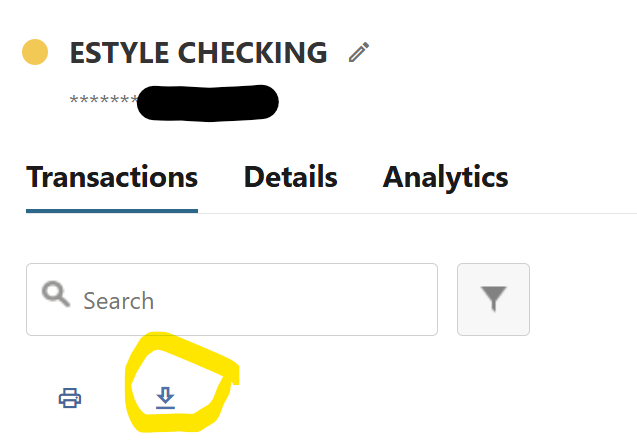
Click on the little download symbol: Select download format=⇒ dates =⇒ accounts and click on download.
Then on quicken do an import on the qfx file =⇒ download transactions will be there.
Did a transaction with ECU two hours ago and that info is available and has been downloaded to Quicken.
This process is working and much improved over the web connect world. With the web connect, deposits wouldn't download until after 11:00am that day.
1 -
What happens when it starts working again? Do you have to figure out which transactions have already been downloaded? It still could be a mess.
0 -
Good Question:
That's a risk!
Good backup process is essential for Quicken anytime.
1 -
Well just for the heck of it this morning I Used the tools, add account method and I was actually able to connect to elevations and it brought in all of my accounts and brought in transactions for the last three days. So apparently there has been some progress made
0 -
I have seen intermittent connectivity over the past couple of months. That said, I would be very cautious and back up each time you download, as the frequency of corruption with these downloads is also an issue.
0 -
makes sense
0 -
I was able to create a new File and link all my accounts with the correct balances.
All of my categories and reminders are lost, but at least the transactions are in the right accounts.0 -
That's promising. Wondering if we should still wait for the all-clear from Quicken in case they have some weird regression or something.
0 -
Yeah, I just updated again and something is messed up. When I first updated, the balances were right. I updated again and it downloaded a transfer from my checking to credit card. Now, I am off by that amount in both accounts. The weird thing is that I see that amount repeating over and over in the Balance column.
Clearly, it isn't fixed.0 -
You would think they would disable the service for the time being to prevent this kind of corruption rather than relying on each user to be knowledgeable about the situation.
But then again, I think that’s the reasonable thing to do but Quicken’s approach here defies reason :-)
0 -
And the lack of status updates is discouraging
0 -
I received a call from ECU stating they believe that as of yesterday evening (1/6/2025) this is fixed. I'm in the process of recreating all my accounts in a new file to test this. Note: even if this works upon reconnection, I would STRONGLY recommend keeping backups and paying close attention to potential future corruption until we go several weeks with reliable downloads and transaction data integrity.
0 -
UPDATE:
I recreated my elevations accounts in a new Quicken file and it looks good. All 12 accounts have transactions that are in the right place. I'm going to reneable them on my primary QUicken file (making sure I have a backup 1st ;-) and see how things go for the next few days.1 -
Restored Q file from yesterday and used OSU with EUC, CHASE AND CITI. This caused a synch action. Then all 3 accounts now have to be reset. Did the reset to ECU and one transaction was already cleared. Another was matched. The usual issue of deposits not being available. Savings account had the posting for Dec's interest which was already reconciled.
There's junk in the pipeline!!!
Be CAREFUL!!!!!
0 -
Sorry - not quite following you. Can you be more explicit on what is actually happening that is not expected?
0 -
Restored Quicken from none Quicken backup.
Did the downloads via OSU that triggered a Cloud sync and didn't finish the OSU.
Had to redo the OSU for ECU, CHASE AND CITI were selected. During OSU: ECU, CHASE and CITI were required to be reset. Below shows that ECU have been reset and CITI and Chase still needs to be reset.
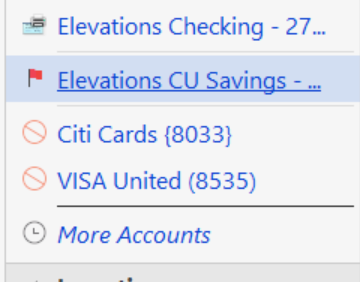

Just now after resetting the ECU accounts, there is bogus transaction for ECU savings:

The amount doesn't belong to checking or savings.
Here's the current state of OSU:
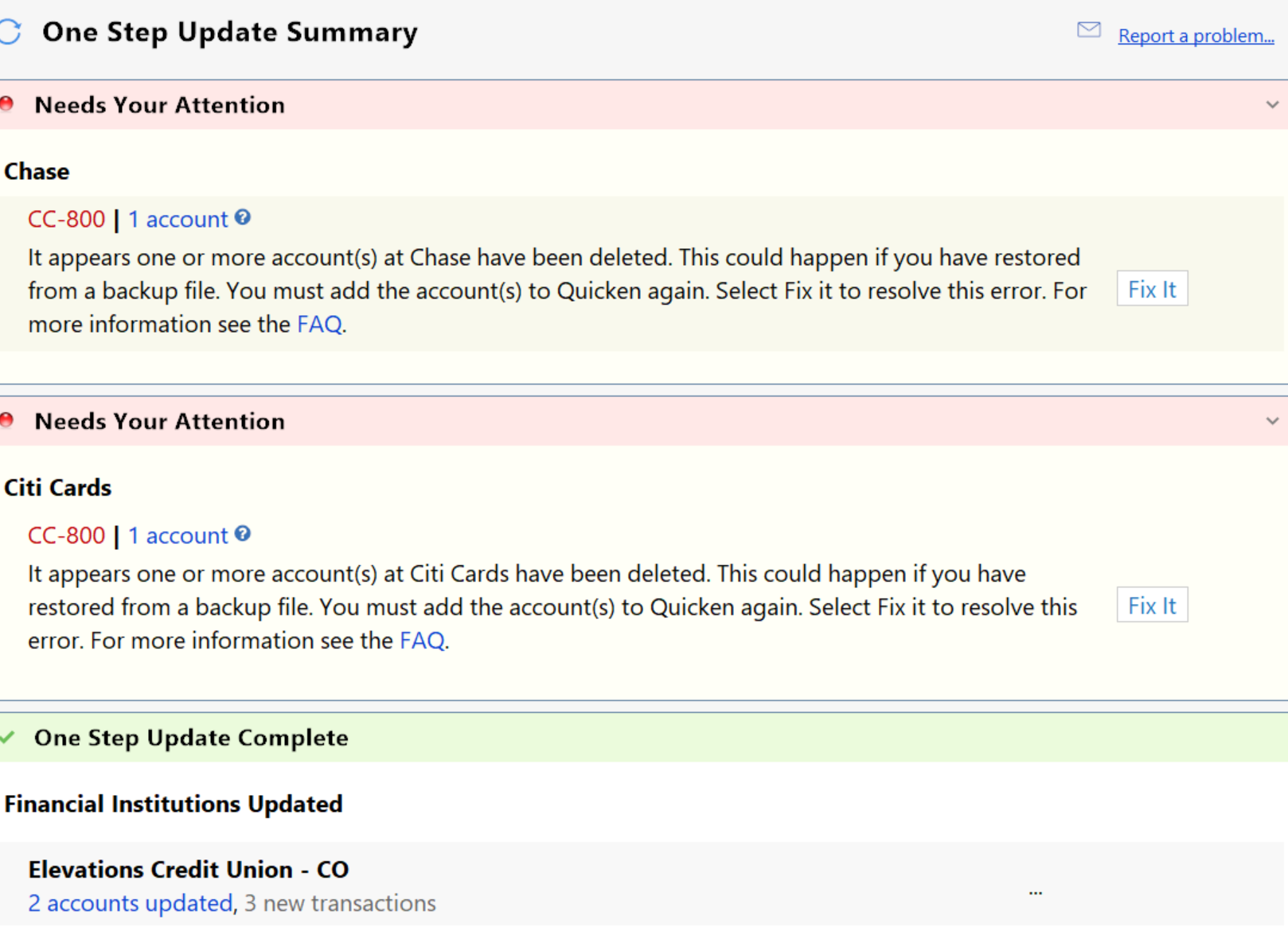
It appears that a new Quicken file is required or do the download process manually from ECU.
0 -
I don't think citi and chase have anything to do with the ECU issue. I've been trying to test with the ECU accounts isolated. It's pretty disappointing that you are still seeing bogus transactions in your ECU account. Is that a completely bogus transaction or a misallocated one (as in it should be in a different ECU account?
0 -
Just did a Quicken global search and it belongs to a CD that is not linked and it ended up in savings account.
0 -
🤦♂️
0 -
Is the CD an elevations account?
0 -
yes
1 -
Here is the reason my comments about Chase & Citi:
- This is a Windows test:
- When doing OSU since ECU stopped working, there has been no issues with the downloads of Chase and Citi.
- Today when adding ECU to OSU, then that’s when the reset for Chase and Citi showed up. This also required ECU to be reset.
- Did a another restore from a non-Quicken backup.
- Did a download within the ECU checking account and this also required Chase and Citi to be reset.
- To this exercise makes me think this whole ECU is still an issue except your experience of setting up new file and accounts for ECU. Was that a Mac test?
New File Test:
- Windows test and setup a new file and downloaded all ECU accounts.
- All ending balances are correct.
- Will do another download on 1-8-26
0 -
I'm on a Mac. TBH, I don't care which platform is seeing cross-account corruption (CAC…I kind of like the ring of that), because if this is happening anywhere, I'm inclined to hold off on re-enabling download on my primary Quicken file.
0 -
I am going to continue doing the manual download from ECU web site until this is really fixed.
0 -
I disconnected all of my accounts and then reconnected them. Things seem to be working properly for me at this point.
1 -
Note that connectivity definitely seems to be restored, but there are still reports of transactions "leaking" to other accounts. So be vigilant when downloading.
0 -
It looks list connectivity is back - anyone noticing more transactions going into the wrong account still? I haven't been able to recreate that.
0 -
Has anyone tried downloads again? I'm afraid to try it again. Last time the transactions were mixed up between 4 accounts and I don't want to have to straighten them out again!
0