Linking my existing web profile to Quicken Classic Desktop

MScottE
MScottE Quicken Mac Subscription Member

I dowloaded Quicken classic desktop to my new Mac. I no longer have access to my old Mac. I need to sync my desktop version with my online version. I can see my online profile under Settings-Connected Services-See all Cloud accounts, but I cannot select the account I want.

What doe I need to do?

Answers

  • John_in_NC
    John_in_NC Quicken Mac Subscription SuperUser, Mac Beta Beta

    Hi, @MScottE

    You mentioned you didn't have access to your older Mac. But do you have a copy (or backup) of the data file that was on it? You will need it to proceed if you want to retain your older data as your Cloud Account data is not a backup-it only contains a small subset of data. Those accounts you see in your profile will only work if you have the original data file on your computer to work with.

    If you have a copy of your data file, then restore it to your new Mac and you should be able to point it to the existing Cloud account you used for that file. Ask if you need help doing this.

    If you don't have a copy of your older data file, then you will have to start fresh on your new Mac in Quicken Desktop, and allow it to create a new Cloud account.

  • jacobs
    jacobs Quicken Mac Subscription SuperUser, Mac Beta Beta

    @MScottE If you don't have any copy of your old desktop Quicken Mac data file, as @John_in_NC mentioned, there is one long-shot you can try…

    Quicken's cloud services weren't designed for reconstructing a desktop data file, because as @John_in_NC noted, the data stored in the cloud is an incomplete subset of your desktop data file. Starting over from the cloud account had indeed been impossible in the past. But a few years ago, an experimental feature was added to allow users to start a new desktop file from their Cloud data, but it has been broken and fixed a few times over the years without ever appearing as a fully-tested and supported part of the program. I haven't seen any user reports about success or failure with this recently, so if you have no backups whatsoever and want to try this feature, follow these steps.

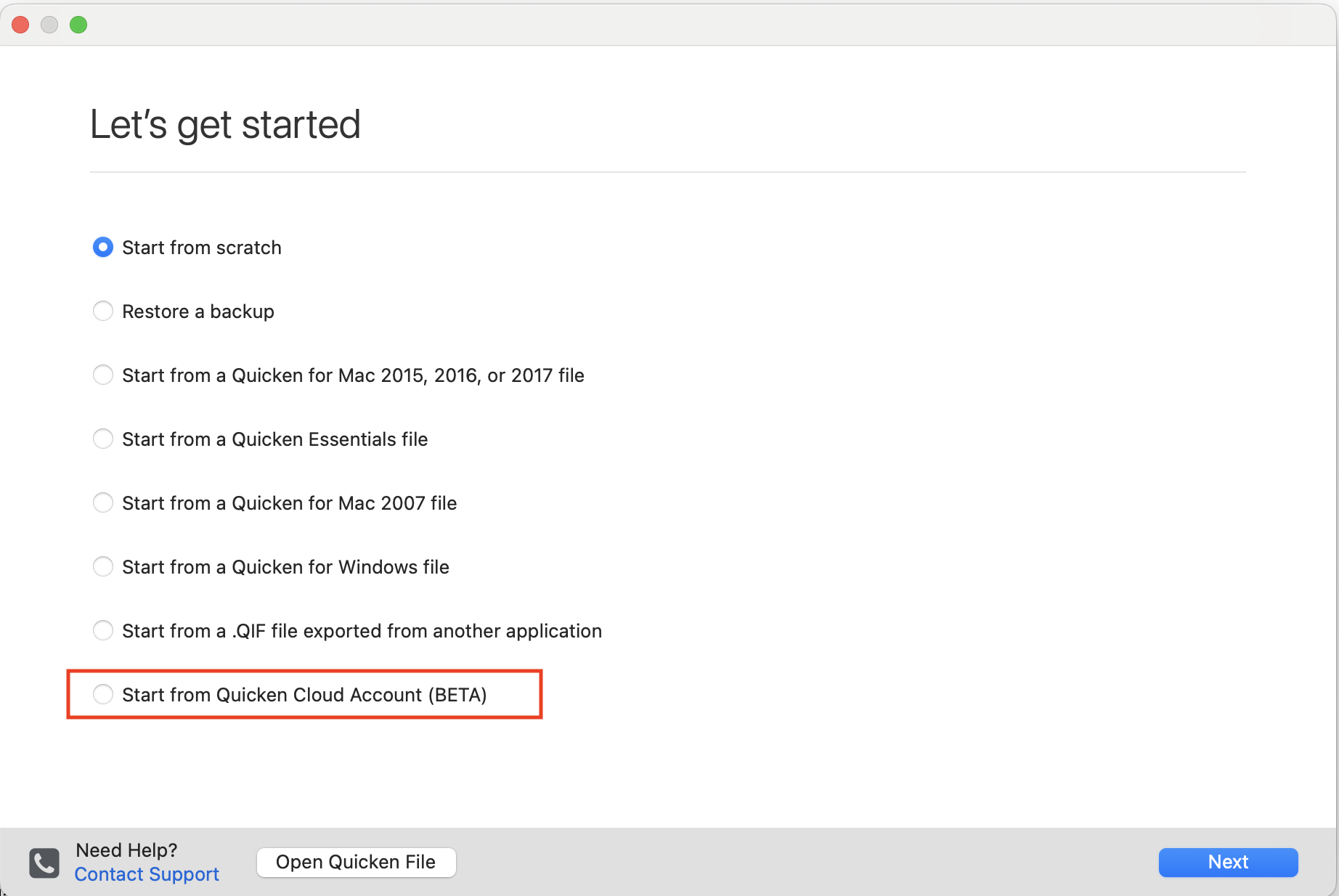
    This hidden feature in Quicken Mac is on the Let's Get Started page of the application (which you can get to if you do File > New). The hidden trick is holding down the Command key while selecting File > New. That reveals an additional option to start from a Quicken Cloud Account:

    Screenshot 2025-11-23 at 3.59.14 PM.png

    Note this option is labeled as "beta", but it's said that for several years, and there's no guarantee it will work exactly as expected. A year or two ago, people reported trying this and it didn't work, but the development team supposedly fixed it somewhere along the way. If you have no backups whatsoever of your old Mac, you've got nothing to lose by trying this. (Please report back here if it does or does not work for you.)

    Quicken Mac Subscription • Quicken user since 1993
  • Jon
    Jon Quicken Mac Subscription SuperUser, Mac Beta Beta
    edited November 23

    @MScottE A couple additional notes on @jacobs post:

    It won't let you leave that dialog box with the "Start from Quicken Cloud Account' option selected unless you continue to hold down the Command key while you click the Next button.

    A little experimenting with my recent data files shows that if Mobile Sync was turned off you will only get transactions for accounts that were using Quicken Connect to download transactions - you won't get anything for accounts that were using Direct Connect or were not set up for downloading at all, because without Mobile Sync those transactions never passed through Quicken Cloud.

    I think if Mobile Sync was turned on you will get everything but I'm still in the process of testing that.

    Edit: I did not get everything when restoring a file that had had mobile sync turned on. Some of my banking accounts did not have all their transactions restored - instead they had a Live Balance Adjustment transaction making up the difference. Some closed accounts that had not seen any activity for years had no transactions at all.

    Investment accounts were initially empty, after a sync some of them were updated to show recent activity and current holdings but none of them had all the transaction history restored.

  • Chris_QPW
    Chris_QPW Quicken Windows Subscription Member ✭✭✭✭

    Web/Mobile/Quicken Cloud dataset doesn’t support investment transactions, it is “simple investing mode” only.

    Also, when you first turn on Sync to Mobile/Web in Quicken Desktop it syncs something like 3 years of data. After that it will keep all the new data, of course until you have a problem with it and the “solution” is to reset it, and then you be back to about 3 years.

    Signature:
    This is my website (ImportQIF is free to use):

    http://www.quicknperlwiz.com/

  • jacobs
    jacobs Quicken Mac Subscription SuperUser, Mac Beta Beta

    Web/Mobile/Quicken Cloud dataset doesn’t support investment transactions, it is “simple investing mode” only.

    Hmmm, that doesn't sound right, @Chris_QPW. Quicken Cloud sync existed long before the relatively recent (in the last couple year) implementation of simple investing mode.

    Quicken Mac Subscription • Quicken user since 1993
  • Chris_QPW
    Chris_QPW Quicken Windows Subscription Member ✭✭✭✭

    I only used the term “simple investing mode” as a quick way for people to visualize what it supports. Mobile/Web has never supported investment transactions. In fact, it started out with no support for investment accounts at all, but later they add support for showing the security positions and cash balance, but they have never gone beyond that. From what I understand Simplifi is the same as was Mint.

    Signature:
    This is my website (ImportQIF is free to use):

    http://www.quicknperlwiz.com/

  • Jon
    Jon Quicken Mac Subscription SuperUser, Mac Beta Beta

    I don’t know if it’s explicitly tied to Simple Investment tracking, but from what I recall from experimenting with the mobile app a year or two ago that’s basically what it acts like. You can see what your investment accounts are worth but you can’t see or enter transactions in them. Made the mobile app worthless to me.

  • Chris_QPW
    Chris_QPW Quicken Windows Subscription Member ✭✭✭✭
    edited November 24

    Oh and I should have said that the support of the limited investment information in Mobile/Web did in fact predate simple investing mode in the Quicken Desktop applications.

    Signature:
    This is my website (ImportQIF is free to use):

    http://www.quicknperlwiz.com/