Fidelity Downloaded Transactions Not Matching

micdif
micdif Quicken Windows Subscription Member ✭✭

Windows Quicken Deluxe R64.35 Build 27.1.64.35

One Step Update Fidelity Roth IRA Account downloaded transactions correctly download.

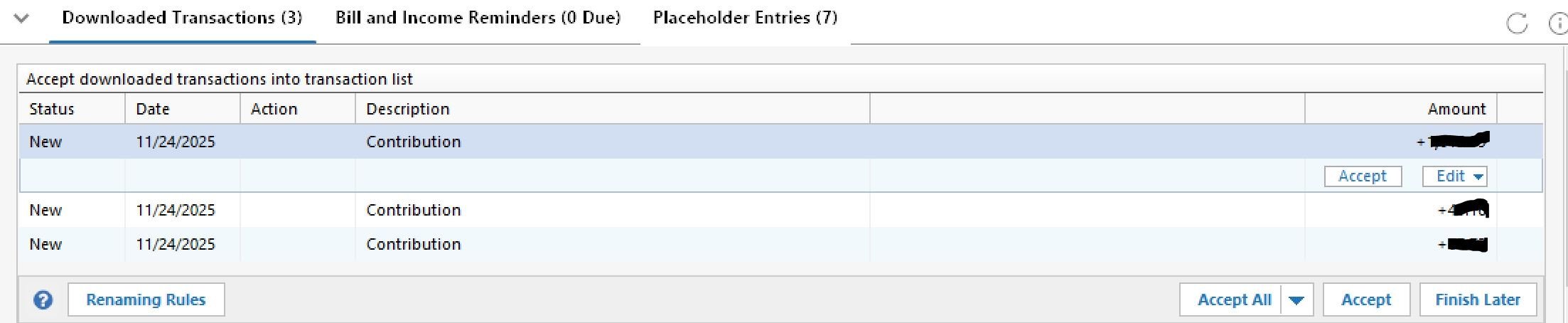
Fidelity 401K account downloads but they are generic transaction labeled deposit (maybe contribution). It doesn't have any details about the security or shares bought. Just the total amount.

I'm forced to go into my Fidelity account and manually enter in the information then delete the downloaded transactions.

This has been going on months since the Fidelity migration that Quicken undertook.

I've been following the mess on the other posts that list so many issues that they are still working on but I didn't see this specific issue listed and I wasn't sure if it was being actively worked on.

Quicken is supposed to be making my life easier with automation and this is not easier. Especially for a paid subscription.


Comments

  • Quicken Kristina
    Quicken Kristina Quicken Windows Subscription Moderator mod

    Hello @micdif,

    Thank you for letting us know you're seeing this issue. To clarify, when you say the transactions aren't matching, do you mean they do not match what you see on Fidelity's website, or do you mean there are reminders/manual transactions that they should be matching to in the account register in Quicken? If you're willing, please post a screenshot of what you are seeing download into your Quicken (make sure to redact any personal information). If needed, please refer to this Community FAQ for instructions on how to attach a screenshot. Alternatively, you can also drag and drop screenshots to your response if you are not given the option to add attachments.

    I look forward to your response!

    Quicken Kristina

    Make sure to sign up for the email digest to see a round up of your top posts.

  • micdif
    micdif Quicken Windows Subscription Member ✭✭

    I already deleted the transactions so I can't provide a screenshot.

    Quicken does the One Step Updates and downloads the transaction from both my Fidelity accounts. My Roth account downloads the correct transactions but my 401 downloads generic transactions. It hS the corredt total overall but is missing the security name and the number of shares bought.

    I'm forced to manually go into my Fidelity account to look up the information and enter new transactions. I then delete the generic downloaded transactions.

    It should correctly download each security I bought along with shares, overall total cost, price per share.

  • Quicken Kristina
    Quicken Kristina Quicken Windows Subscription Moderator mod

    Thank you for your reply,

    To be able to look into the issue, we would need sample transactions and log files. The next time this issue happens, please navigate to Help>Report a Problem and send a problem report with log files attached. Please include either a screenshot showing the problem transactions, or include the transaction information (date/payee/amount).

    Report a Problem QWin.png

    Once the problem report is sent, please post to let me know.

    Thank you!

    Quicken Kristina

    Make sure to sign up for the email digest to see a round up of your top posts.

  • tkiehne
    tkiehne Quicken Windows Subscription Member

    I'm having the same problem which began fairly recently and may have started when I added my wife's Fidelity account about 4-5 weeks ago.

    Prior to this, any contributions would come into my Fidelity investment account with all information - security, number of shares, price; now I get a generic deposit/contribution with the total amount but no other info. This leaves my securities balance and cash balance out of whack until I can get the full info From Fidelity and correct the transaction. My wife's account is more complicated and requires correcting 1-2 dozen transactions each time I update. Needless to say this is not sustainable.

    Screenshot below shows a snippet; top txn is what I expected prior to the issue, next txn is what is currently being entered by Quicken.

    Screenshot 2025-11-30 203305.png
  • micdif
    micdif Quicken Windows Subscription Member ✭✭

    @Quicken Kristina

    Attempted to send a Report as you described four times and it kept failing. Par for the course with Quicken products. I removed the attachment of the screenshot I took and it finally sent.

    Here's the screenshot I was trying to attach to the Report.

    It's exactly the same as tkiehne showed above. This has been ongoing for months since the Quicken Fidelity "update" which is way too long. Oddly, my other Fidelity account does download correctly.

    Capture.JPG