Fidelity OSU

QuikNewbie
QuikNewbie Quicken Windows Subscription Member ✭✭

Currently, I'm a deer in the headlights, trying to decide if I should enter my Fidelity accounts into Quicken.

My experience with Quicken; I use it to balance my accounts. My investment accounts and IRA are NOT in Quicken. I go to the Fidelity website to review them, but they aren't in my Quicken files.

I download my Visa transactions (custom date) and then import them. I enter my cash management transactions manually then reconcile them to the statement.

Do I try to add my investment accounts to Quicken? I've had problems with updates originating from Quicken on previous bank accounts, so I usually import OFX files. I'm doing this the "long way", but I'm afraid the problems everyone is having with Quicken/Fidelity may frustrate me too much, or I'll be trying to clean up multiple messes.

Advice is appreciated (so is your patience.) @ Windows 11 Home , Quicken R65.17

Best Answer

  • Chris_QPW
    Chris_QPW Quicken Windows Subscription Member ✭✭✭✭
    Answer ✓

    I think this is a very personal choice at this time. Given all the turmoil with the changeover with the connection type it isn't any more a slam dunk that connecting your accounts is the best way to go. And it really depends on how much value you would find in having that information in Quicken, which varies by use case. In fact, I'm in the process of moving my investments from Chase to Fidelity, and I pretty much have decided not to connect/download from Fidelity. But my use case is a bit different than what most people have. I'm thinking of posting on that in the Water Cooler section of this forum when I'm done moving the accounts in a week or so.

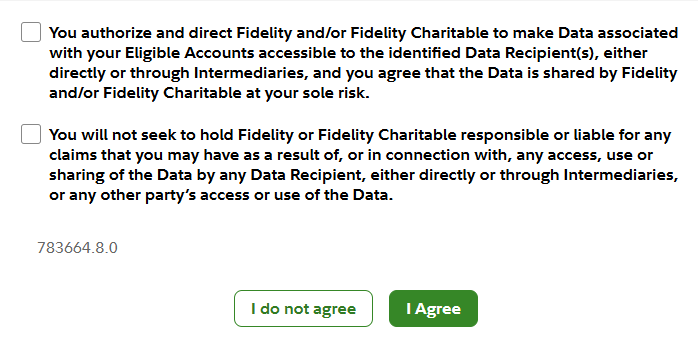
    But I would say that it you find value in this, you might want to just try it. You can later delete the account in Quicken without any problems and turn off the permission to share your data. But I will note one thing that I was going to mention in that future post. This really goes for all online connections, but when connecting an account for Fidelity they really point it out with a pages long statement that ends with you having to select these checkboxes.

    image.png

    Signature:
    This is my website (ImportQIF is free to use):

    http://www.quicknperlwiz.com/

Answers

  • Chris_QPW
    Chris_QPW Quicken Windows Subscription Member ✭✭✭✭
    Answer ✓

    I think this is a very personal choice at this time. Given all the turmoil with the changeover with the connection type it isn't any more a slam dunk that connecting your accounts is the best way to go. And it really depends on how much value you would find in having that information in Quicken, which varies by use case. In fact, I'm in the process of moving my investments from Chase to Fidelity, and I pretty much have decided not to connect/download from Fidelity. But my use case is a bit different than what most people have. I'm thinking of posting on that in the Water Cooler section of this forum when I'm done moving the accounts in a week or so.

    But I would say that it you find value in this, you might want to just try it. You can later delete the account in Quicken without any problems and turn off the permission to share your data. But I will note one thing that I was going to mention in that future post. This really goes for all online connections, but when connecting an account for Fidelity they really point it out with a pages long statement that ends with you having to select these checkboxes.

    image.png

    Signature:
    This is my website (ImportQIF is free to use):

    http://www.quicknperlwiz.com/

  • QuikNewbie
    QuikNewbie Quicken Windows Subscription Member ✭✭
    edited November 26

    Thank you. I was hesitant after reading the two "check boxes." Yes, you're right, every online bank/investment system has these releases, but Fidelity really makes you think, "what am I sharing and who else has access to this?" I may just stick to my "old school" way of doing it - my cash management account and my Visa account, entering transactions individually, not through the internet. I appreciate your response.

    Now I'm not sure how to cancel those permissions with Fidelity. Here goes the "deep dive."

  • Chris_QPW
    Chris_QPW Quicken Windows Subscription Member ✭✭✭✭

    From the main menu under Accounts & Trade → Security Settings → External data sharing

    Signature:
    This is my website (ImportQIF is free to use):

    http://www.quicknperlwiz.com/