Unable to Import any QFX Files after Latest Windows Update [Edited]

2»

Comments

  • Quicken Anja
    Quicken Anja Moderator mod
    edited November 28

    Hello @ATC Doug,

    Thanks for the details!

    Just to make sure we're on the right track—when you say you're downloading your transactions to your download file, are you referring to a QFX file that you're manually downloading from Principal and then opening to import into Quicken?

    Please do not delete or recreate the account yet—that’s not necessary at this stage.

    Looking forward to your reply!

    -Quicken Anja
    Make sure to sign up for the email digest to see a round up of your top posts.

  • dan.nees
    dan.nees Quicken Windows Subscription Member ✭✭
    edited November 28

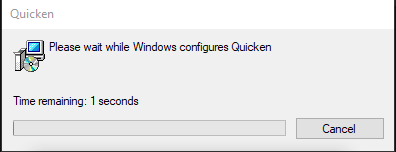
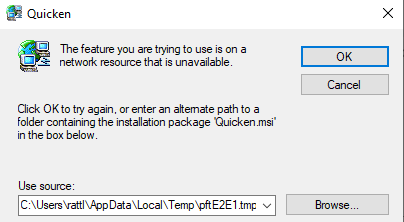
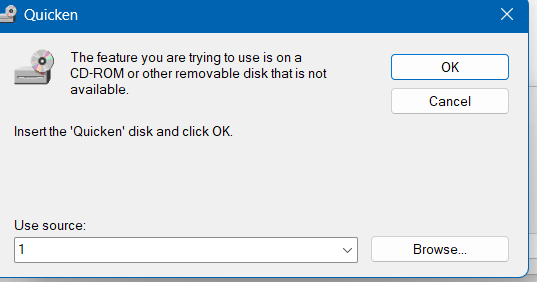
    I am unable to import .QFX files today after receiving latest Quicken Classic update (v R65.17; build 27.1.65.17). When I click the .QFX file, historically it simply loaded the transactions into Quicken. Today, I receive first a popup window that says "Please wait while Windows configures Quicken." Then after attempting to install something, I receive a message "The feature you are trying to use is on a network resource that is unavailable" with a file path that does not appear to exist on my local machine. I am able to manually import by going to File>File Import>Web Connect File. I confirmed that the .QFX file extension is still associated with Quicken on this machine. Appears to me that the recent update may have affected the automatic QFX handling process.

    [Merged Post]

  • Quicken Anja
    Quicken Anja Moderator mod

    Hello @dan.nees,

    Thanks for reaching out! I've merged your post with this thread that describes the same/similar issue to what you are experiencing.

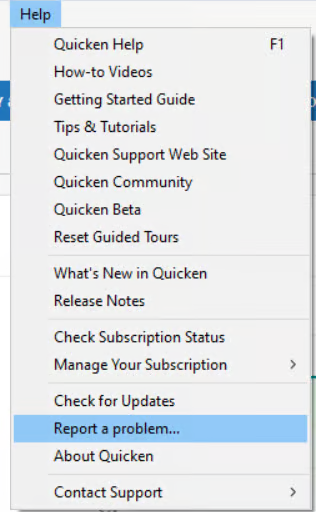
    There is currently an open ticket tracking the issue described in this thread (CBT‑931). To contribute to the investigation, we ask that you please submit your log files, screenshots, and a sanitized data file via Help > Report a problem.

    image.png

    However, some users above have reported that uninstalling and reinstalling Quicken has resolved the problem for them, so I suggest trying that to see if it helps in your case.

    However, I also recommend that after you have uninstalled and before you proceed with reinstalling, please open your Windows File Explorer and navigate to This PC > C: Drive > Program Files (x86) and delete the folder titled "Quicken" (doing so does not affect your data files).

    image.png

    After you have deleted this folder, go ahead and try reinstalling.

    Let us know how it goes!

    -Quicken Anja
    Make sure to sign up for the email digest to see a round up of your top posts.

  • JT Shupe
    JT Shupe Quicken Windows Subscription Member

    When I started quicken today there was an update. I'm not sure this update was successful. The reason I believe this is because when I try to import my downloaded qfx files I get one of the following :

    There are Quicken components currently open, and can not be uninsatlled. Please close Quicken and try uninsatlling again.

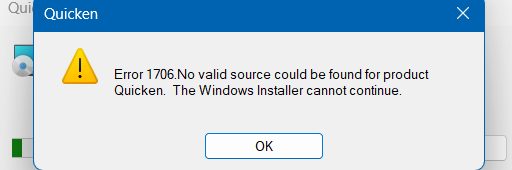
    Error 1706 No valid source could be found for product quicken. The Windows installer cannot continue.

    These errors happen when downloading and auto updating or double clicking no the QFX file. If I try to use File > Import > Web Connect that imports the transactions.

    Quicken Classic Delux3
    R65.17
    27.1.65.17

  • JT Shupe
    JT Shupe Quicken Windows Subscription Member

    When I started quicken today there was an update. I'm not sure this update was successful. The reason I believe this is because when I try to import my downloaded qfx files I get one of the following :

    There are Quicken components currently open, and can not be uninsatlled. Please close Quicken and try uninsatlling again.

    Error 1706 No valid source could be found for product quicken. The Windows installer cannot continue.

    These errors happen when downloading and auto updating or double clicking no the QFX file. If I try to use File > Import > Web Connect that imports the transactions.

    Quicken Classic Delux3
    R65.17
    27.1.65.17

  • JT Shupe
    JT Shupe Quicken Windows Subscription Member
    edited November 28

    When I started quicken today there was an update. I'm not sure this update was successful. The reason I believe this is because when I try to import my downloaded qfx files I get one of the following :

    There are Quicken components currently open, and can not be uninsatlled. Please close Quicken and try uninsatlling again.

    Error 1706 No valid source could be found for product quicken. The Windows installer cannot continue.

    These errors happen when downloading and auto updating or double clicking no the QFX file. If I try to use File > Import > Web Connect that imports the transactions.

    Quicken Classic Delux3
    R65.17
    27.1.65.17

  • JT Shupe
    JT Shupe Quicken Windows Subscription Member
    edited November 28
    image.png

    This is what happens when I download transactions which try to auto add to quicken

  • JT Shupe
    JT Shupe Quicken Windows Subscription Member
    edited November 28

    Followed by

    image.png

    The source does not exist

  • JT Shupe
    JT Shupe Quicken Windows Subscription Member
    edited November 28

    The one thing I've tried to resolve this is download the manual update from quicken and run it :
    https://www.quicken.com/support/update-and-patch-20182019-release-quicken-windows-subscription-product/
    This did not resolve the issue with downloaded qfx data not auto importing when clicked on or when downloaded.

  • jkeppy
    jkeppy Quicken Windows Subscription Member
    edited November 28

    Having the same issue when attempting to download transactions

  • Quicken Anja
    Quicken Anja Moderator mod

    Hello @JT Shupe & @jkeppy,

    Thanks for reaching out! I have merged your posts to this thread that addresses the same topic and has an open ticket.

    Please review my previous response in this thread for instructions to submit your log files as well as try uninstalling and reinstalling the program, as other users in this thread have reported that doing so resolved the issue for them.

    Thank you!

    -Quicken Anja
    Make sure to sign up for the email digest to see a round up of your top posts.

  • JT Shupe
    JT Shupe Quicken Windows Subscription Member

    I uninstalled, deleted the indicated directory and reinstalled.
    Then opened my backup and did a download from my bank.
    All worked as expected.

  • Quicken Anja
    Quicken Anja Moderator mod

    @JT Shupe Thanks for the update! Glad to hear that worked for you.

    -Quicken Anja
    Make sure to sign up for the email digest to see a round up of your top posts.

  • ATC Doug
    ATC Doug Quicken Windows Subscription Member ✭✭✭
    edited November 28
    image.png image.png

    Yes it is a QFX

    image.png

    I have screen shot the boxes that popup plus the file I'm trying to download.

  • Quicken Anja
    Quicken Anja Moderator mod

    @ATC Doug Thanks for confirming!

    I have merged your posts to this thread that addresses the same topic and has an open ticket.

    Please review my earlier response in this thread for instructions to submit your log files as well as try uninstalling and reinstalling the program, as other users in this thread have reported that doing so resolved the issue for them.

    Thank you!

    -Quicken Anja
    Make sure to sign up for the email digest to see a round up of your top posts.

  • rdtheisen
    rdtheisen Quicken Windows Other Member

    QFX import broke after updating to R65.17. Running the transaction download file from the downloads folder no longer worked, as others reported. However, as one user noted, importing the downloaded QFX file by utilizing the import feature inside of the Quicken program worked with no problem. No time at this point to uninstall and reinstall Quicken as others have done. Will use the File Import feature within Quicken till issue is resolved, hopefully, by the next Quicken update. Thanks

  • Quicken Anja
    Quicken Anja Moderator mod

    Hello @rdtheisen,

    Thank you for sharing the details of what you're seeing. While we do have an active ticket investigating this issue, there’s currently no ETA for a fix. In the meantime, the uninstall/reinstall workaround has been resolving the problem for affected users.

    Performing an uninstall/reinstall should not impact your data, but if you'd like extra peace of mind, you can create a backup first as a precaution before proceeding.

    Using the File > Import option is a fine temporary workaround, but to restore the ability to launch QFX files directly from your downloads folder, the reinstall step is recommended.

    Thank you!

    -Quicken Anja
    Make sure to sign up for the email digest to see a round up of your top posts.

  • Gebran
    Gebran Quicken Windows Subscription Member

    I was having the same problem after the update. The web file import worked when I imported the file using: File→ File Import → Web Connect (.QFX) File… instead of clicking "Open File" from the browser download list.

  • jalundblad
    jalundblad Quicken Windows Subscription Member
    edited November 29

    I have zero confidence in Intuit now, need to find Quicken alternative. [Removed - Speculation]

  • NotACPA
    NotACPA Quicken Windows Subscription SuperUser ✭✭✭✭✭

    Q user since February, 1990. DOS Version 4
    Now running Quicken Windows Subscription, Business & Personal
    Retired "Certified Information Systems Auditor" & Bank Audit VP

  • ATC Doug
    ATC Doug Quicken Windows Subscription Member ✭✭✭

    I deleted and reinstalled Quicken as instructed. I was able to download my transactions from Principle.

    Thank you for your help.

  • michael2
    michael2 Quicken Windows Other Member

    This happening today with my Fidelity QFX. It seems much more likely to be a Quicken issue then a bank issue.

  • Quicken Anja
    Quicken Anja Moderator mod

    Hello All,

    Thank you all for the additional reports and updates!

    I just wanted to quickly step in here and reiterate that we do have an active ticket tracking this behavior (CBT-931/CTP-15415). At this time, the uninstall/reinstall workaround (including deleting the Program Files (x86) > Quicken folder before reinstalling) which is outlined step-by-step in one of my earlier responses in this thread, has resolved the issue for the majority of users in this thread. If you haven’t tried that yet, we recommend doing so. Creating a backup beforehand is optional but always a good precaution.

    If you continue to experience issues after reinstalling, please submit your log files via Help > Report a problem so we can include your data in the investigation.

    Glad to hear several of you are now able to import QFX files again. If anyone is still encountering this problem, please let us know so we can continue to track affected cases.

    Thank you for your patience!

    -Quicken Anja
    Make sure to sign up for the email digest to see a round up of your top posts.

  • Rx
    Rx Member ✭✭✭
    edited December 3

    Total QFX import breakdown? Anybody want to bet the "upgrade" to QFX exports is what broke this? And hey, I am sure we all have plenty of time to uninstall and reinstall in order to get through our usual workload. Oh and my reinstall FAILED:

    Tue Dec 02 13:49:05.180 2025 : Log Opened
    Tue Dec 02 13:49:05.180 2025 : Getting OS Version info
    Tue Dec 02 13:49:05.180 2025 : OS stats:
    Tue Dec 02 13:49:05.180 2025 : Microsoft Windows Vista family
    Tue Dec 02 13:49:05.180 2025 : Workstation
    Tue Dec 02 13:49:05.180 2025 : Checking for multiple setup.exe-s
    Tue Dec 02 13:49:05.180 2025 : Checking for admin rights
    Tue Dec 02 13:49:05.180 2025 : User has administrator rights
    Tue Dec 02 13:49:05.180 2025 : Checking application paths
    Tue Dec 02 13:49:05.180 2025 : Module Path: C:\Users\dennis\AppData\Local\Temp\pft4D54.tmp\DISK1
    Tue Dec 02 13:49:05.186 2025 : CD Root: C:\Users\dennis\AppData\Local\Temp\pft4D54.tmp
    Tue Dec 02 13:49:05.186 2025 : Processing command line arguments
    Tue Dec 02 13:49:05.186 2025 : Command line parameters:
    Tue Dec 02 13:49:05.186 2025 : OS check OK
    Tue Dec 02 13:49:05.186 2025 : Checking to see of QuickenPatch is already open
    Tue Dec 02 13:49:05.194 2025 : quickenPatch is closed.
    Tue Dec 02 13:49:05.194 2025 : Checking to see of Quicken is already open
    Tue Dec 02 13:49:05.200 2025 : Quicken is closed.
    Tue Dec 02 13:49:05.200 2025 : msiexecpath found: C:\Windows\SysWOW64\\msiexec.exe
    Tue Dec 02 13:49:05.202 2025 : MSI version found: 5.0
    Tue Dec 02 13:49:06.220 2025 : UpdateProductName: ProductName is Quicken
    Tue Dec 02 13:49:06.222 2025 : Checking if Quicken is already installed.
    Tue Dec 02 13:49:06.222 2025 : Looking for version in MSI package C:\Users\dennis\AppData\Local\Temp\pft4D54.tmp\DISK1\Quicken.msi
    Tue Dec 02 13:49:06.222 2025 : Loading C:\Windows\SysWOW64\\msi.dll
    Tue Dec 02 13:49:06.237 2025 : Found product code {I_DELETED_TO_POTECT_MY_CODE}
    Tue Dec 02 13:49:06.237 2025 : Product not installed on this machine
    Tue Dec 02 13:49:06.243 2025 : Looking for Quicken install path
    Tue Dec 02 13:49:06.243 2025 : Looking for Quicken.ini in All Users\AppData directory
    Tue Dec 02 13:49:06.243 2025 : Found: C:\ProgramData\Quicken\Config\Quicken.ini
    Tue Dec 02 13:49:06.243 2025 : Quicken.ini found but there's no ExePath!
    Tue Dec 02 13:49:06.243 2025 : Looking for Quicken.ini in Windows directory
    Tue Dec 02 13:49:06.243 2025 : Found: C:\WINDOWS\Quicken.ini
    Tue Dec 02 13:49:06.243 2025 : Quicken.ini found but there's no ExePath!
    Tue Dec 02 13:49:06.243 2025 : ExePath NOT Found:
    Tue Dec 02 13:49:06.243 2025 : Previous version of Quicken NOT FOUND!
    Tue Dec 02 13:49:06.243 2025 : Checking if Quicken is already installed found: Quicken not installed
    Tue Dec 02 13:49:06.243 2025 : Closing Quicken agents
    Tue Dec 02 13:49:06.243 2025 : Closing class
    Tue Dec 02 13:49:06.243 2025 : Closing class
    Tue Dec 02 13:49:06.243 2025 : Closing class
    Tue Dec 02 13:49:06.243 2025 : Closing class
    Tue Dec 02 13:49:06.243 2025 : Closing class
    Tue Dec 02 13:49:06.285 2025 : Installing 3rd party apps
    Tue Dec 02 13:49:06.285 2025 : msiexecpath found: C:\Windows\SysWOW64\\msiexec.exe
    Tue Dec 02 13:49:06.285 2025 : MSI version found: 5.0
    Tue Dec 02 13:49:06.285 2025 : Verifying .NET Framework Installation and Health Check-up
    Tue Dec 02 13:49:06.304 2025 : Verification of .NET Framework Installation and Health Check-up done
    Tue Dec 02 13:49:06.304 2025 : Checking IE 6.0 version
    Tue Dec 02 13:49:06.304 2025 : IE version found 9.11.26100.0
    Tue Dec 02 13:49:18.249 2025 : Checking for locked files.
    Tue Dec 02 13:49:18.259 2025 : File not found : C:\ProgramData\Quicken\\Config\q.dat
    Tue Dec 02 13:49:18.259 2025 : File not found : C:\ProgramData\Quicken\\Config\qwpkg.cfg
    Tue Dec 02 13:49:18.259 2025 : File not found : C:\ProgramData\Quicken\\Config\pricode.ini
    Tue Dec 02 13:49:18.259 2025 : msiexecpath found: C:\Windows\SysWOW64\\msiexec.exe
    Tue Dec 02 13:49:18.259 2025 : Quicken Package Path: C:\Users\dennis\AppData\Local\Temp\pft4D54.tmp\DISK1\Quicken.msi
    Tue Dec 02 13:49:18.264 2025 : Install Properties: QLOG_DIR="20251202_134905" INSTALLDIR="C:\Program Files (x86)\Quicken" ARPINSTALLLOCATION="C:\Program Files (x86)\Quicken" ISQNUE=FALSE ISTRIAL=FALSE QUILEVEL=1 LAUNCHED_BY_SETUP=1
    Tue Dec 02 13:50:00.716 2025 : Check Quicken Version after Install
    Tue Dec 02 13:50:00.716 2025 : Build Version: 27.1.64.35
    Tue Dec 02 13:50:00.787 2025 : Wrong File Version for: C:\Program Files (x86)\Quicken\SendError.dll
    Tue Dec 02 13:50:00.787 2025 : File Version: 27.1.3.4
    Tue Dec 02 13:50:04.400 2025 : File not found : C:\Program Files (x86)\Quicken\QHI.EXE
    Tue Dec 02 13:50:04.400 2025 : Now Uninstall All versions of Quicken due to version mismatch.

    So I've uninstalled Quicken, cannot do ANYTHING now, and the reinstall failed. REALLY??

    [Removed - Rant]

    [Merged Post]

  • Rx
    Rx Member ✭✭✭

    I had posted a comment to one of these threads with details from my Install Log after Reinstalling failed; I guess it was removed because of the level of unhappiness I expressed. And whatever useful information my install log contained is lost.

    The standard Windows Settings/Apps/Uninstall did not clean things up properly. Why don't your updates of your own software keep track of what is there and ensure uninstall works? I've worked in software for decades, and while keeping this sort of information straight is not glamorous, it is not that hard to do either.

    Because the uninstall was incomplete, my attempt to reinstall Quicken failed and left me without any access to my Quicken data!

    I had to search the web to find detailed instructions on downloading a 3rd party tool, run that, comb through my registry to ensure all references were removed (most but not all were), and delete the AppData\Roaming\Quicken directory that was still left behind even with the 3rd party tools. All in all, I spent around 2.5 hours on this, instead of doing useful work.

    PLEASE, get your uninstall functionality working, even if you have to borrow from QCleanUI.exe. Why must we rely on the kindness of 3rd party developers to make the software we pay for YEARLY uninstall itself properly? Why do we need to even do uninstalls to fix problems like this?

    Perhaps in addition to fixing this QDF import problem and getting Uninstall to work properly, Quicken should add "rollback" functionality into their updates, akin to a Windows Restore point (note that Windows allows for multiple restore points, not just the last one)? At least that way we could fall back to a Last Known Working Version vs. spending all this time cleaning up and reinstalling on our own!

    Thanks

  • Quicken Anja
    Quicken Anja Moderator mod

    Hello All,

    Thanks for reporting this issue!

    For those still experiencing this issue—this has been escalated internally, though we do not have an ETA available at this time. In the meantime, we now have an open Alert posted. Please refer to this Community Alert for any and all available updates and information.

    Thank you!

    -Quicken Anja
    Make sure to sign up for the email digest to see a round up of your top posts.

  • CvilleDana
    CvilleDana Quicken Windows Subscription Member

    Same problem. So frustrating to have to do a workaround because the update screwed us up.😖