How to change account type to "no cash balance"?
Any hints on changing the accounting style to remove the cash balance column and cash accounting?
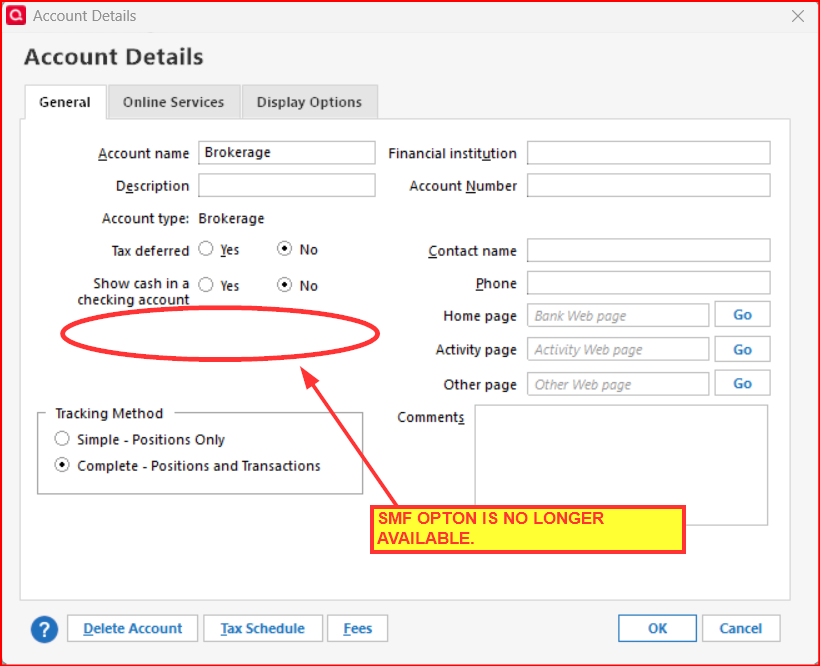
Seems a change several months ago. One used to be able to change this from the "edit account details" menu. It is now gone. A real pain when trying to track mutual funds; the new account menu-driven screens forces a brokerage-style, sweep account set up. Not even an option any more to add a single mutual fund. I used to be able to edit the account later. But alas, it's now gone from the edit menu. Setting up a new account does the same thing, a cash balance by default. How does one reconcile a single mutual fund when we need to reconcile the share balance, NOT the cash balance. Drives me nuts.
Answers
-
What version are you running?
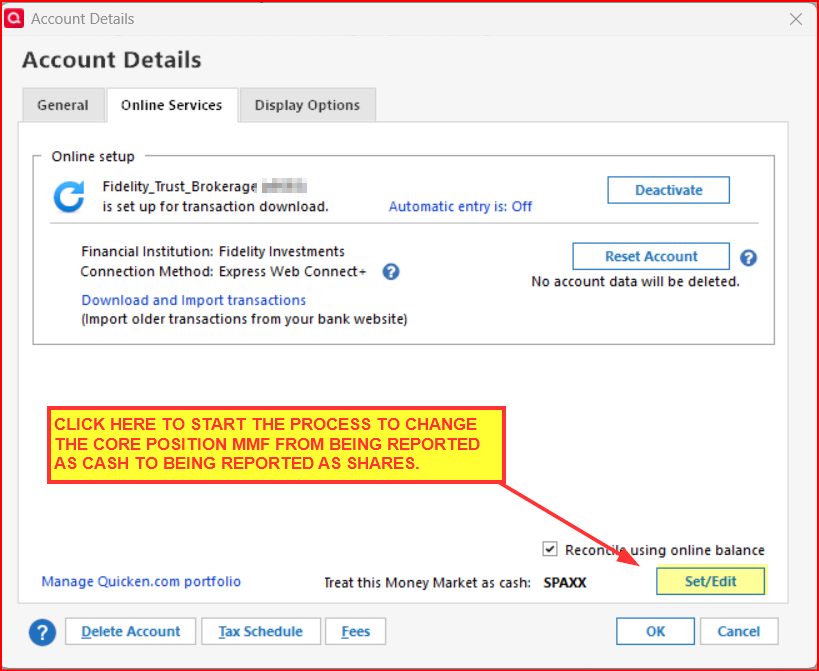
R65.15 added a button to the Online Services tab of Account Details that will allow you to change how the Core Position MMF is reported in Quicken. Click on that button and you will have the ability to have that MMF reported as Shares instead of as Cash. So if you are not running R65.15 you might want to update to it (or preferably to R65.17 which includes a couple of hot fixes).
Since your Core Position is being reported as Cash I don't think Quicken retains any shares transactions history for it. My guess is that when making this change Quicken will either enter an Add Shares transaction to get all of the shares into the register or it will add a Placeholder which then you will need to resolve by manually entering the Add Shares transaction or the individual missing shares transactions history.
Also, when making this change I don't think it will take full effect until you close the file, reopen it and then run OSU.
Did this answer your question?
Quicken Classic Premier (US) Subscription: R65.15 on Windows 11 Home
0 -
An aspect that might be in play here: Anytime a 'regular' investment account gets more than one security or a cash position, the option to make it a SMF account goes away. If in some fashion you can get all cash positions to $0 throughout the history of the account, I would expect you to get the SMF option back on the Security Detail screen. I am not at all clear how the more recent moves on handling MMF as cash interacts with the behavior I just cited.
1 -
Note: SMF = Single Mutual Fund. This option is only available for accounts that have never held any securities other than one mutual fund
QWin Premier subscription1 -
Hmmm….I missed that bit about SMF. The question in my mind: Is the issue about a brokerage account with a single MF held in it? Or is it a true SMF?
My understanding is that a SMF is actually an account where the account and the MF are one-in-the-same. No other securities nor Cash can be held in the account. Cash is either immediately reinvested or it is moved to a totally separate account where it can be held or distributed. This typically happens with MF companies that sell their own MF products to the public, such as American Funds.
But brokerage accounts can be structured to hold many different securities or just a single one. The securities are simply account holdings, they are not the account itself.
My post above was in reference to a brokerage account that might have a single MF held in it, not a true SMF.
Quicken Classic Premier (US) Subscription: R65.15 on Windows 11 Home
0 -
The reason I raised the SMF aspect was from the original comments about removing the cash balance column. The SMF accounts lack that column.
0 -
Thanks for the suggestions - still no resolution to my issue. A bit more details given some of the responses - there's two things at issue.
- Adding an investment account - no option to add a single mutual fund. Following the menu driven options in Q R65.17 to add an account, downloading online one's account positions or adding an "off-line" account results in an account with a cash balance. The legacy option of adding a "single mutual fund" has been removed. No huge problem, one used to be able to remove the cash accounting via a selection button in the edit account menu. No longer there. As Boatnmaniac suggested, the new-ish button in the Account Details> Online Services menu> "Treat this money market as cash" edit option makes no visible changes. It does make me question, is the system treating my mutual fund account as a money market account given the language?
- Edit to a single Mutual Fund, no cash balance - I used to be able to edit the account later, force it to be a single mutual fund. (yes, it is truly a single mutual fund). This feature is gone now from the edit menu. Setting up a new account does the same thing, a cash balance/cash accounting by default as if it is a brokerage account. Proper reconciliation of a mutual fund or stock requires share balance accounting, not cash balance accounting.
I appreciate many use brokerage accounts, and developers are trying to make things simple, but this is another case of new functionality creating headaches for experienced users and actually going backwards. As a +25 year subscriber to Q, back when one could push a single download button and import all tax transactions effortlessly directly into Turbotax!!!, this is a problem. I miss that Quicken!
0 -
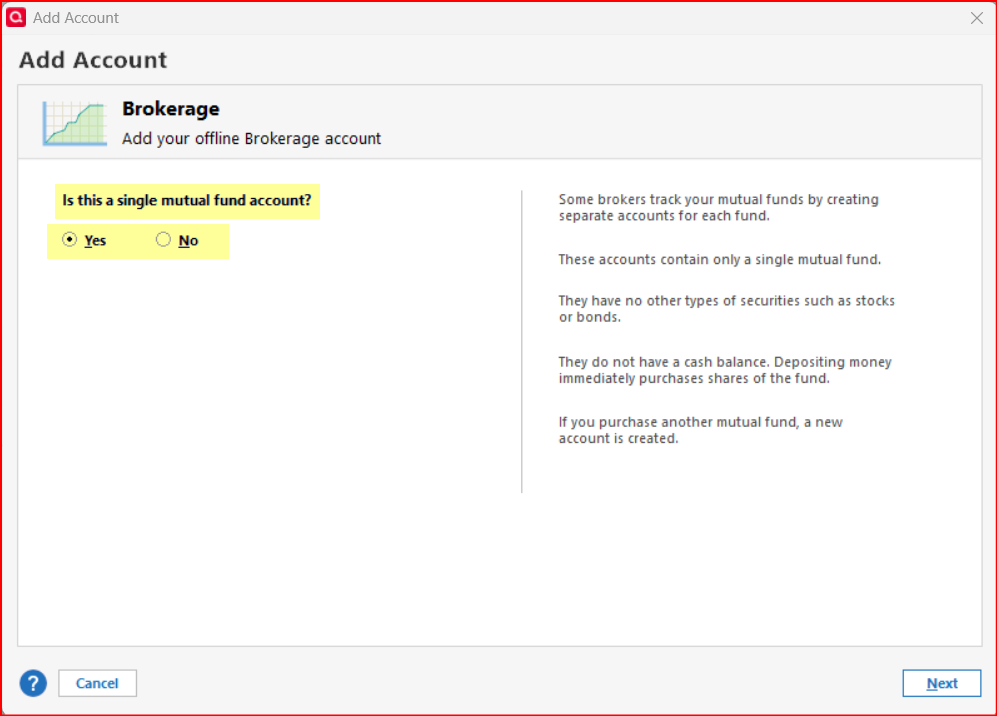
I just created an off-line brokerage account and toward the end of the account setup process I got this:
You did not get this?
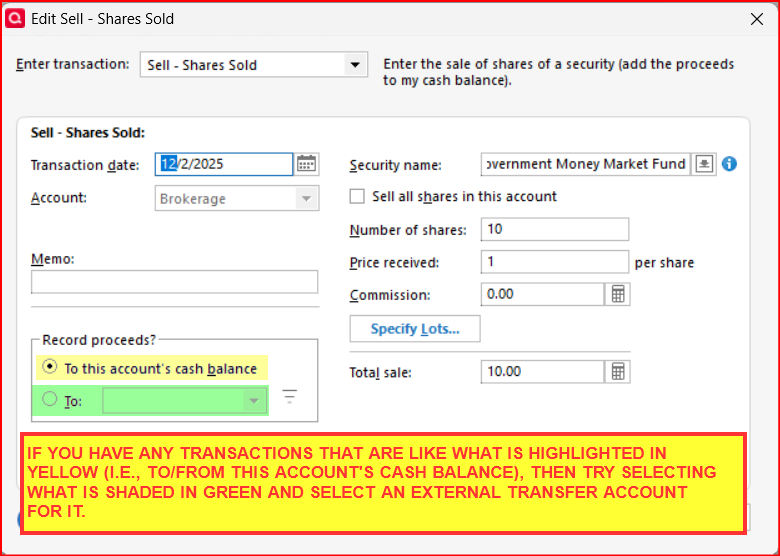
I had to select a cash source outside of the account to fund a buy of SPAXX (the fund I'd designated as the fund of this account) because this account can hold no cash so Quicken created a BoughtX transaction in the register.
I then did a Sell transaction and was forced to select an external account to transfer the cash to from that sell transaction, creating a SoldX transaction.
That is how a SMF account should be working.
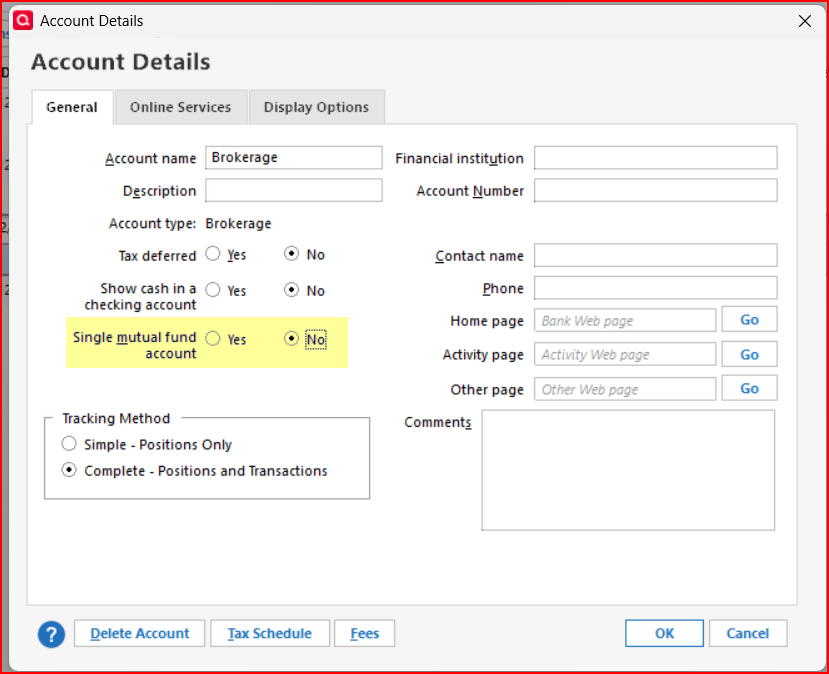
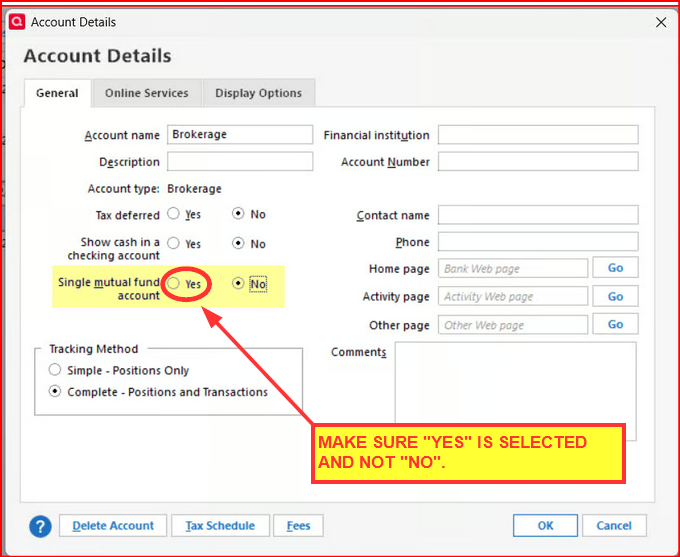
But when I went to Edit Account Details the General Tab shows it was not a SMF….so, yeah, something broke here. It did, however, give me the option to change it to a SMF.
I then changed it to a SMF. When I tried to sell some shares I was required to transfer the cash to an external account since it could not be deposited to the cash balance.
I then changed it back to a multiple securities brokerage account and changed that sell transaction to be deposited to the accounts cash balance.
I then tried to change it back to a SMF and that option was no longer provided.
I repeated the cycle (moving cash to the account balance vs transferring the cash from the security transaction directly to an external account) several times and always got the same repeatable results regarding the SMF option.
This leads me to think that you have some SMF transaction buys/sells where the cash came from or was paid into the account's cash balance. If there are any of these transactions remaining in your account they will prevent you from being given and being able to select the SMF option for the account.
You might want to try doing the following…MAKE SURE TO BACK UP YOUR DATA FILE BEFORE PROCEEDING.:
Also, do you have an cash transactions in the account…cash transferred into/out of the account, interest deposits, dividend deposits, etc.), these will need to be changed, as well so they are transfers in from or out to an external account instead of being deposited to or removed from the account's cash balance.
In the end, you will want to ensure that no was ever held in the account. Then I'm thinking you will once again be able to change the account to a SMF account.
Now, the question then is, what account(s) might you have used for this in the past? And if you make these changes will it mess up the balances in that account(s) because you will now have duplicate transactions in them? If that happens, you will need to delete the duplicate transactions that have a regular category and retain the transactions that have the SMF transfer category (SMF account name enclosed in brackets).
Well, it seem like it's logical and could possibly resolve the issue for you. If it doesn't work out right, you can always restore that backup file and everything will be as it is now.
Let me know if you do this and what the result was.
Quicken Classic Premier (US) Subscription: R65.15 on Windows 11 Home
0
Categories
- All Categories
- 56 Product Ideas
- 36 Announcements
- 224 Alerts, Online Banking & Known Product Issues
- 22 Product Alerts
- 702 Welcome to the Community!
- 671 Before you Buy
- 1.2K Product Ideas
- 53.7K Quicken Classic for Windows
- 16.3K Quicken Classic for Mac
- 1K Quicken Mobile
- 812 Quicken on the Web
- 111 Quicken LifeHub