Entries disappearing from checking account after being accepted

RobbieW
RobbieW Quicken Windows Other Member

The past few weeks, after downloading and accepting entries into a checking account (has happened to multiple accounts), after closing the file the next time I open it, the entries seem to have disappeared. Adding to this, it seems that they are there as there are multiple lines of entries that are blank, but the next new entry line is several entry lines down (see screen capture below)
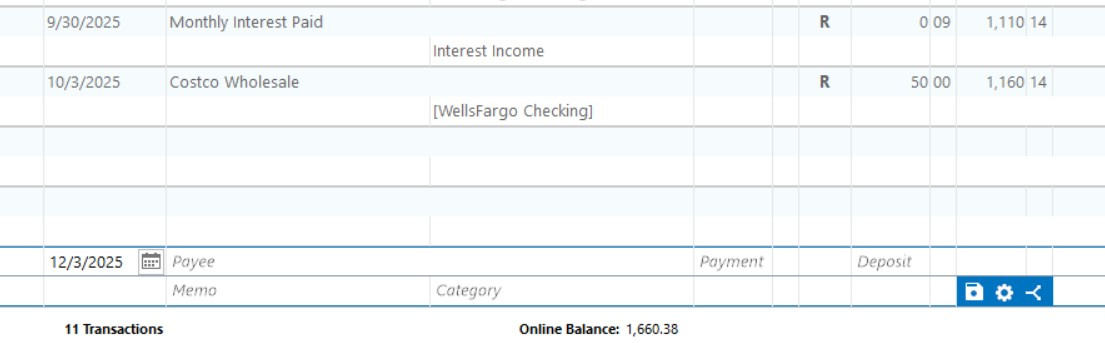
Screenshot 2025-12-03 094834.jpg

. Any idea what's causing this and how to fix?

Answers

  • Quicken Alyssa
    Quicken Alyssa Quicken Windows Subscription Moderator mod

    Hello @RobbieW,

    Thank you for sharing what you are experiencing with us.

    I am unsure what exactly could be causing this based on the information I have so far, but I do have some follow-up questions for you that could help narrow it down.

    • Do you use Quicken Mobile & Web?
    • How do you open Quicken?
      • Are you using the application icon that is a red square with a white Q in it?
      • Are you using a file with an icon that looks more rectangular, like a sheet of paper with the corner folded?
    • Where is your data file located?
    • Is your file being synced/backed up by any third-party services like Norton, OneDrive, or Dropbox?

    Looking forward to your response.

    Quicken Alyssa

    Make sure to sign up for the email digest to see a round up of your top posts.