One of my Vanguard investment accounts isn't listed when I try to set it up for Direct Connect.

millersp54
millersp54 Quicken Windows Subscription Member

About two months ago, one of my investment accounts at Vanguard quit downloading transactions using Quicken's Direct Connect feature. For several years transactions downloaded to this account using Direct Connect successfully. I have disable the account and then tried to set it up again repeatedly, but it never shows up as a choice when Quicken connects to the Vanguard site. All my other accounts show up. I download transactions for this account using the workaround of downloading manually from the Vanguard website with no problem but it is a lot more time consuming than using Direct Connect. Vanguard advises that it is a problem with Quicken. Can anyone give me some help please? Thanks!


Comments

  • Quicken Kristina
    Quicken Kristina Quicken Windows Subscription Moderator mod

    Hello @millersp54,

    Thank you for letting us know you're encountering this issue. Since Vanguard told you it's a Quicken problem, it sounds like they suspect the problem may be specific to your file. Did they have you do any troubleshooting?

    I suggest that you start by validating your data file.  Please save a backup file prior to performing these steps. 

    Validate: 

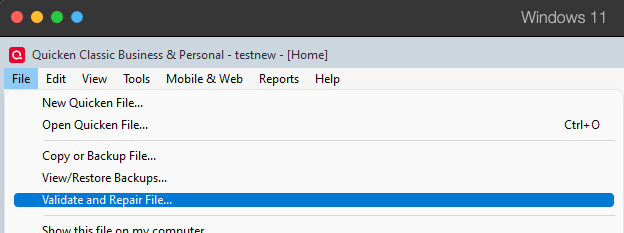
    1. File
    2. Validate and Repair File... Validate and repair.png
    3. Validate File
    4. Click OK
    5. Close the Data Log
    6. Close Quicken (leave it closed for at least 5 secs)
    7. Reopen Quicken and see if the issue persists.

    Please let me know how it goes!

    Quicken Kristina

    Make sure to sign up for the email digest to see a round up of your top posts.