Schwab Retirement - web connect download doesn't work either

I have two retirement accounts with Schwab, and I'm aware that Schwab Retirement discontinued Quicken Direct Connect.
Web connect download is not working either. I get the following error:
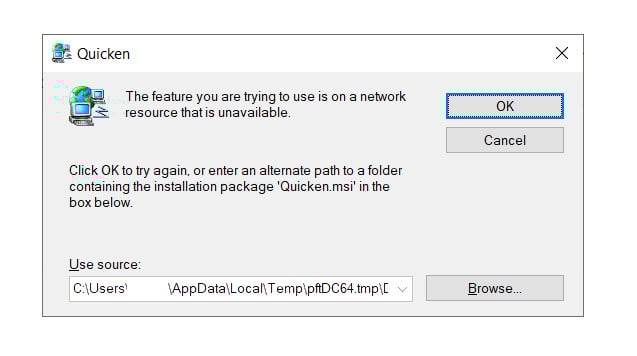
I have a Schwab brokerage account, but past attempts to download retirement account transactions from the Schwab brokerage site were disastrous (transactions from 2 accounts merged into one, lots of duplicates, etc.).
Any suggestions?
Thank you.
Comments
-
Hello @GW123,
Thank you for sharing your experience and reporting the issues you are having.
What you are running into when trying to import QFX files is actually a Known Issue. As stated in the linked alert, uninstalling and reinstalling the application should resolve the issue.
As for the two "merged" accounts, were you able to resolve that issue? If not, I think the best course of action would be restoring a backup from before the issue started. Before doing that, you will need to disconnect ALL of your Schwab accounts in your current data file.
Once you are in a good backup, please do the following:
1. Save a Backup. Steps can be found in this article if needed.
2. Disconnect ALL Schwab accounts in Quicken. Here are the steps on how to do that.
3. Revoke Quickens Third-Party Access from the Schwab website.
4. Add accounts back into Quicken
Once back in Quicken, you will want to make sure you choose the "LINK to existing" option for all of the accounts that are already in Quicken.
Let us know how it goes and if you need further guidance.
Quicken Alyssa
Make sure to sign up for the email digest to see a round up of your top posts.
0 -
- Importing QFX files - now working after uninstalling and reinstalling Quicken.
- Downloading Schwab retirement transactions from Schwab brokerage site (Schwab.com) - still not working properly. I disconnected all my Schwab accounts, revoked third-party access from Schwab website and re-linked all accounts to my existing accounts (double-checked: all linked correctly). However, transactions download only from one of the two retirements accounts, and end up in both of my linked accounts.
- Suggestions?
0 -
Thank you for following up, and I apologize for the delayed response.
Are you still experiencing these issues?
If so, please provide more information:
- Are you running into the same pop-ups when importing QFX files after uninstalling/reinstalling, or is it something different now?
- What steps are you taking to import the QFX?
- Are you dragging and dropping it, or going to File>File Import?
- I would suggest going the File>File Import route.
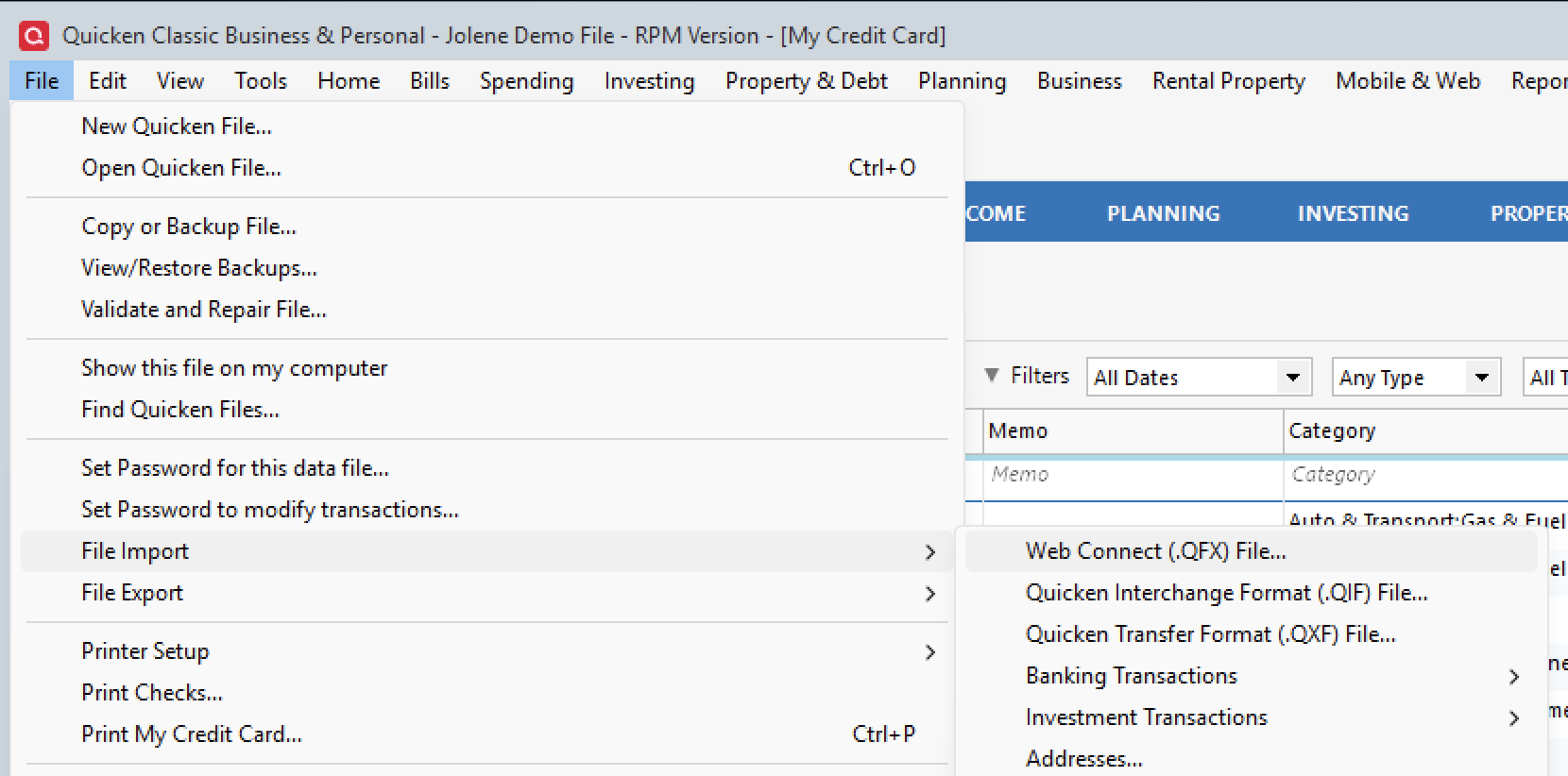
- I would suggest going the File>File Import route.
- Are you dragging and dropping it, or going to File>File Import?
- Where is your data file located?
- Is your file being backed up/synced with any third-party services like Dropbox, OneDrive, or Blackblaze?
Looking forward to your response!
Quicken Alyssa
Make sure to sign up for the email digest to see a round up of your top posts.
0 -
Importing QFX files has been working since my previous message (no pop-ups).
What is still not working (and has never worked) is Downloading Schwab retirement transactions from Schwab brokerage site (Schwab.com), even after disconnecting all my Schwab accounts, revoking third-party access from Schwab website and re-linking all accounts to my existing accounts (double-checked: all linked correctly). What happens is that transactions download only from one of the two retirements accounts, and end up in both of my linked accounts.
0 -
Thank you for following up!
I think we will need to look at how this information is being sent to Quicken from Schwab.
Due to the nature of the issue you are describing, it is recommended that you contact Quicken Support directly for further assistance, as they can walk you through troubleshooting steps in real-time and escalate the situation as needed.
The Quicken Support phone number can be found through this link here.
Thanks again!
Quicken Alyssa
Make sure to sign up for the email digest to see a round up of your top posts.
0

Categories
- All Categories
- 6 Product Ideas
- 34 Announcements
- 248 Alerts, Online Banking & Known Product Issues
- 19 Product Alerts
- 265 Welcome to the Community!
- 301 Before you Buy
- 1.5K Product Ideas
- 55.8K Quicken Classic for Windows
- 16.9K Quicken Classic for Mac
- 1K Quicken Mobile
- 834 Quicken on the Web
- 129 Quicken LifeHub