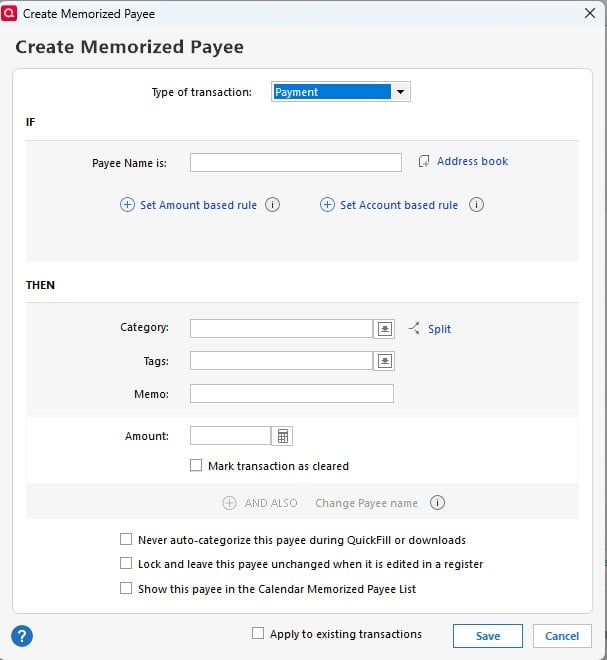
Change to Memorized Payee Options

Bione
Bione Quicken Windows Subscription Member ✭✭✭✭

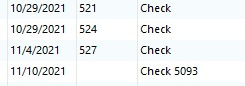
This feature is almost perfect except for example Truist does and will not put the check number in that specific column. Payee will show "Check #1030" in the Payee column. I am not sure if other institutions have done this also. This makes using the upgraded memorized payee feature hard to use for recurring same $ transactions. A work around for this would be adding the "Contains" option to the Payee Name. This could work as follows:

Payee Name contains "Check"

Set Amount to ex. $125

Set Account Rule to Truist Checking

Set Category to ex. Housekeeping

Do not Rename.

rename.jpg
3
3 votes

New · Last Updated

Comments

  • Jim_Harman
    Jim_Harman Quicken Windows Subscription SuperUser ✭✭✭✭✭
    edited December 10

    It is common for the downloaded Payee for checks to be "Check nnnn."

    If this is an Express Web Connect or EWC+ account, I would think that Quicken Inc/Intuit control the data that is sent to Quicken and thus if the check number is blank and the downloaded Payee begins with "Check" followed by a number, they could populate the Check # field.

    QWin Premier subscription
  • Bione
    Bione Quicken Windows Subscription Member ✭✭✭✭

    I asked the question about the check number field not being populated and put in the payee column back in a July discussion. This was the general conclusion from there.

    I followed up with Quicken Support and was told that this was a Truist issue. I did call Truist Digital Support and got an agent that was a Quicken user. He told me he would put in a ticket, but this is how they were doing it and would probably not change.

    I found that this changed with Truist back in November 2021. Probably with the BB&T merger.

    Transactions2.jpg

    I have seen another report such as this, but they did not give the institution. Since my original post the Memorized Payee feature was enhanced with additional options. This would enhance this more and resolve at least my issue.

  • UKR
    UKR Quicken Windows Subscription SuperUser ✭✭✭✭✭

    Are you writing paper checks or are you using Truist's Bank Bill Pay system to print and mail paper checks for you?

    Manually recording these paper checks when you write them (or let Quicken on your PC print a check for you) would give you correctly named and numbered transactions, e.g.

    12/1/25  3456   Squeaky Clean House Cleaners   Housekeeping   125.00
    

    When the check clears the bank a few days later and you download transactions from the bank, Quicken will match the downloaded transaction "Check 3456" with the one already in your register. No Renaming Rules needed.

  • Bione
    Bione Quicken Windows Subscription Member ✭✭✭✭

    I agree with the manual pre-entry but was trying to make this more automatic. I do write an equal number of manual checks and to save postage let Truist mail the balance.