Reauthorize/download issues with Fidelity [Edited]

I'm having the same reauthorization/download issues as many other issues. Is there a common resolution to all of these problems yet? Has quicken made any statements about it?
I have an issue that I don't see anyone else mentioned. The update process for fidelity forced me to add another account. It is labeled as an account that I don't have at fidelity? The account populated with the transactions that are in my company 401k plan. The data goes back to 2023. Now my investments are almost doubled because I have an existing account with my 401k transactions.
The new account has downloaded current transactions and back to 2023. The existing 401k account has no transactions after 10/3/25 even after downloading for the account.
The same transactions are still in my 401k plan. But the amounts like share balance and cash balance are not the same.
How can I get this right. Should I delete the existing account. Is it possible to compare the transactions between the two accounts.
Answers
-
Hello @watsonda1,
Thank you for reaching out! To help troubleshoot these issues, please provide additional information. What specific reauthorization/download issues are you encountering? You mentioned that you were forced to add an account that's already in your file. What exactly happened that forced you to add the account? Usually, on the Add/Link screen, you should be able to specify "Don't add to Quicken" if you don't want the account connected in your file.
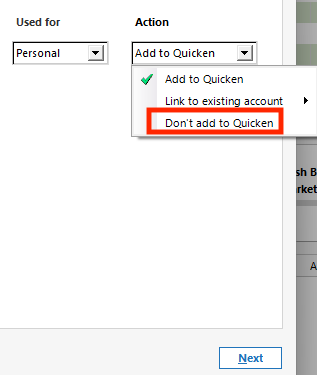
If that account is a duplicate account, then there are a couple options. Since it sounds like the duplicate account is connected/updating and the original account isn't, you can copy any historical transactions you need from the original account to the new one.
To do that, backup your Quicken file, then click the gear icon near the upper right and select Move Transactions.
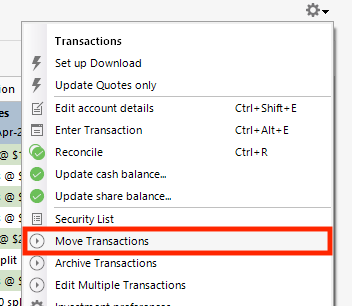
Select the transactions to move and the account to move to. Then, verify that all the history you needed is moved before deleting the original account.
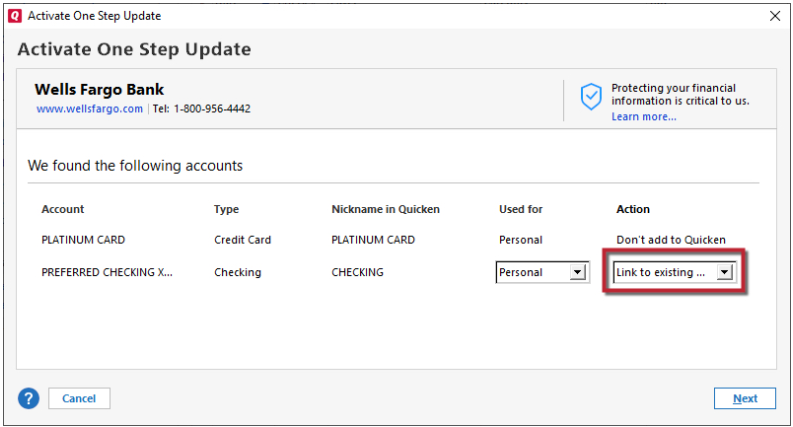
Alternatively, if you prefer to keep the original account and get rid of the newer one, backup your Quicken file, delete the newer, duplicate account, then reconnect the original account by navigating to Tools>Add Account and following the prompts, making sure to carefully link the account to the correct nickname in Quicken.
I look forward to your response!
Quicken Kristina
Make sure to sign up for the email digest to see a round up of your top posts.
0

Categories
- All Categories
- 60 Product Ideas
- 36 Announcements
- 219 Alerts, Online Banking & Known Product Issues
- 21 Product Alerts
- 704 Welcome to the Community!
- 671 Before you Buy
- 1.2K Product Ideas
- 53.9K Quicken Classic for Windows
- 16.4K Quicken Classic for Mac
- 1K Quicken Mobile
- 812 Quicken on the Web
- 115 Quicken LifeHub