Classic Quicken Deluxe on Windows - Hangs on Startup and other operations.
This started 3 or 4 days ago without any updates taking place. The session with quicken will hang for about 30 seconds during startup and then will do the same during certain operations. When activating Task Manager, it only shows 'Not Responding' and then breaks loose. It has also just gone away and I have to restart the app. Also, when checking for updates under HELP, it comes back with 'Unknown Error'.
Answers
-
I was thinking of reinstalling Quicken Deluxe from scratch as I have had a number of issues trying to apply updates. I have had Quicken installed for 10 to 20 years. Any issues with possibly re-installing quicken with my current DB?
0 -
This also takes place during the downloading of stock market transactions. This is getting frustrating…
0 -
Hello @TBCastagna,
Thanks for posting and for the detailed description of what you’re seeing—hangs on startup and “Unknown Error” messages can definitely be frustrating.
Before reinstalling, I have a few follow-up questions to help narrow down what might be causing this:
- Where is your Quicken data file stored?
Is it on your local hard drive (C: drive) or in a cloud-based or external location such as OneDrive, Dropbox, or a USB drive? - Have you tried any troubleshooting steps so far? If so, what were they?
- Are you using a VPN on this computer? If yes, does disabling it make any difference?
- You mentioned this started 3-4 days ago—did anything change around that time (Windows updates, security software updates, new installs, etc.)?
- Are any third-party backup or security tools actively monitoring your system while Quicken is running?
If you’re open to it, screenshots of the “Unknown Error” message would also be helpful.
If needed, please refer to this Community FAQ for instructions on how to attach a screenshot. Alternatively, you can also drag and drop screenshots to your response if you are not given the option to add attachments.
About reinstalling Quicken
Yes—reinstalling Quicken will not affect your existing data file, as long as you don’t delete the data file itself. However, if you want, you can save a backup as a precaution.
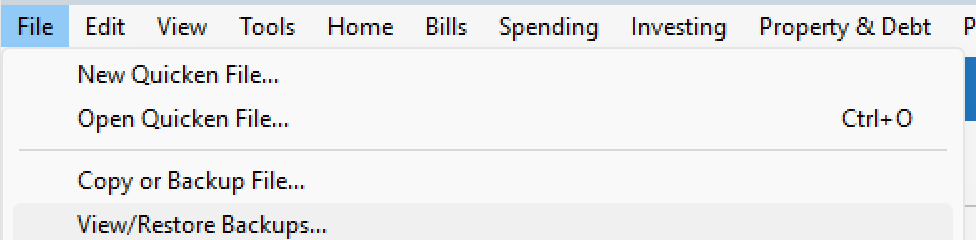
- File > View/Restore Backups...
Please refer to the following support articles for instructions on uninstalling and reinstalling Quicken:
- Uninstalling Quicken (Windows 11 instructions are provided below; you can also find Windows 10 and Windows 8 instructions in the link, if needed)
- Windows 11
- Click the Start button and select Settings (gear icon).
- Select Apps from the settings list, then click Installed apps.
- In the Installed apps list, scroll down to Quicken, click the three dots menu, then select Uninstall.
- Click on Uninstall again to confirm and follow through the prompts until the program is removed.
- Windows 11
- Reinstalling Quicken
Important extra step (recommended):
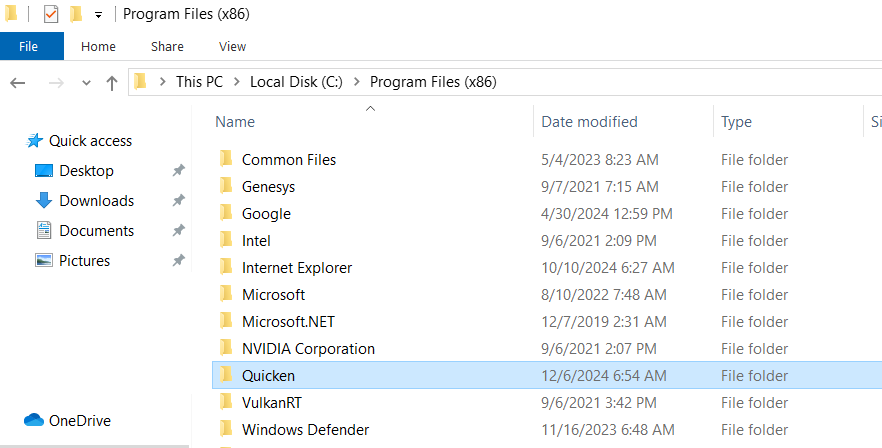
After uninstalling—but before reinstalling—please do the following:- Open Windows File Explorer
- Navigate to:
This PC > C: Drive > Program Files (x86) - Delete the folder titled “Quicken”
(This does not delete or affect your data files.)
Once that folder is removed, proceed with reinstalling Quicken and then open your existing data file.
Let us know the answers to the questions above and whether reinstalling improves the behavior—we’ll go from there.
-Quicken Anja
Make sure to sign up for the email digest to see a round up of your top posts.0 - Where is your Quicken data file stored?
Categories
- All Categories
- 60 Product Ideas
- 36 Announcements
- 223 Alerts, Online Banking & Known Product Issues
- 21 Product Alerts
- 704 Welcome to the Community!
- 672 Before you Buy
- 1.2K Product Ideas
- 53.9K Quicken Classic for Windows
- 16.4K Quicken Classic for Mac
- 1K Quicken Mobile
- 812 Quicken on the Web
- 115 Quicken LifeHub