Is there a way to search transactions adhoc using multiple criteria? (Q Mac)

majorgear
majorgear Quicken Mac Subscription Member ✭✭

I'm reviewing my Quicken configuration , and using transaction information to fine tune it. As such, I need to do multiple adhoc queries using multiple search criteria to find the information I need quickly. These queries only need to be run once, so creating a report would be a complete waste of time.

Is there special/secret syntax I can use to filter "All Transactions" view by multiple criteria? ie. Search for Payee Jim Bob AND dates between 12/1/2024 and 12/1/2025 AND amount < 50.00 .

Thank You.

Answers

  • jacobs
    jacobs Quicken Mac Subscription SuperUser, Mac Beta Beta

    Unfortunately, there is no way to specify multiple criteria in a Search. you can use filters to narrow a few criteria, so you filter for dates in a range and then Search for a specific Payee. But there is no way to search of filter based on amounts.

    For your example, set the date filter Search on the Payee, and then click the Amount column heading to sort the results from lowest-to-highest or highest-to-lowest amounts. If you need to save the results, you could then click on the first transaction in the amount range you want, scroll and Shift-click on the last transaction in the Amount range you want, so the range of transactions is highlighted; you can then print or export the selected transactions.

    If you have to do a lot of tweaking of data or data lookups, you might find it easier to select all transactions for the date range, export them, and then do your further searching in a spreadsheet program.

    There is an existing Idea thread (feature request) for more complex search citeria; you might want to add your vote and post a comment what you'd like to see:

    Quicken Mac Subscription • Quicken user since 1993
  • majorgear
    majorgear Quicken Mac Subscription Member ✭✭

    Creating reports or spreadsheets is exactly what I'm trying to avoid. It sounds like there isn't an answer to my question as Quicken for Mac just can't do it.

  • jacobs
    jacobs Quicken Mac Subscription SuperUser, Mac Beta Beta

    It sounds like there isn't an answer to my question

    There is an answer to your question, which I posted above: there is no way to specify multiple criteria in a Search.

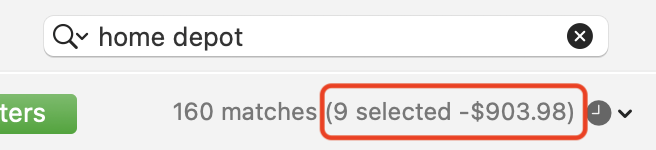
    But there are some workarounds using filters, Search and sorting that can get results to the scenario you asked about. I should have added that if you filter by date, Search for Payee, sort by amount, and select the range of transactions you want, the total of those transactions is shown under the Search box.

    Screenshot 2025-12-20 at 5.26.44 PM.png

    So if you just want to know how many transactions, or the total of the transactions, you don't need to print or export to get that.

    Quicken Mac Subscription • Quicken user since 1993