Search across All Transactions should include Hidden Accounts (Q Mac)

dhockemeyer
dhockemeyer Quicken Mac Other Member

Users with decades of data (and multiple credit/debit cards) hide accounts that are no longer active so it doesn't clutter up our nav bar. We still wish to search for transactions across all our historic accounts, and should not have to unhide/rehide 10+ accounts each time we want to search our transaction history.

By definition - Search across ALL TRANSACTIONS - should include all transactions, regardless of whether the ACCOUNT has been hidden.

There's VALUE in being able to search across ALL of my transactions, not just the ones in active accounts. What made you think we wanted to lose the value of all that history?

Someone has conflated the desire to hide an account from view, with hiding the value of all of the transactions in that account.


1
1 votes

New · Last Updated

Comments

  • jacobs
    jacobs Quicken Mac Subscription SuperUser, Mac Beta Beta

    @dhockemeyer I'm confused by your request, because Quicken Mac already behaves exactly the way you suggest it should! 😀 That is, when you select All Transactions in the left sidebar, a Search will include all accounts, including closed and hidden accounts. (Only accounts set to be Separate are not included in Search results.)

    I just checked and verified that this is working for me as it always has: with All Transactions selected, Search is finding transactions in accounts which I have closed and hidden.

    Do you have any accounts marked as Separate which you're expecting to show up in the Search results. Otherwise, can you check again to select All Transactions and Search for something in one of your hidden accounts to see if transactions from that account show in your search reuslts.

    Quicken Mac Subscription • Quicken user since 1993
  • splasher
    splasher Quicken Windows Subscription SuperUser ✭✭✭✭✭

    Since this was originally posted in a Windows category, I'll add something for that version in case it really isn't a Mac question.

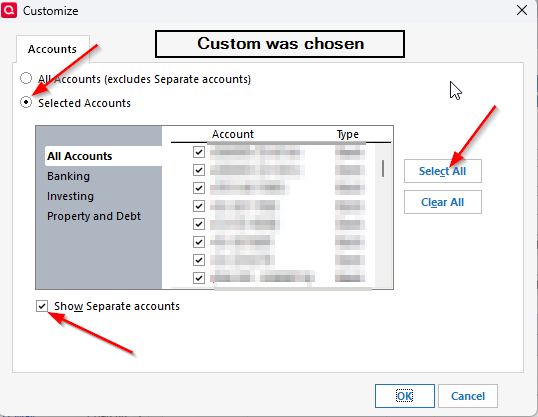
    Select the All Transactions choice in the Account Bar.
    Change the filters on the register to Custom and as shown in this image:

    image.png

    Change to All Dates.

    Now do the search.

    -splasher using Q continuously since 1996
    - Subscription Quicken - Win11 and QW2013 - Win11
    -Questions? Check out the Quicken Windows FAQ list

  • jacobs
    jacobs Quicken Mac Subscription SuperUser, Mac Beta Beta

    @splasher Thanks, I didn't realize this was posted under Windows originally; it's in a Mac category when I saw it, and the user's profile says Quicken Mac.

    @dhockemeyer Can you clarify if you are running Quicken Mac? And if so, does my reply above address what you were posting about, or is there something I'm missing?

    Quicken Mac Subscription • Quicken user since 1993