PNC Bank: 1/1/2026 OSU Downloads
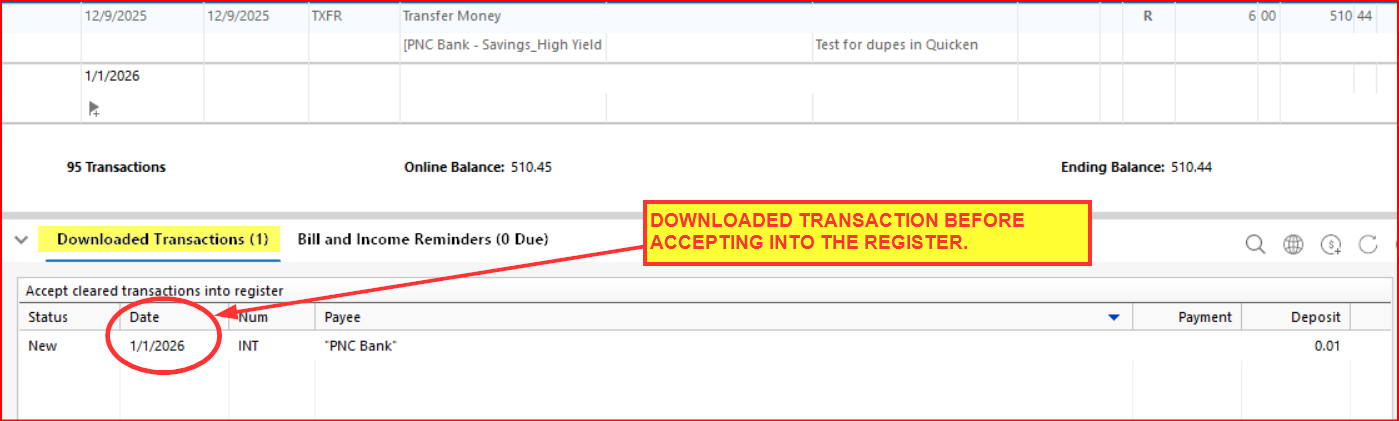
When running OSU this morning, my PNC Bank savings accounts downloaded 12/31/2025 interest deposits with the transaction date being 1/1/2026 but with the posting date being 12/31/2025. See the following pics from one of the accounts.
DOWNLOADED TRANSACTIONS (PRE-ACCEPTANCE):
DOWNLOADED TRANSACTIONS (POST-ACCEPTANCE INTO THE REGISTER): This transaction was not previously manually entered.
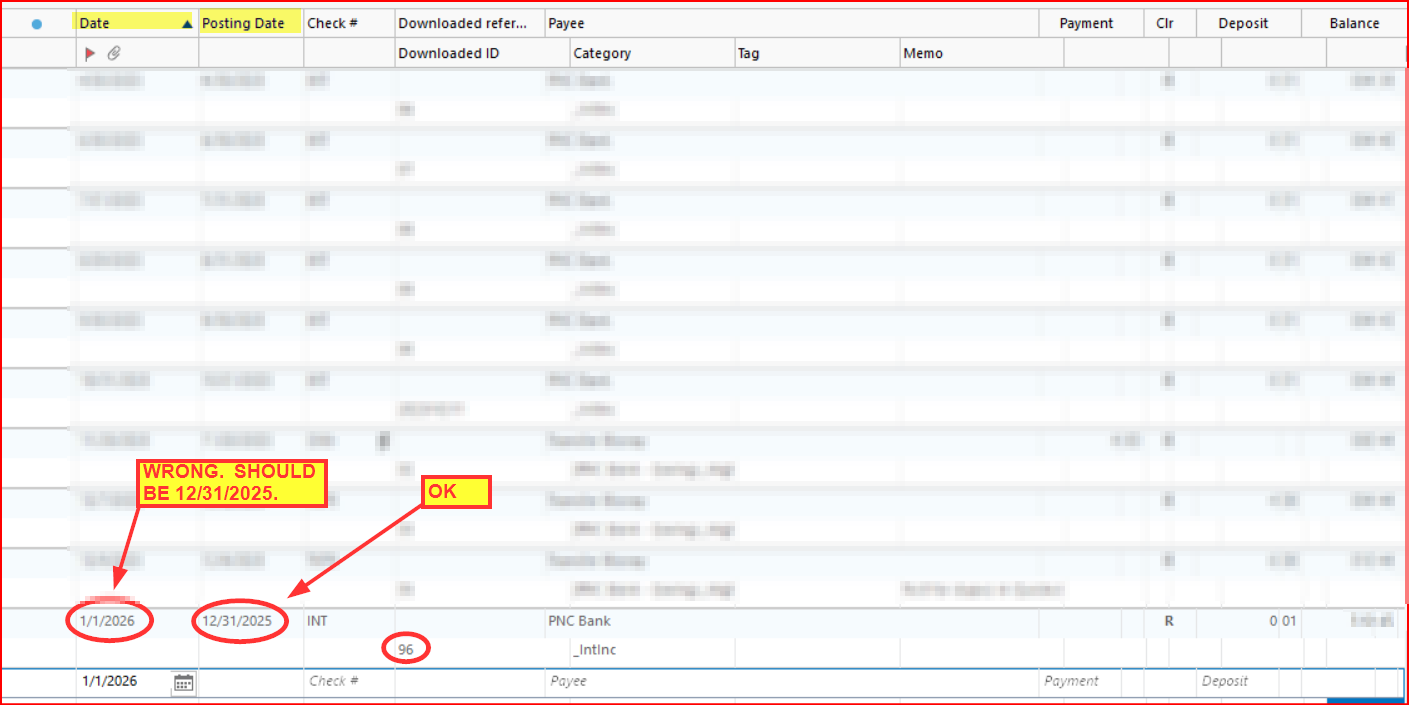
This only happened with 2 PNC account, not with any other FIs where transactions were downloaded.
It's not a big issue for me since it was just a very small transaction amount and I was able to edit the transaction date to the correct 12/31/2025. But it could be a Tax Planner & Reports issue for some if the dollar amount is larger and they do not catch and correct the transaction date before they do their tax returns.
I don't think I've ever seen something like this before. Has anyone else seen this?

Quicken Classic Premier (US) Subscription: R65.29 on Windows 11 Home
Answers
-
Hello @Boatnmaniac,
Thank you for reaching out! I haven't seen behavior like that before. Was this a one-time issue, or are you continuing to see transactions downloading from PNC with a posting date that predates the transaction date?
If you're concerned about an incorrect posting date messing up the Tax Planner and Reports, you can manually edit the Posting Date. To do that, right click on the transaction, hold CTRL, then click on Copy Transaction(s). That should bring up the View Posting Date window, which will allow you to edit the date.
I look forward to your response!
Quicken Kristina
Make sure to sign up for the email digest to see a round up of your top posts.
2 -
It seems to have been a 1X occurrence…1 transaction in two PNC accounts (no other FIs)…that happened only on 1/2/26. I've never seen that happen before, either, but with all the PNC DC issues of the last couple of months it did raise a flag for me.
For me, this was not a posting date error. The posting date was correctly showing 12/31/25. It was only the transaction date that was wrong (it was AFTER the posting date!) and I manually edited that transaction date to correct it from 1/1/25 to 12/31/25 so all is now good for me, both in the registers and in the Tax Reports and Tax Planner.
I posted this mainly to give a heads up to others to look for this issue in the PNC accounts so they can make sure their EOY Tax Reports and Tax Planner are accurate.
BTW, thanks for that tip on how to edit the posting date. I'd always thought that was not editable. There have been some occasions over the years where I would have liked to correct the posting date. I will keep this one in mind!
Quicken Classic Premier (US) Subscription: R65.29 on Windows 11 Home
1 -
Thank you for the follow-up,
I'm glad to hear that it was just a one-time occurrence and you were able to correct it by manually editing the incorrect transaction dates.
If the issue returns, please let us know!
Quicken Kristina
Make sure to sign up for the email digest to see a round up of your top posts.
0 -
@Quicken Kristina , thanks for the cool editing tip!
- Q Win Deluxe user since 2010, US Subscription
- I don't use Cloud Sync, Mobile & Web, Bill Pay1
Categories
- All Categories
- 41 Product Ideas
- 36 Announcements
- 225 Alerts, Online Banking & Known Product Issues
- 21 Product Alerts
- 497 Welcome to the Community!
- 676 Before you Buy
- 1.3K Product Ideas
- 54.3K Quicken Classic for Windows
- 16.5K Quicken Classic for Mac
- 1K Quicken Mobile
- 814 Quicken on the Web
- 115 Quicken LifeHub


