Downloaded Transactions and the Bills and Reminders Tab

nisarun
nisarun Quicken Windows Subscription Member ✭✭

The Bills and Reminders tab (similar to the one below) does not show in one of my accounts.

Thanks.

image.png

Best Answer

  • UKR
    UKR Quicken Windows Subscription SuperUser ✭✭✭✭✭
    Answer ✓

    Could this be the cause?

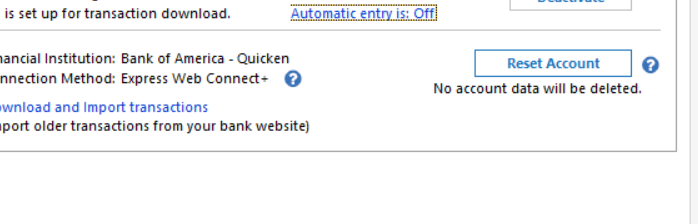
    The Bill and Income Reminders tab and the Downloaded Transactions tab do not show at the bottom of the register if the account has been set to "automatically accept downloaded transactions into your register".
    See Edit / Preferences / Downloaded transactions / Automatically add to banking registers and also for each individual account in Edit Account Details / Online Services tab / clickable text "Automatic Entry is: On/Off"

Answers

  • Boatnmaniac
    Boatnmaniac Quicken Windows Subscription SuperUser ✭✭✭✭✭

    What type of account is it?

    And, sorry but I need to ask this, do you have any Reminders set up for that account?

    Quicken Classic Premier (US) Subscription: R65.29 on Windows 11 Home

  • UKR
    UKR Quicken Windows Subscription SuperUser ✭✭✭✭✭
    Answer ✓

    Could this be the cause?

    The Bill and Income Reminders tab and the Downloaded Transactions tab do not show at the bottom of the register if the account has been set to "automatically accept downloaded transactions into your register".
    See Edit / Preferences / Downloaded transactions / Automatically add to banking registers and also for each individual account in Edit Account Details / Online Services tab / clickable text "Automatic Entry is: On/Off"

  • nisarun
    nisarun Quicken Windows Subscription Member ✭✭

    UKR suggestion solved the problem. Thanks.

    The automatic entry option is very small font. I kept missing it for the last three months.

    See below.

    image.png
  • nisarun
    nisarun Quicken Windows Subscription Member ✭✭

    To answer Boatmaniac:


    it is a bank checking account. I have reminders set up. But accidentally (or because I screwe up) I had clicked “automatic download transactions “ on. So the Bills and Reminders stopped being displayed.



    Thanks.