Quicken Sounds, especially startup chimes, are way too loud.
This subject has been brought up before. The Quicken sounds are twice as loud as every other app on my computer and it is very annoying. The "suggested solution" is to adjust the Windows Sound Control. In other words, Quicken is saying "Not our problem", and have consequently closed older threads on this subject. It seems to me Quicken could easily add a sound control for the app which many other apps seem to have. Or just set the sound level lower by about 50%. Why is Quicken reluctant to do this?
Comments
-
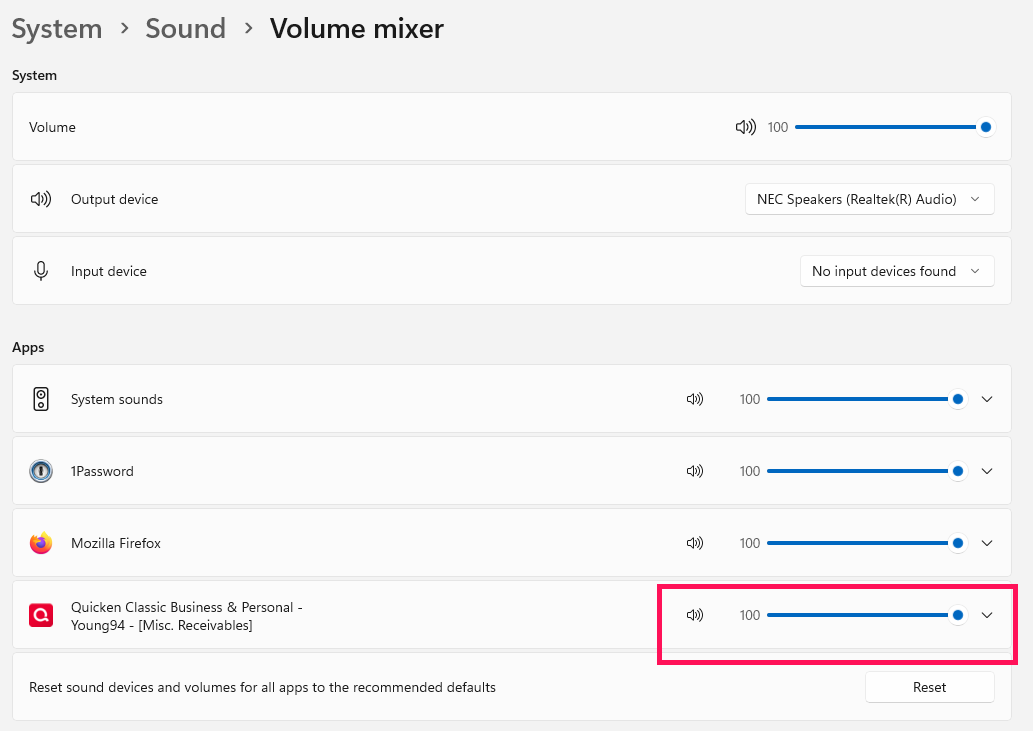
This didn't work for you?:
Adjusting that slider certainly worked for me.
1 -
Thanks Tom. I had tried Volume Mixer before my post, but it did not work initially because the Quicken app did not show on the list of apps. Little did I know that the Quicken app has to be open to appear on the Volume Mixer page. This I finally discovered by accident, so the problem has been fixed (after a lot of wasted time). Thanks again Tom, and no thanks to Quicken or Microsoft.
0 -
Well, at least we are lucky enough that Microsoft put in that option. In "old times" we had to modify the sounds themselves, Intuit refused to change them even though there were lots of complaints about them being too loud and Quicken Inc hasn't changed them either.
Signature:
This is my website (ImportQIF is free to use):0
Categories
- All Categories
- 40 Product Ideas
- 36 Announcements
- 222 Alerts, Online Banking & Known Product Issues
- 21 Product Alerts
- 525 Welcome to the Community!
- 674 Before you Buy
- 1.3K Product Ideas
- 54.3K Quicken Classic for Windows
- 16.5K Quicken Classic for Mac
- 1K Quicken Mobile
- 814 Quicken on the Web
- 115 Quicken LifeHub