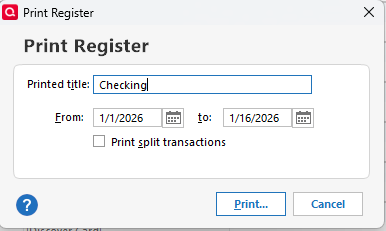
How do I print a register?
If I go Ctrl/P, I get a setup (portrait, various columns narrow enough to fit on an 8.5 inch page, and so on), can choose what pages to print, and whether to print to paper or to PDF etc, but then NOTHING HAPPENS except that I get a notice that no pages were printed. I know I did this last year for my 2024 taxes. Why can't I do it this year?
Best Answers
-
After the Ctrl/P and before getting the setup screen, what are you entering on the pop-up in between?
Did you set the correct dates?
That screen evidently defaults to the current year.
-splasher using Q continuously since 1996
- Subscription Quicken - Win11 and QW2013 - Win11
-Questions? Check out the Quicken Windows FAQ list0 -
Have you selected 1/1/25 to 12/31/25 as the date range? For me it defaults to 1/1/26 to the last transaction in the register.
If that is not it, does the print preview work as expected?
QWin Premier subscription0
Answers
-
After the Ctrl/P and before getting the setup screen, what are you entering on the pop-up in between?
Did you set the correct dates?
That screen evidently defaults to the current year.
-splasher using Q continuously since 1996
- Subscription Quicken - Win11 and QW2013 - Win11
-Questions? Check out the Quicken Windows FAQ list0 -
Have you selected 1/1/25 to 12/31/25 as the date range? For me it defaults to 1/1/26 to the last transaction in the register.
If that is not it, does the print preview work as expected?
QWin Premier subscription0 -
Thank you, thank you! No, I wasn't setting the start date a 01.01.2025……
0
Categories
- All Categories
- 40 Product Ideas
- 36 Announcements
- 222 Alerts, Online Banking & Known Product Issues
- 21 Product Alerts
- 525 Welcome to the Community!
- 674 Before you Buy
- 1.3K Product Ideas
- 54.3K Quicken Classic for Windows
- 16.5K Quicken Classic for Mac
- 1K Quicken Mobile
- 814 Quicken on the Web
- 115 Quicken LifeHub