Taxable and Sheltered Dividends Inaccurate in Reports
Despite setting the type of account correctly (Brokerage, Roth, Traditional) in Accounts, all of the reports I run mix taxable dividends in tax-free category.
This happens in summary reports and in the Tax forms for Schedule B. This has been happening for some time. Many versions ago I added separate categories for taxable and tax-free entries, but I can't do that anymore because the Investments category will not permit changes or additions.
I run Quicken Classic Premier Version 8.4.1 (Build 804.59810.100) and MacOS 26.1.
Answers
-
That is true for the Summary reports, I wound up excluding tax-deferred accounts from my saved category summary reports for that reason.
I'm not seeing that problem with the Schedule B or the Tax Schedule reports. I don't have any of those saved but when I pulled up new ones and checked the settings they both defaulted to not including retirement or tax-deferred accounts. If you saved a copy of those reports check the settings to see if you modified them to include all accounts.
0 -
As @Jon said, the key distinction is Tax reports versus all other reports. Tax reports, like Schedule B and Schedule D, by default exclude retirement and tax-advantaged accounts, because you usually don't want to see investment income for those accounts for tax-reporting purposes. (But you can manually select retirement and tax-advantaged accounts for any Tax report should you want to.)
Conversely, the non-tax reports, like Transaction, Summary and Comparison reports will, by default, include all accounts. But if you're interested in seeing only taxable income, you can manually edit the account selection to exclude retirement accounts.
You can save custom reports with any of these settings so you don't need to remember or configure them in the future. It's very flexible to suit the wide variety of ways we Quicken users make use of the program.
Quicken Mac Subscription • Quicken user since 19930 -
Thanks for the answers. I found the problem: the same securities held in taxable and tax-free accounts appear because there is only one choice available in Window/Security.
Settlement funds especially are hamstrung by this lack of choice. I don't think I can have the same security twice in the Security list without it affecting downloads.0 -
@neloe That shouldn't matter - you can have the same security in both taxable & tax-free accounts. For example, last year I had SPAXX dividends in 3 Fidelity accounts - two taxable and one IRA. It's the same security in all three but the dividends in the IRA are not listed in the Schedule B report as long as the IRA is not selected in the report's account settings.
0 -
there is only one choice available in Window/Security
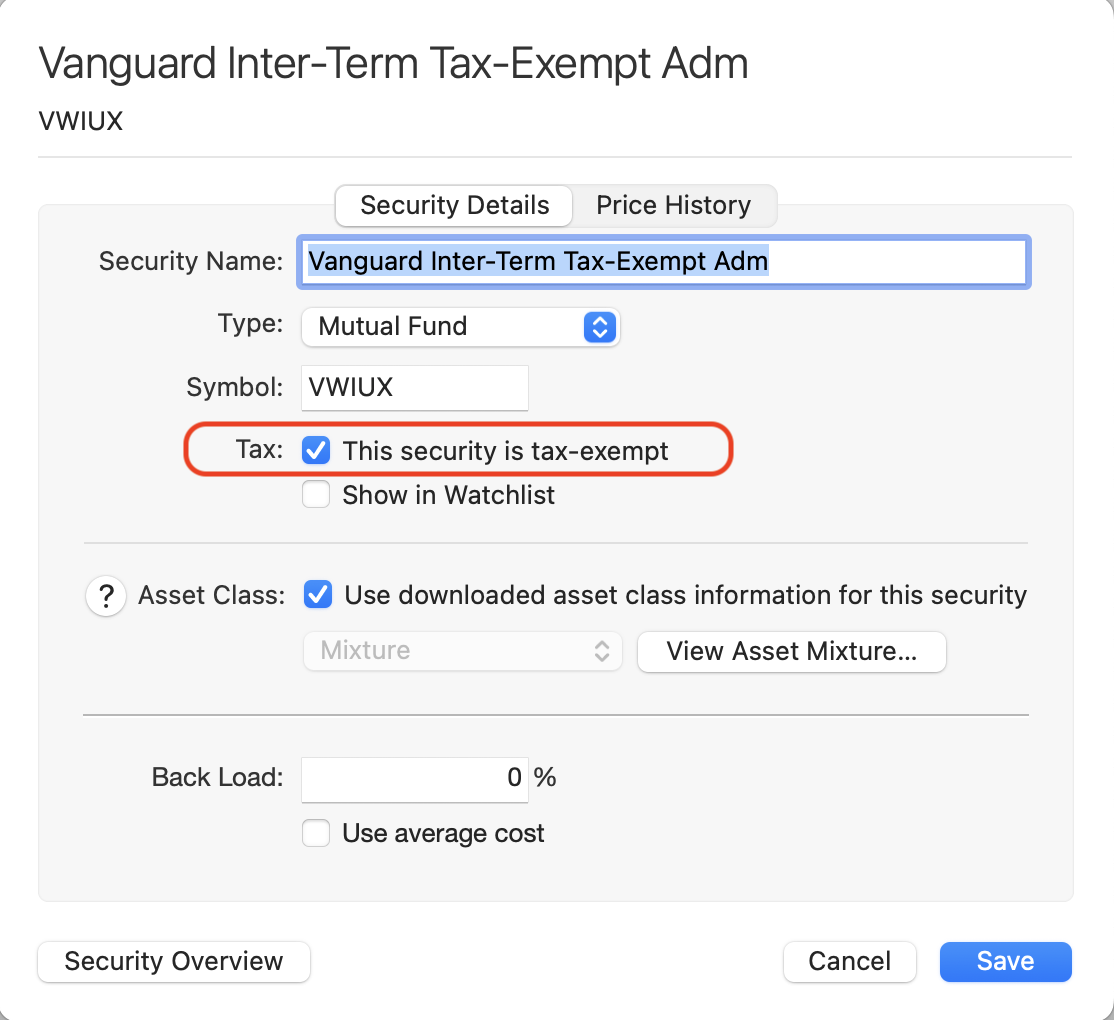
@neloe Are you referring to the "This security is tax-exempt" checkbox on the Security settings window:
That checkbox should only be checked if the security itself is tax-exempt. In this example, I'm showing a tax-exempt Vanguard bond fund. This checkbox tells Quicken that income from the security is tax-exempt, irrespective of what type of accent it is held in — e.g. if held in a taxable brokerage account, dividend income from this security is tax-free.
That checkbox should not be checked simply because you have a security in a non-taxable account, like an IRA or 401k. As discussed above, the account type is used in reports to exclude investment income from all securities in the account when reporting for tax purposes. That's why you don't need to have two different security entries in the securities list for the same actual security held in both taxable and tax-free accounts.
Quicken Mac Subscription • Quicken user since 19930
Categories
- All Categories
- 41 Product Ideas
- 36 Announcements
- 223 Alerts, Online Banking & Known Product Issues
- 21 Product Alerts
- 526 Welcome to the Community!
- 676 Before you Buy
- 1.3K Product Ideas
- 54.3K Quicken Classic for Windows
- 16.5K Quicken Classic for Mac
- 1K Quicken Mobile
- 814 Quicken on the Web
- 115 Quicken LifeHub