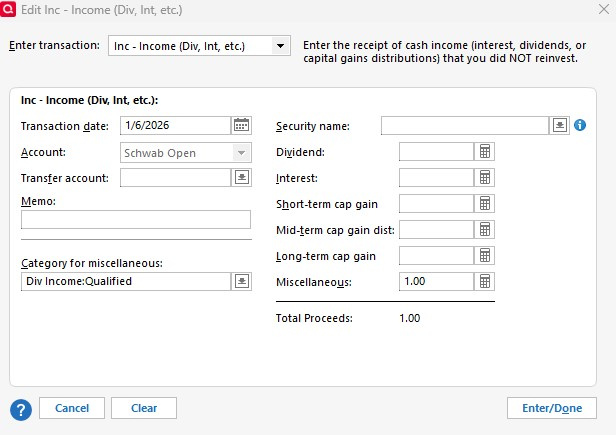
It is a bad system that insists upon me using your categories when entering Interest into my investment accounts. I want to use the categories I set up.
Can you fix this?
Let me know what you are going to do about this.
Thank you.
Quicken's predefined Categories for investment income, capital gains, etc. are used extensively in the Investing and tax reports and elsewhere. I doubt they will change that.
But you can create your own Categories and give them the same Tax line items as the built-in ones and with some exceptions they should work the same as the predefined ones. For example the standard Categories include Div Income and Interest Inc, which as far as I know work the same as _DivInc and _IntInc.
Note that the investing Categories are hidden by default; I find it useful to un-hide them.
If you want to use your own categories, the work around is to edit the transaction, move the income to Miscellaneous, then you can select your own category. I agree with both of you. This is better if you want to segregate your qualified, taxable and nonqualified income, but Quicken likely won't change it because it will mess up there default reports. As long as you set up the tax line data in your categories as Jim indicated, your investment income reports and tax reports work fine. Note that you have to put the money under Miscellaneous before you can use the Category drop down.
Hello All,
This Idea seems to have stalled, and we would like to gauge current interest in this request. Please vote if you have not done so already!
Thank you!