How do I get rid of error CC505?

jjtool
jjtool Quicken Windows Other Member

I have the Quicken Classic Starter program - it worked well for about a year or two - now every time I log on to my bank that error pops up. The bank is The Bank of Kremlin in Enid, Okla. This has been happening for about 10 days now - it's not going to fix itself. Any ideas?


Answers

  • Quicken Anja
    Quicken Anja Moderator mod

    Hello @jjtool,

    Thanks for reaching out!

    I took a look on our end, and I’m not seeing The Bank of Kremlin listed directly as a supported financial institution. However, when checking your account, I do see an internal FDP-105 (CC-505) error occurring with Cowboy Bank.

    Can you please confirm whether your account is connected under Cowboy Bank in Quicken?
    If so, the CC-505 error you’re seeing occurs when Quicken is unable to communicate with your bank’s servers. Even if you can log into the bank's website directly, this error usually indicates a temporary issue on their side or a block on the server that Quicken uses to download transactions.

    Here’s what you can try:

    1. Wait one business day – many CC-505 issues resolve on their own after a short delay.
    2. Refresh your online account information:
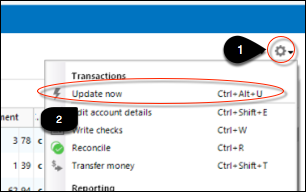
      • In your account register, click the Actions (gear) icon at the top right (or press Ctrl + Shift + N).
      • Select Update Now and follow the prompts. image.png
      • Repeat for each affected account.
    3. Try again the next business day if the problem persists.

    If this continues or has continued for more than 48 hours despite following these steps, it’s best to contact Quicken Support so they can assist further or escalate the issue.

    You can also review the full guidance in this support article.

    Thank you!

    -Quicken Anja
    Make sure to sign up for the email digest to see a round up of your top posts.

  • Boatnmaniac
    Boatnmaniac Quicken Windows Subscription SuperUser ✭✭✭✭✭
    edited January 6

    It looks like in Feb 2024 Kremlin Bank was renamed Cowboy First Bank. There no longer is a financial institution listed in Quicken (nor on the Internet) for a "Kremlin" bank which means the bank discontinued support of Quicken under that name and, in fact, no longer exists under the Kremlin name.

    I also did a search for Cowboy First Bank and found a listing for them under Cowboy Bank and it shows that they support manual downloading via Web Connect and One Step Update downloading via Express Web Connect. You might want to confirm that you are able to log into your online account with Cowboy First Bank and then use that log in to do set up downloading with them.

    I do suggest that before you try to add Cowboy First Bank you first go to the Online Services tab of Account Details and Deactivate your download connection. After than, do Add Account, select Cowboy Bank and initiate the process to set up downloading….making sure to carefully LINK the downloaded data to the account you already have in Quicken.

    Quicken Classic Premier (US) Subscription: R65.29 on Windows 11 Home

  • jjtool
    jjtool Quicken Windows Other Member

    Thank you for the response Anja - I double checked and you are right - Kremlin Bank is now Cowboy Bank for almost a year now. However, my problem with CC505 started just a few weeks ago and the web page does show Cowboy Bank when I try to update my accounts - so the banks name change a year ago is not the problem. Can you think of anything else I might try? Thankyou so much! Jim

  • Boatnmaniac
    Boatnmaniac Quicken Windows Subscription SuperUser ✭✭✭✭✭

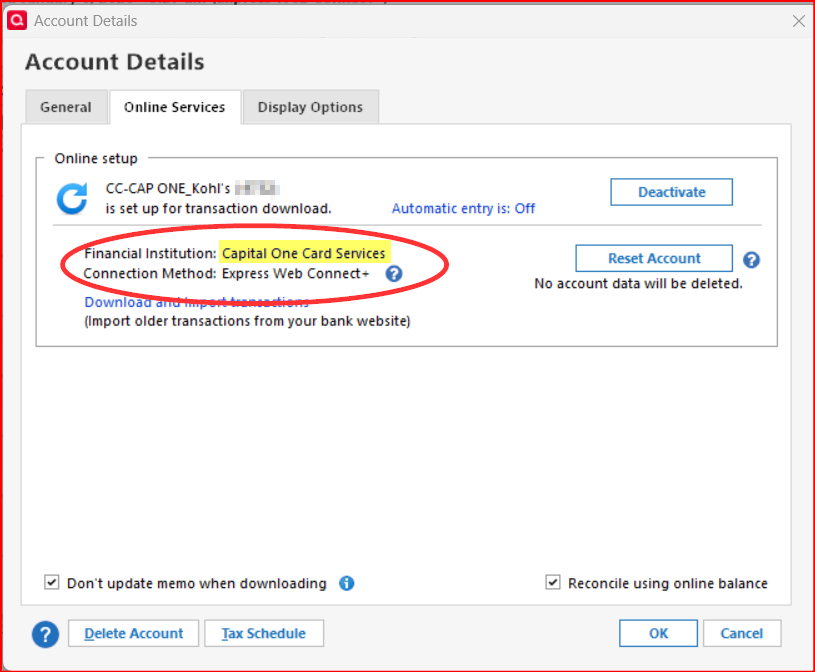
    @jjtool - Go to the Account Register > upper right Gear icon > Edit Account Details > Online Services tab. What is the name of the Financial Institution that is listed there (see the example highlighted in yellow in the following picture)?

    image.png

    Quicken Classic Premier (US) Subscription: R65.29 on Windows 11 Home

  • jjtool
    jjtool Quicken Windows Other Member

    Financial Institution ( Cowboy Bank ) is correct. Something else is wrong - I am lost here - 74 yrs old - computer stupid - 😯

  • Boatnmaniac
    Boatnmaniac Quicken Windows Subscription SuperUser ✭✭✭✭✭

    Did you try #2 as suggested by @Quicken Anja?

    If you did and that did not fix the issue, have you contacted Quicken Support as she had also suggested?

    Quicken Classic Premier (US) Subscription: R65.29 on Windows 11 Home