Memorized payee changes every month, so it's useless

Hello
Every month, I receive a payment from the city that pays for a rental, and so it needs to have the same category and tag every month. The payee appears as:
CITY OF MIAMI mm-dd-yyyy followed by other numbers. Memorizing the payee is pointless since it changes every month, but the only constant are the words "city of Miami".
Do I have a way to store the memorized payee so that "if it contains CITY OF MIAMI", then use this tag and category? I've looked and didn't find the option to do so, but I ask in case there is another way.
Thank you
Q user since right after the abacus
Win Deluxe edition
Answers
-
Assuming you are downloading transactions from your financial institution, you can set up a Renaming Rule to change the payee from “CITY OF MIAMI mm-dd-yyyy followed by other numbers” to “CITY OF MIAMI”. Then create the Memorized Payee “CITY OF MIAMI” to categorize the transactions with your desired category.
Quicken user since Q1999. Currently using QW2017.
Questions? Check out the Quicken Windows FAQ list1 -
Thank you.
Yes, they are downloaded transactions. Will the renaming rule work if the monthly transaction changes name every month as I described in the initial post?
Q user since right after the abacus
Win Deluxe edition0 -
Will the renaming rule work if the monthly transaction changes name every month as I described in the initial post?
Yes it will.
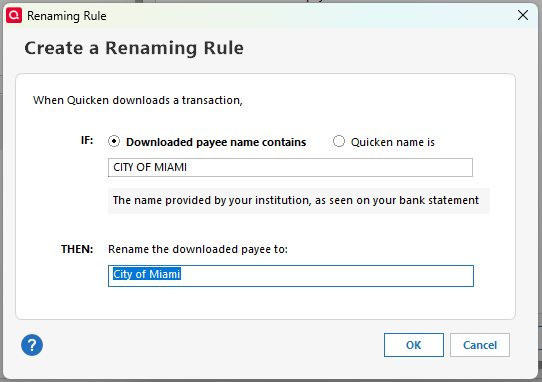
Go to Tools >Renaming Rules and click on Add a rule. The rule you create should look like this
 QWin Premier subscription2
 -
Thank you Jim. I see that the rule says "payee contains", and therefore I can work with that.
Thanks again
Q user since right after the abacus
Win Deluxe edition0 -
It should work in the case you describe, but be aware that to Quicken, "contains CITY OF MIAMI" means "contains the words "city", "of", and "miami" in that order.
It would not match to "cityofmiami" or "city of miamiville" or "miami, city of".
It would match to "City Council of Greater Miami" or "the great city of Miami".
QWin Premier subscription1


Categories
- All Categories
- 16 Product Ideas
- 34 Announcements
- 248 Alerts, Online Banking & Known Product Issues
- 20 Product Alerts
- 516 Welcome to the Community!
- 680 Before you Buy
- 1.5K Product Ideas
- 55.6K Quicken Classic for Windows
- 16.8K Quicken Classic for Mac
- 1K Quicken Mobile
- 834 Quicken on the Web
- 126 Quicken LifeHub