Planner Broken After Opening Backup
Restored from a manually created backup (Quicken did not create the backup, I simply copied the qdf file). Had to reauthorize accounts (expected) but then noticed planner was broken. In Wages/Salary section of Planner Scheduled bills and deposits button was disabled and it was going off projected increase from prior year which gave this wildly inaccurate estimation. In the original file it was using Scheduled bills and deposits.
Comments
-
Validating the file did not show any corruption. Strange how the planner got into this weird state when opening the copied file.
Ended up just restoring from a Quicken-created backup in the backup folder and the planner did not have the issue. I don't know if there is some magic happening when Quicken creates the backup automatically or via File/Copy or Backup File that isn't happening if you just do a file system copy of the QDF file outside quicken.
I did need to re-authorize the accounts, which I guess makes sense from a security standpoint, but is inconvenient.
0 -
Tax Planner may appear to go overboard when you change to a new Tax Year and there are no new transactions on file for the new tax year yet.
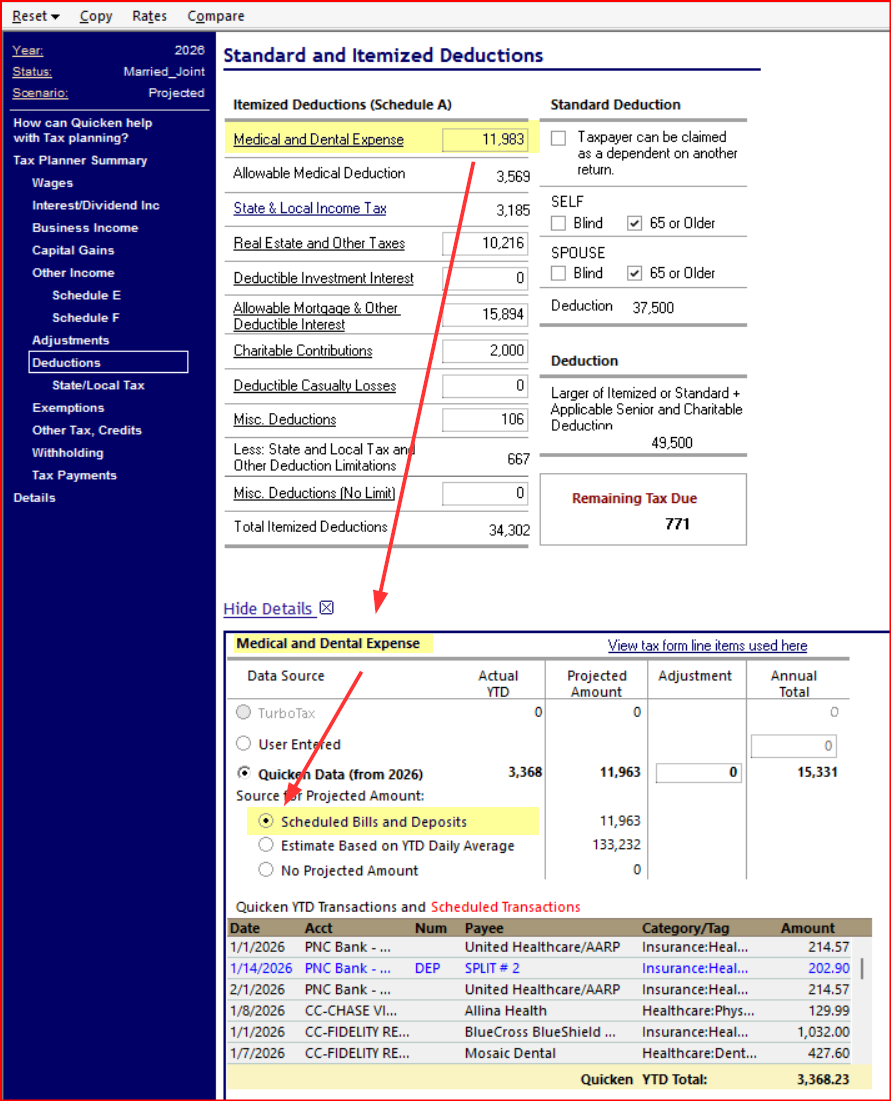
Once you have entered all transactions for January, Tax Planner's estimates based on this year's new transactions and future scheduled reminders will improve, but you will have to review each tax line to select the applicable "Source for projected amount" and that "Quicken data for 2026" has been selected.0 -
In the original file it was using Scheduled bills and deposits.

You may want to review the details for each income/expense section in the 2026 Tax Planner to make sure they are set to import the scheduled bills and deposits. If sounds like you might not have done this, yet. This is an exercise that usually needs to be made every year when first working with the new year's plan. Here is a picture showing what I mean by this:
Quicken Classic Premier (US) Subscription: R65.29 on Windows 11 Home
0 -
Hi thanks for the feedback all. Yeah this one was strange, the planner was working fine in the original file. I copied the original file and opened the copy. Then in the planner "Scheduled Bills and Deposits" is greyed out. I assumed some sort of corruption but it validated fine.
0
Categories
- All Categories
- 41 Product Ideas
- 36 Announcements
- 225 Alerts, Online Banking & Known Product Issues
- 21 Product Alerts
- 497 Welcome to the Community!
- 676 Before you Buy
- 1.3K Product Ideas
- 54.3K Quicken Classic for Windows
- 16.5K Quicken Classic for Mac
- 1K Quicken Mobile
- 814 Quicken on the Web
- 115 Quicken LifeHub