Categories Missing
hayespm46
Quicken Windows 2017 Member
I manage my churches through Quicken for many years. When I opened Quicken this month, a group of categories had disappeared. I have hundreds of transactions that now have no category, including several reminders. Is there any way to recover lost categories?
[Edited-Readability]
Tagged:
0
Comments
-
Hello @hayespm46,
Thank you for reporting the issue you are seeing.
Anytime there is a sudden change like this that we want undone, it's usually easiest to restore a backup from before the issue started.
To do this:
- Connect to the drive that contains your backup file; this could be your computer's hard drive, a Dropbox drive, a USB drive, or other backup media.
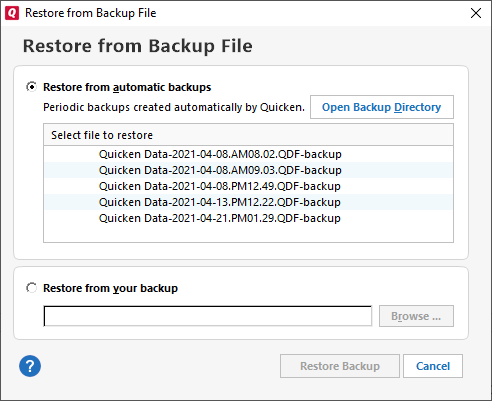
- Choose File menu > Backup and Restore > Restore from Backup File. The Restore from Backup File screen will appear.
- If you want to restore a backup file that Quicken created automatically for you, choose Restore from automatic backups, and then select one of the backup files listed.
- If you want to restore a backup file that you created yourself, choose Restore from your backup, and then click Browse to locate your backup.
- Select Restore Backup. This will overwrite your current file.
Hope this helps!
Quicken Alyssa
Make sure to sign up for the email digest to see a round up of your top posts.
0
Categories
- All Categories
- 42 Product Ideas
- 36 Announcements
- 225 Alerts, Online Banking & Known Product Issues
- 21 Product Alerts
- 497 Welcome to the Community!
- 677 Before you Buy
- 1.3K Product Ideas
- 54.4K Quicken Classic for Windows
- 16.5K Quicken Classic for Mac
- 1K Quicken Mobile
- 814 Quicken on the Web
- 115 Quicken LifeHub