Not new to quicken, but I am definitely not the expert many here are. I have looked for a similar error, but not found a good match.
The Ending balance showing in the account register and in the account list does not match the running balance shown in the account register (see pic).
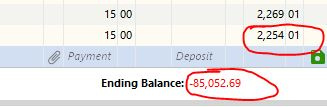
The running balance is correct. The correct account balance is showing on the Net Worth report. This is the only account that is incorrect. Some things to note that have happened recently in this specific account:
- there is a transfer from this account to RBC that changes whenever OSU is run, whether new transactions from RBC are downloaded or not (the change has happened four different times, always changing to the same incorrect amount and date). This morning, I deleted that transfer (it was reconciled at the time) and re-entered the transfer (making sure to mark it reconciled). That transaction is currently as it should be (correct amount and date). I really don't think this point matters but wanted to include it just in case.
- I reconciled this account this morning without issue. It had the correct starting balance at that time and reconciled perfectly.
- I do not download any transactions to this account, they are all entered manually (I only download data for my investment accounts)
After reconciling this morning (six other accounts at this institution were also reconciled without issue), I confirmed the balance in this account with a spreadsheet outside Quicken (just kept as a check) and closed Quicken. The issue was first spotted when I re-opened Quicken this afternoon. I puzzled as to what may have happened.
I did a Validate File. If I read correctly, no major issues were found (corrected a couple scheduled transactions and pointed that a stock split may be missing). I have not tried a Super Validate; not sure if I should, what it may do, etc.
My OS is Windows 10. I am currently running version R65.29, Build 27.1.65.29.
Thank you in advance for any and all replies and guidance.

