Classic Mac Business & Personal 8.4.1
I have three Amex accounts - late last year connection issues developed that were eventually sort out. Now they are back for me:
"Quicken cannot connect to this account."
Anyone else having issues?
Paul
Hello @Paul1,
Thanks for reaching out!
I checked internally, and your accounts are returning a CP_ACCOUNT_NOT_FOUND error, which usually means Quicken is no longer able to match the existing account connection properly on the backend. This often happens after an account has been deactivated or deleted and the restored via a backup restore.
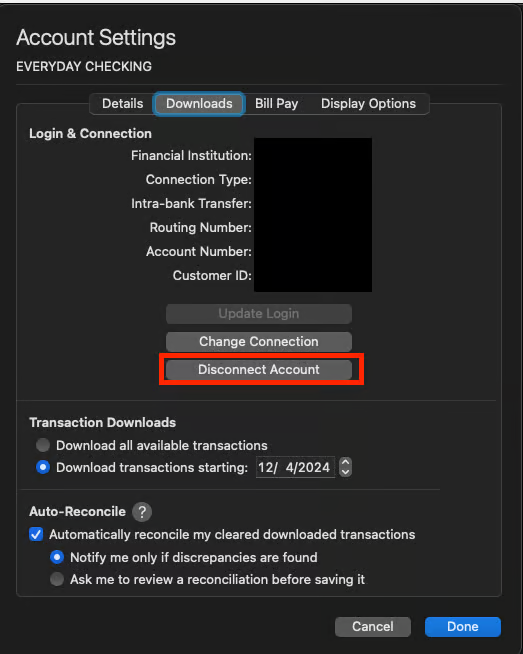
The fix is usually a clean deactivate/reactivate. You can find the instructions provided below in this support article as well.
Deactivate first:
Then reactivate:
This usually clears the CP_ACCOUNT_NOT_FOUND condition.
If it still fails after doing that, the next step would be to contact Quicken Support so they can review logs and escalate if needed.
Hope this helps!
Thanks - I don't recall changing anything on my end but that fixed my two Amex cards and they are reconnected.
However I also have an Amex savings account which had been connected and quicken now states that the account can't be found. Last connection was December.
@Paul1 Glad to hear the two Amex card accounts are working again!
For the Amex savings account, could you please share a screenshot of the exact error message you’re seeing when Quicken says the account can’t be found?
If needed, please refer to this Community FAQ for instructions on how to attach a screenshot. Alternatively, you can also drag and drop screenshots to your response if you are not given the option to add attachments.
Thank you!
When I go through the connection steps I select the account (in the web browser), everything seems like its going to connect then I get this message:
@Paul1 Thanks for following up and for providing the screenshot—it’s very helpful!
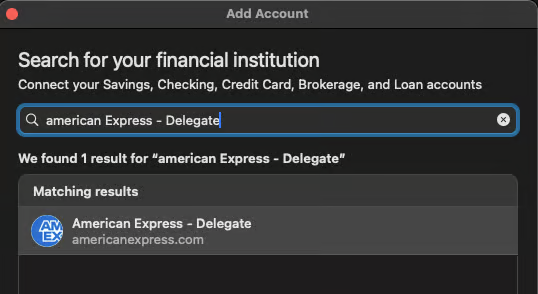
I did some digging and came across this older post where a user confirmed they were able to reconnect their Amex High Yield Savings accounts by using a different instance in the financial institution list. Instead of selecting the standard “American Express,” they chose “American Express – Delegate” when adding the account.
Could you try using that option and see if it allows you to add the savings account and connect successfully?
Thanks - that did connect but then I had to re-connect my two Amex credit card accounts as they got disconnected. It took a couple of tries but they are connecting again.
However the "Delegate" connection requires two factor authentication each time it connects. My other Amex accounts do not. Any solutions for that?
Thanks again.