Greyed-Out Page Scaling; A Workaround for Printing Proper Reports
Until…and if ever…Quicken Classic can fix the greyed-out page scaling print process (when trying to fit report data to 1-page wide), I discovered a workaround to offer.
After creating a Quicken report with all the options you need, the Print dialog box offers the option to Export to "tab-delimited (Excel compatible) disk file." Export as a "TXT" file and save it to whatever location you need.
Import the new TXT file into a blank Excel spreadsheet. Choose options "Delimited," with "Tab" delimiters, with a "General" column data format. Click "Finish" and "Import" into your Excel sheet. From there, you can resize columns or add any other formatting changes you choose in Excel. Save the Excel workbook.
In Excel, you can print the report without the scaling issues present in Quicken. It might not be the quickest process, but it has advantages if the Quicken scaling issue stops your work…like it did mine.
Comments
-
Hello @nkhuval,
Thank you for taking the time to share this workaround with the community—we really appreciate you detailing the steps so clearly. This is a great option for users who need properly formatted reports while the page scaling issue persists.
At this time, the underlying page scaling issue is still being actively worked on under the open ticket. While we don’t yet have an ETA for a permanent fix, feedback and workarounds like yours are very helpful for both users and our internal teams.
Thank you!
(CTP-15302)-Quicken Anja
Make sure to sign up for the email digest to see a round up of your top posts.0 -
Another workaround is to select "Quicken PDF printer on nul:" as the printer. This enables the scaling options and produces a PDF file that you can print using the Acrobat Reader.
QWin Premier subscription0 -
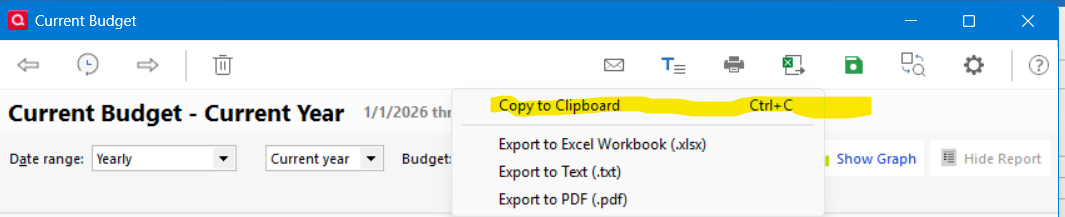
Rather than printing the report in that manner, I prefer to copy the report (Ctrl-C)
then switch to Excel and paste it in (Ctrl-V).
0
Categories
- All Categories
- 49 Product Ideas
- 35 Announcements
- 229 Alerts, Online Banking & Known Product Issues
- 21 Product Alerts
- 499 Welcome to the Community!
- 677 Before you Buy
- 1.3K Product Ideas
- 54.5K Quicken Classic for Windows
- 16.5K Quicken Classic for Mac
- 1K Quicken Mobile
- 817 Quicken on the Web
- 116 Quicken LifeHub