I received the errors when attempting to update both my US Bank and Navy Federal account information today.
Perhaps this Support Article will be of assistance to you: https://www.quicken.com/support/error-message-ol-220-ol-221-ol-222-ol-223-ol-224-ol-225-or-ol-226-when-using-online-services/
FYI: Financial Institutions do maintenance on weekends more than on any other day. This error often occurs when the FI is doing maintenance, sometimes due to a total connection block and other times due to restricting the level of access being made available. Often times doing Update Now after getting the error code will result in a good download. But if it does not, try again later. It is possible that the error will not go away until the next business day which in this case will be Tuesday because Monday is the MLK Day holiday and most FIs will not be open.
Still not working on January 20, 2026
Hello @TSD,
Thank you for letting us know you're encountering an issue. To help troubleshoot, please provide more information.
I look forward to your reply!
I'm getting the same error using US Bank account for about 4 days now.
@J.T. @Boatnmaniac @Bowhunter688 @Quicken Kristina
POST DISCLAIMER: Only seen this with USBank, not my other banking/investment institutions. If Navy Federal also having issues then possibly this is a "middle-man service" in between the bank and the customer causing the file corruptness.
This is a US BANK (or middleman service) issue, not QUICKEN as @Boatnmaniac has implied with his response. I have seen the same problem since 17 JAN at least for US BANK.
The QFX files are corrupted, with many duplicated tags and such. Found one "supposed to be unique tag" listed 32x. File size is way inflated. Normally 3-8KB, coming in 96-300KB now.
Normally by now USB tech folks have got it straightened out but not yet. Best thing is to NAG US BANK Customer Support. Unfortunately there are no "TECHNICAL" problem drop-downs so you have to talk to someone with ZERO software knowledge trying to convince them the problem is on USB side.
Posted a write-up under this topic with some of the file problems found ... https://community.quicken.com/discussion/7970287/quicken-will-not-reauthorize-usbank
Good Luck ... waiting patiently(?) for USB to figure it out!
LarryG
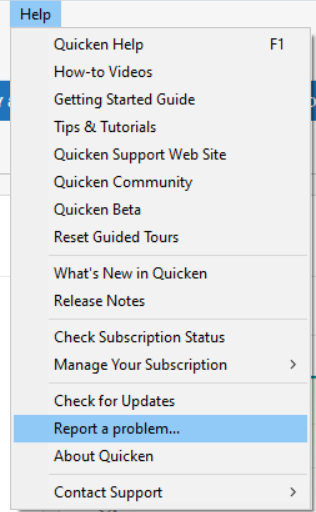
Thanks for the additional information. Have you submitted a report to Quicken along with the log files (Help > Report a Problem). That can be very helpful to the Quicken team in determining what the cause of the issue is and what they can or need to do to help resolve it…even if it is not a specific Quicken issue.
Also, just to clarify: I was not implying this is a Quicken issue. I simply posted the Support Article for the error code that was referenced in the OP. And I mentioned that getting that error code, especially on a weekend, might indicate a financial institution (USB) cause (i.e., blocking or restricting connections because they might possibly be doing some sort of system maintenance).
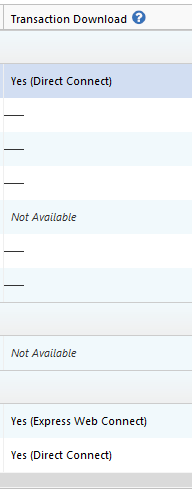
No one has said what connection method their account(s) are set up with but if they are set up with EWC+ then Quicken needs to be involved in the resolution of it because it might be something in their system or in the aggregator's system that could be causing or at least contributing to the issue. If this is a DC connection issue, then, yes, most likely it is a USB caused issue.
BTW, I have 5 USB bank accounts set up with EWC+ in one of my data files. I run OSU on that data file 1X just about every day, even on the weekend that this issue was first reported, and have experienced no error codes or issues with downloading. So it is interesting that if those reporting this issue are set up with EWC+ then why is it that only some people do but others do not?
Hey @Boatnmaniac, I have not had a problem [yet] with the accounts using EXPRESS WEB CONNECT+ (EWC+) … and ONE STEP UPDATE (OSU) is only processing those setup with EWC+, but it appears I no longer use DIRECT CONNECT (DC) for any account, however, I still use manual QFX file download and import with a couple three institutions. IMHO (and Mech/Software Engineer opinion), the QFX files are CORRUPT. A simple DIFF between a good one and a bad one shows all sorts of duplication and problems in the QFX file.
SUPPOSITION: I do not know if Quicken provides just a QFX file spec to institutions or a tool of some sort … BUT … if Quicken changed the spec on the QFX file format back when R65.29 B27.1.65.29 was released and the banking institutions are slowly picking that new format up; which would explain the sporadic reports by Quicken customers using all the different banking institutions; that would mean the QFX format and the release are not compatible, which would ultimately be Quicken's problem.
One thing is for sure … the QFX downloads are WAY INFLATED size-wise, with many duplicated tags.
To answer your first question … NO … I have not created a Quicken report, as I was waiting for USBank to fix their download, but if my supposition is correct, then possibly Quicken has a little more skin in the game! That and USBank downloads are still BLOATED as of today (21 JAN)!
I have been having this problem with Truist Bank since Jan 19. My last successful download was Jan 9. I have successfully downloaded from Chase.com on Jan 21.
Same here with Truist Bank. Unable to download since 1/19/26.
Also unable to use downloaded data from US Bank. So, I set up the one step connect. It downloaded about 45 days of data but I need several months. I can't find a way to fill the gap.
I also downloaded a csv file from US Bank. I haven't worked with this in awhile —
Q: Using the downloaded csv file — can I import that to a spreadsheet then cut and paste into a register to get my missing months of data?
Is the account a checking, savings or credit card account? If so, you should be able to manually download and save the data in the Quicken (.QFX) file. Just click on the CSV option to see the drop-down for the other download file options.
Importing a CSV file into Quicken can work but you will need to make some adjustments to the file in order for the import to work properly. It's much better to import QFX files, instead because they are formatted corrected when they are downloaded so the import process should work quite smoothly.
I am still not able to download transactions from the US Bank website. I am downloading a QFX file and attempting to open in Quicken Classic on my desktop and still receiving the error "Quicken is unable to complete your request.[OL-221-A} [OL-221-B]"
This is for checking accounts, savings accounts and credit card accounts.
My last successful download was 1/10/2026.
Unfortunately, I don't have any new transactions on my Navy Federal accounts to see whether it's working or not.
Note: I'm another U.S. Bank customer who is having this same issue - same error messages and it started around the same time as the others. My Wells Fargo QFX file imports are working fine.
I also agree that the file looks considerably larger than it did previously.
Unfortunately, it seems it is not very convenient to communicate with U.S. Bank about a technical issue. Sigh.
Hello All,
If you are encountering this issue with US Bank, it is a known issue which our teams are working to resolve. To contribute to the investigation, please navigate to Help>Report a Problem and send a problem report with log files attached. Please include CTP-16089 in the description of the issue.
While you will not receive a response through this submission, these reports will help our teams in further investigating the issue. The more problem reports we receive, the better.
We apologize for any inconvenience!
Thank you.
(CTP-16089)
I also have not been able to download transactions from the US Bank website. I am downloading a QFX file and attempting to open in Quicken Classic on my laptop and still receiving the error "Quicken is unable to complete your request.[OL-221-A} [OL-221-B]"
Hello @gkantak,
Thank you for letting us know you're also seeing this issue and for sending logs to help our teams investigate the issue.
To clarify, when you say you have not been able to download transaction from the US Bank website, do you mean you're having trouble on their website directly, or do you mean that you're able to download the file, but get the error when importing into Quicken?
Thank you!