Sales Tax liability account- Adjust opening balance? (Q Mac)
Hi, new Quicken user here, switched from MoneyDance to Business & Personal at the new year, because I wanted to streamline my small business accounting. I have entered a couple of unpaid invoices from last year, and noticed it created a sales tax liability account. Awesome! Now I just completed my local tax return, and made a payment. The problem is, my payment was for a bunch of taxes and invoices that are not entered, and can't be entered because for example my business checking account transactions only imported back to October, but I have paid, taxable invoices that occurred before then.
What I need is the ability to adjust the sales tax liability account, or the balance will simply never be correct. I understand I can run a date-limited report to get the info for my future returns, but it's super annoying having an incorrect balance showing.
I am unable to add any kind of transaction other than a sales tax payment, which must be linked to an account.
I am unable to edit any of the existing transactions, because they are from invoices.
I am unable to create a ghost invoice to create the earlier tax liability, because that will affect my income.
Any other ideas for workarounds?
Best Answers
-
Now I just completed my local tax return, and made a payment.
The transaction you used to make this tax payment, does it contain a Split category/transfer of the amount of Sales Tax recorded for those invoices you entered?
Done correctly, I would assume that it reduces the Sales Tax account balance to 0.00 as of 12/31/25 (assuming that you recorded the payment transaction as of 12/31/25)-1 -
@UKR That's not the way Quicken Mac Business & Personal handles sales taxes and payments.
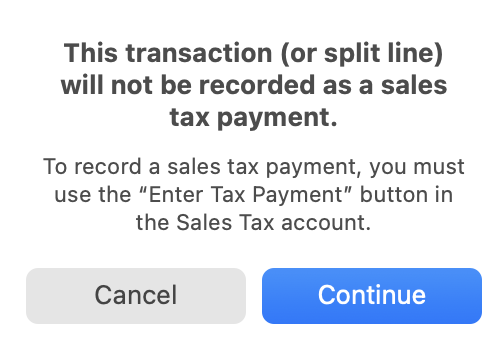
The Sales Tax liability accounts in Quicken Mac aren't regular accounts. You can't enter a transfer transaction to increase or decrease the sales tax liability. And sales tax payments are also not quite regular transactions, even though they show up in an account register with the category of "Sales Tax Payment". That's a special category which doesn't show up in any menu of categories, and if you try to manually enter a transaction and manually type "Sales Tax Payment" in the category field, Quicken is wise to that attempted end run and blocks you:
@bellasarah In order to properly use Quicken's sales tax liability account going forward, I think you need to make your sales tax payment in Quicken be only for the amount of sales tax from the invoices you entered in Quicken, not the full amount you actually paid. Then your liability will be properly zeroed out and accurate going forward. But because you paid more in sales taxes for your pre-Quicken business operations, then enter a manual transaction for the additional amount you paid to the tax authority. You will need to create a business category to use for this transaction — something like "Sales Tax Payment (pre-Quicken)" — which you'll never use again! So this manual transaction plus the regular Quicken sales tax payment transaction will sum to the amount you actually just paid. Going forward, it will all be automated with your invoices generating the tax liability and your tax payments zeroing out the liability account.
Quicken Mac Subscription • Quicken user since 19931
Answers
-
Now I just completed my local tax return, and made a payment.
The transaction you used to make this tax payment, does it contain a Split category/transfer of the amount of Sales Tax recorded for those invoices you entered?
Done correctly, I would assume that it reduces the Sales Tax account balance to 0.00 as of 12/31/25 (assuming that you recorded the payment transaction as of 12/31/25)-1 -
@UKR That's not the way Quicken Mac Business & Personal handles sales taxes and payments.
The Sales Tax liability accounts in Quicken Mac aren't regular accounts. You can't enter a transfer transaction to increase or decrease the sales tax liability. And sales tax payments are also not quite regular transactions, even though they show up in an account register with the category of "Sales Tax Payment". That's a special category which doesn't show up in any menu of categories, and if you try to manually enter a transaction and manually type "Sales Tax Payment" in the category field, Quicken is wise to that attempted end run and blocks you:
@bellasarah In order to properly use Quicken's sales tax liability account going forward, I think you need to make your sales tax payment in Quicken be only for the amount of sales tax from the invoices you entered in Quicken, not the full amount you actually paid. Then your liability will be properly zeroed out and accurate going forward. But because you paid more in sales taxes for your pre-Quicken business operations, then enter a manual transaction for the additional amount you paid to the tax authority. You will need to create a business category to use for this transaction — something like "Sales Tax Payment (pre-Quicken)" — which you'll never use again! So this manual transaction plus the regular Quicken sales tax payment transaction will sum to the amount you actually just paid. Going forward, it will all be automated with your invoices generating the tax liability and your tax payments zeroing out the liability account.
Quicken Mac Subscription • Quicken user since 19931 -
THANKS! Splitting the transaction was the way to go. I just categorized the rest as "local taxes" under business expenses. I didn't record it as 12/31 because we pay our sales taxes the month after the end of the year/quarter. I think that makes it Federally deductible in 2026, not 2025, but I'll look at that when the time comes.
0 -
Thanks, @jacobs for setting the record straight. Q Mac does things differently from Q Windows.
I wish Q Windows would "learn" about all the new and different things in Q Mac business invoicing, etc.BTW, there's some information about Sales Tax accounts in Q Mac here:
Understanding sales tax accounts (quicken.com)
@bellasarah , I'm glad that between my bumbling and @jacobs expert help you were able to figure things out. 😉
Please do not hesitate to ask if you have additional questions.0
Categories
- All Categories
- 49 Product Ideas
- 35 Announcements
- 219 Alerts, Online Banking & Known Product Issues
- 18 Product Alerts
- 504 Welcome to the Community!
- 673 Before you Buy
- 1.4K Product Ideas
- 54.8K Quicken Classic for Windows
- 16.6K Quicken Classic for Mac
- 1K Quicken Mobile
- 824 Quicken on the Web
- 120 Quicken LifeHub