ALERT: Quicken Classic for Windows fails to install under latest Windows 11

rloeb
rloeb Quicken Windows Subscription Member

Problem is that the install contains an unsigned printer driver, which Win11 no longer allows. There's a workaround, but it involves rebooting into safe mode, disabling the driver signing requirement, then installing. (The latest Windows bug makes this especially complicated because it doesn't allow shutdown or restart…)


Comments

  • Quicken Kristina
    Quicken Kristina Quicken Windows Subscription Moderator mod

    Hello @rloeb,

    Thank you for letting us know you're seeing this. To better assist, please provide more information:

    • Which version of Windows is this happening in? You can see this by navigating to Settings>System>About.
      • I tested on my own computer, running Windows 11 Home version 25H2, and could not replicate the issue you describe.
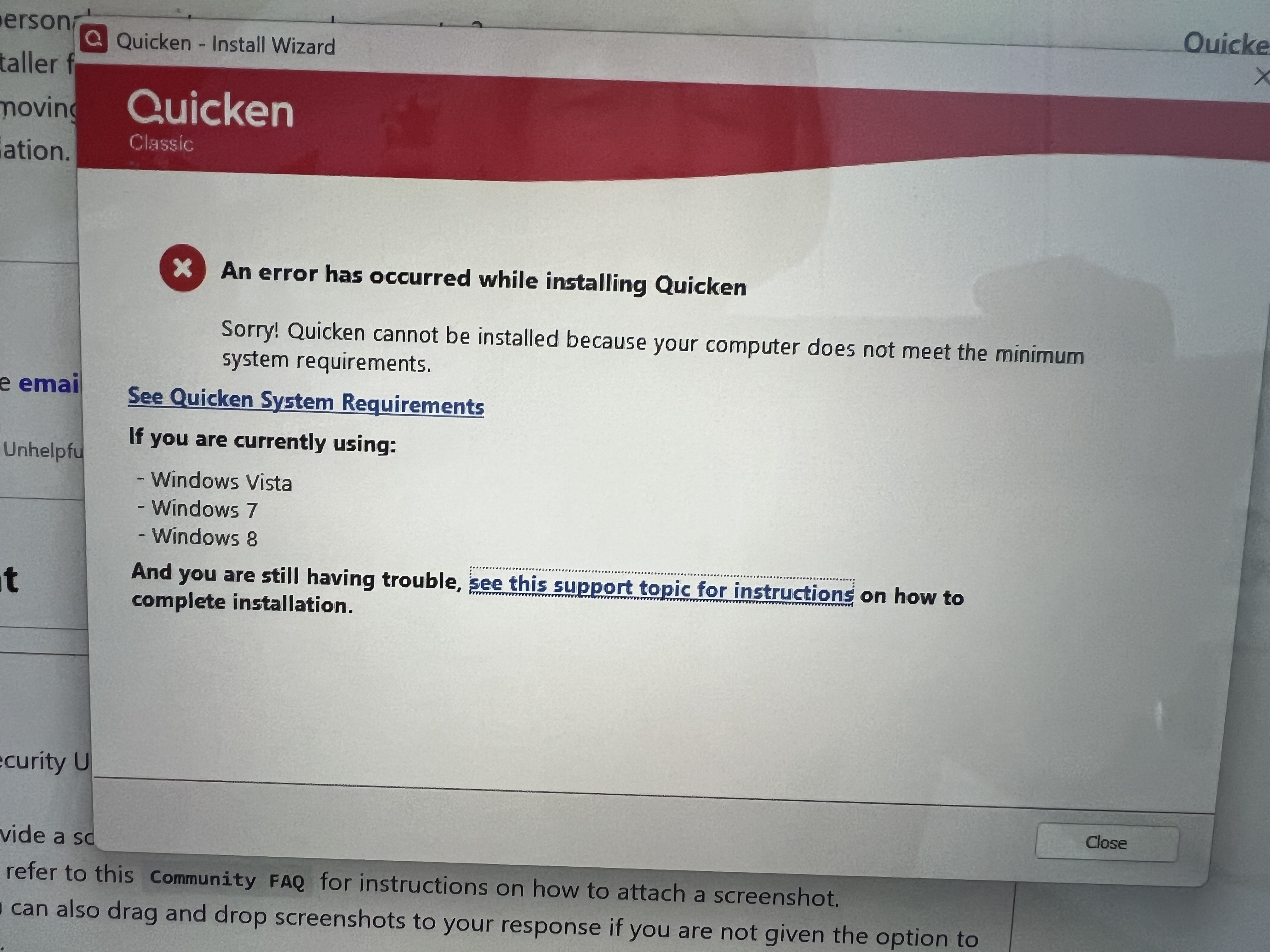
    • Are you able to provide a screenshot of the error message you saw when trying to install Quicken?
      • If needed, please refer to this Community FAQ for instructions on how to attach a screenshot. Alternatively, you can also drag and drop screenshots to your response if you are not given the option to add attachments.
    • Are you installing the program directly on your local hard drive?
    • Are you installing the program in a virtual machine?
    • Is this happening on a personal computer or a work computer?
    • Are you running the installer from your downloads folder?
      • If you are, please try moving the installer to your desktop. Sometimes permissions in the downloads folder prevent proper installation.

    I look forward to your reply!

    Quicken Kristina

    Make sure to sign up for the email digest to see a round up of your top posts.

  • Grammy605
    Grammy605 Quicken Windows Other Member ✭✭

    • I'm running 2026 Security Uodate (KB5074109) (26200.7623)
    • Are you able to provide a screenshot of the error message you saw when trying to install Quicken?
      • If needed, please refer to this Community FAQ for instructions on how to attach a screenshot. Alternatively, you can also drag and drop screenshots to your response if you are not given the option to add attachments. IMG_4882.JPG
    • Are you installing the program directly on your local hard drive? From my desktop
    • Are you installing the program in a virtual machine? No
    • Is this happening on a personal computer or a work computer? personal
    • Are you running the installer from your downloads folder?
      • If you are, please try moving the installer to your desktop. Sometimes permissions in the downloads folder prevent proper installation. see above answer

    Any help woud be appreciated

  • RalphC
    RalphC Quicken Windows Subscription Member ✭✭✭✭

    I would try updating your printer driver, reboot your computer, and then try installing Quicken.

  • BK
    BK Quicken Windows Subscription Member ✭✭✭✭

    @Grammy605 , Microsoft issued a warning about KB5074109, suggesting users experiencing issues to uninstall it. And presumably yesterday's KB5078127 resolves some of them but not all. I don't think that is your problem but just FYI.

    - Q Win Deluxe user since 2010, US Subscription
    - I don't use Cloud Sync, Mobile & Web, Bill Pay