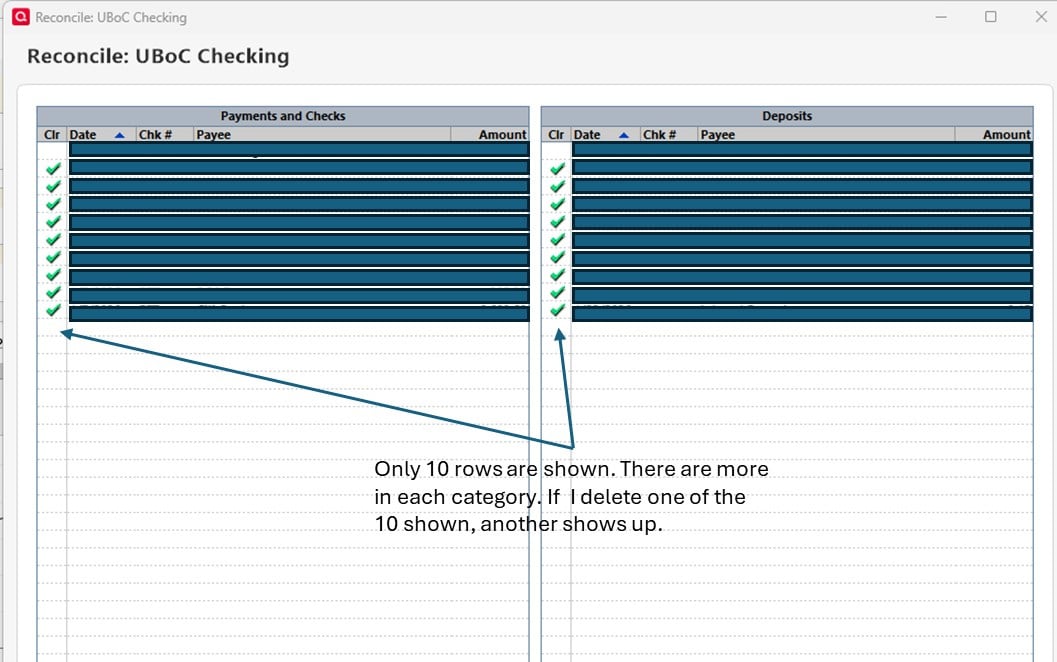
Both the "Payments and Checks" and "Deposits" list only show a maximum of 10 items. We're reconciling our statement, and both sections have more than 10 items, but adding any transactions beyond 10 don't show up. Do better.
Are you saying that there isn't a vertical scroll bar at the right edge of each of the two columns? What screen resolution and text scaling %size are you using? Are you using View / Use large Fonts?
Can you please capture one or more images of the parts of your Quicken reconciliation window showing the issue, sensitive information blacked out as necessary to protect your privacy and attach the image(s) here?How do I post a screenshot in the community from a mac
How do I post a screenshot in the community from windows
Please save images to files of file type PNG or JPG only. They're easier to work with than PDF files.
The issue isn't that there is no vertical scroll bar, it just will only show 10 items max. I can minimize the window and the scroll bar does show up, but still lists only 10 items in each category. Display resolution: 3440 x 1440. Scale: 100%. Text size 100% - changing it had no effect.
Thanks for the image. If you haven't rebooted Windows since the installation of the latest Quicken update, please do that first and try Quicken again.
Font size problems? Display issues? (Windows) Please try the following procedure: - Close Quicken !!! (This process won't work while Quicken is running!) - Check the Compatibility tab settings in your Quicken Desktop program icon: - In the Windows Start Menu right-click the Quicken icon. Select "Open File Location". This brings up a Windows File Explorer window. Right-click the highlighted Quicken shortcut line item. or - Go to the traditional Windows Desktop and right-click the Quicken program icon. or - Use Windows File Explorer, navigate to C:\Program Files (x86)\Quicken\ and right-click qw.exe - Now click Properties. - Select the Compatibility tab. - Uncheck all settings. - Windows 7, 8.1: Check "Disable display scaling on high DPI settings". - Windows 10, 11: Click "Change high DPI settings".- Check "Override high DPI scaling behavior. Scaling performed by:" and select "Application" (also try the other available options repeating the entire procedure!). Click OK. Users with high resolution monitors, 3840x2160 with 225% scaling, try "System (Enhanced)" - Be sure to uncheck the "Run this program in compatibility mode for [older Windows version]" setting. - Click the "Change settings for all users" button. - Click Apply and exit. - Reboot Windows. - Now start Quicken and see if that makes a difference.
Some additional tuning suggestions: - Ensure that you have the latest available display, monitor or graphics device drivers for Windows installed. The version that comes with the Windows installation material may not be up to date. - System requirements: 1024x768 or higher screen resolution, 1280x1024 minimum for Large Fonts settings - Unless absolutely required, try not to use "View / Use large fonts" - Try setting the bank account registers to use a different font style or size: go to Edit / Preferences / Register, click the Fonts button and try different fonts. - Try adjusting the bank account registers' row height: go to Edit / Preferences / Register, choose among the available Row Height choices: Compact, Comfortable or Standard - If all else fails, try changing Windows Control Panel / Display options for "Make text and other items … smaller or larger" to use a different scaling level, but try not to exceed 125% - Try using the Windows Magnifier. Press the Windows logo key and the = key to open Magnifier. Customize Magnifier to increment Zoom in 25% intervals. Also try "dark mode" by using inverted colors.
Rebooted. Tried everything you said. Nothing fixed it. However, I have figured out the behavior. I was wrong, it doesn't max out at 10 entries - that was just a coincidence. It won't list any entries for Jan 19th 2026 or later. If I change the dates on the entries to Jan 18th, everything works fine. I don't know if it's a fixed date problem, or it's only showing entries 6 days old or more. I'll be able to test that tomorrow I guess.
What version, edition level (Starter, Deluxe, etc.) and release (R xx.xx) of Quicken are you using? US, Canadian or other country version? Is your subscription expired or still active? Click Help / About Quicken (Mac: Quicken / About Quicken) for this information.
When you started Reconcile, what Statement End Date did you use? Paper Statement Date ending, e.g., 12/31/25? Online Balance as of ??/??/??
Does your bank post transactions with a transaction date of today, but a Post date of tomorrow? This means, there's a hold on the transaction and the money can only be used tomorrow or later. To see if that's what's causing your issues, add the Downloaded Posting Date to the register (temporarily). Only manually entered transactions with a transaction date within the statement period and cleared transactions with a Posting Date within the statement period are considered for reconciliation.