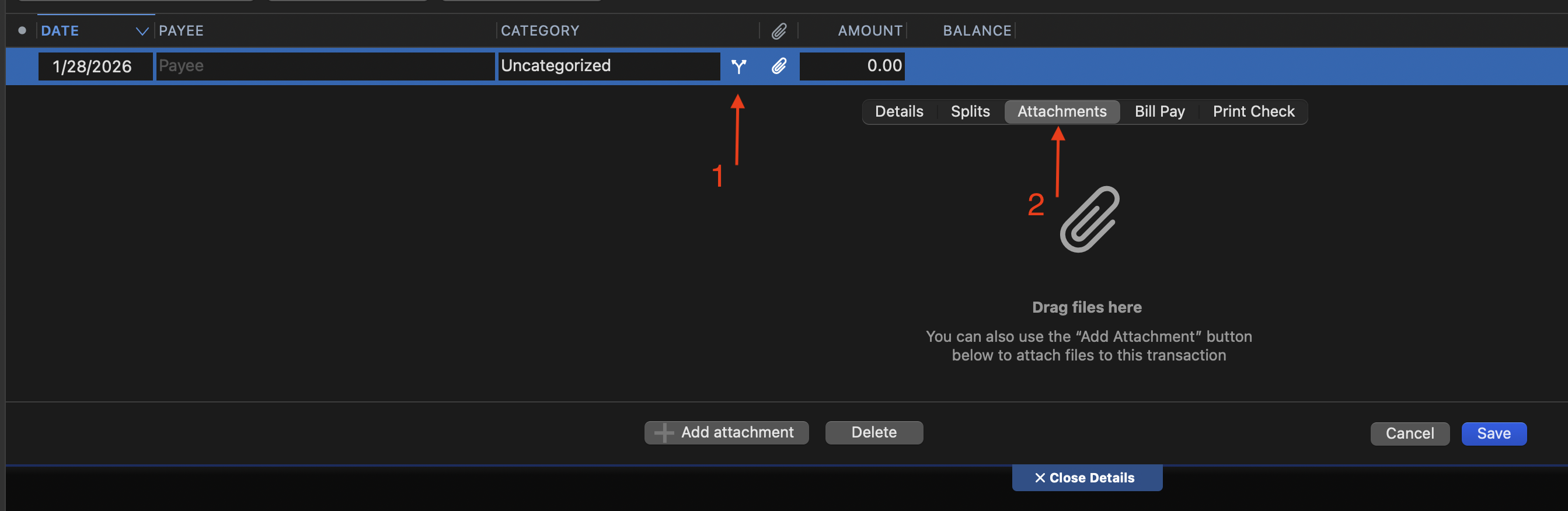
when entering an expense transaction you should be able to add a receipt at that time, not have to go back and edit to add
You can already do this - click on the Split symbol when entering your transaction and you'll get access to the Attachments tab where you can add a receipt without having to edit the transaction afterwards.
As @Jon said, you can already do this. But there are a couple other (and possibly simpler) ways you can add an attachment as you're entering a transaction.
(1) As you're entering a transaction, click the Edit Details blue tab under the transaction:
This opens a Details sub-screen, where you can click the Attachments tab to add your attachment:
(2) Easier still, click the Attachments (paper clip) icon, and you can select the attachment with no further clicks:
(This requires that you have the Attachments column visible in your register, but you probably want that if you're doing attachments anyway.)
(3) Alternatively, you can do it with no clicks if you select Transactions > Add Attachment from the menu. Or fastest, click the keyboard shortcut for this command: Command-Shift-H.
Edit Details basically does the same thing as the Split button, they just default to different tabs. Neither one goes straight to Attachments so one isn't really easier than the other in that respect.
I forgot about the attachment button since I don't have that column enabled, but someone who regularly uses attachments should turn it on in their registers for the convenience.
ok let me clarify my issue….when you enter a transaction that is scheduled in "Bill and Income Reminders" there is no option to add attachments. You have to enter the reminder and then go back to it to add.
Scheduled transaction reminders aren't real transactions. You have to mark them as paid to turn them into a real transaction before you can add attachments, before that you just get an error even if you try to do it through the register:
Any attachments you made to a scheduled transaction would be attached to the entire series of transactions, not to a specific transaction. That might be useful for something like an insurance policy where you would have policy documents that would not be specific to any single premium payment. But what would happen when the series of transactions ended and there was no longer an entry in the Bills & Income tab; how would you get to those attachments then? It's an interesting idea, but I'm not sure there's a easy way to implement it.