Cost Basis Missing

denmarfl
denmarfl Quicken Windows Subscription Member ✭✭✭✭

Recently one of my Stocks did some sort of conversion….the Stock left the dow and went over to the NYSC….doing so, it also went from 82 shares to 41 shares…the over all Value…Market value did no change much as the price per share went up.

Here's my issue, quicken or the way Vanguard pushed down this change did not handle it correctly as now I have the NYSC Investment showing the correct Share price….but it NO Longer shows its Cost basis….Cost Basis is shown as 0.00…and of course a GAIN\LOSS as the same dollar amt as the Conversion Date when it took place.

Is there away to insert the Cost basis? The Cost basis would be displayed in Holdings the day before the conversion took place…or at least it be be close…

If this is doable, detailed steps to follow would be greatly appreciated

Answers

  • Jim_Harman
    Jim_Harman Quicken Windows Subscription SuperUser ✭✭✭✭✭

    This should be recorded in Quicken as a Stock Split with 41 new shares and 82 old shares. You should delete any other transactions that were downloaded in conjunction with the split - perhaps a Removed and Added.

    QWin Premier subscription
  • denmarfl
    denmarfl Quicken Windows Subscription Member ✭✭✭✭

    The Register does show a ADDED and a REMOVED…however, as the Attachment shows when the 2 Downloads were accepted it went into HOLDINGS showing with 2 entries/same Investment…One is ADR the other is PLC. The ADR shows the correct investment information…but does Not show its costs basis…which I would like to know if there is away to add Cost basis?

    The PLC entry…hopefully can be deleted as it serves no Value…is that possible….

  • Jim_Harman
    Jim_Harman Quicken Windows Subscription SuperUser ✭✭✭✭✭
    edited February 3

    Sorry, the conversion of AstraZenica shares is more complex that I had assumed. It changed from ADR shares to direct shares trading on the NYSE. The new ticker is AZN and it probably has a new CUSIP number. I'm not sure what the ticker was before the conversion.

    Did you have more than one tax lot of this security? You can tell by clicking on the + sign in the Holdings view. That will affect the easiest way to enter this conversion in Quicken.

    QWin Premier subscription
  • denmarfl
    denmarfl Quicken Windows Subscription Member ✭✭✭✭

    One (1) Lot…..one purchase.

  • Jim_Harman
    Jim_Harman Quicken Windows Subscription SuperUser ✭✭✭✭✭

    OK, then you can Remove the old shares and Add the new ones. In the Added transaction, you can enter the total cost basis and the original date acquired. There should not be a Stock split.

    The old ticker was ADS and the CUSIP was 04653108

    The new ticker is AZN and the new CUSIP is different. Hopefully this was set when the Added transaction was downloaded. The new security should have a different name than the old one.

    To get quotes, make sure the ticker for the new shares is correct.

    QWin Premier subscription
  • q_lurker
    q_lurker Quicken Windows Subscription SuperUser ✭✭✭✭✭

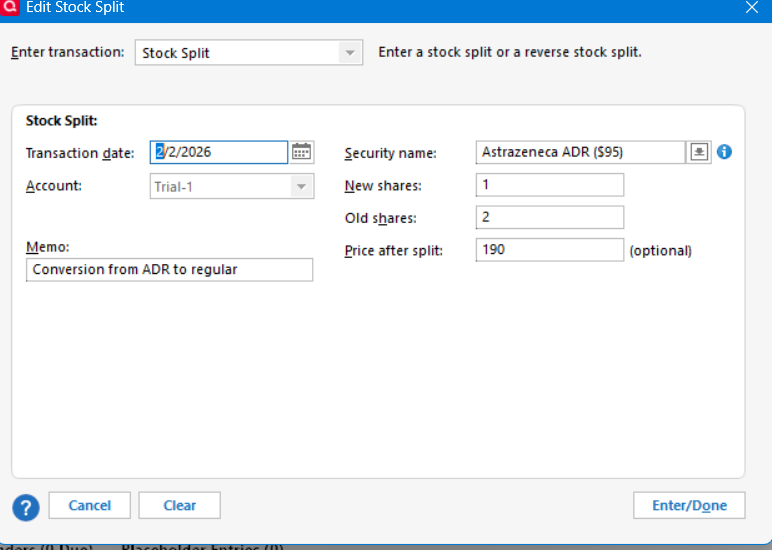
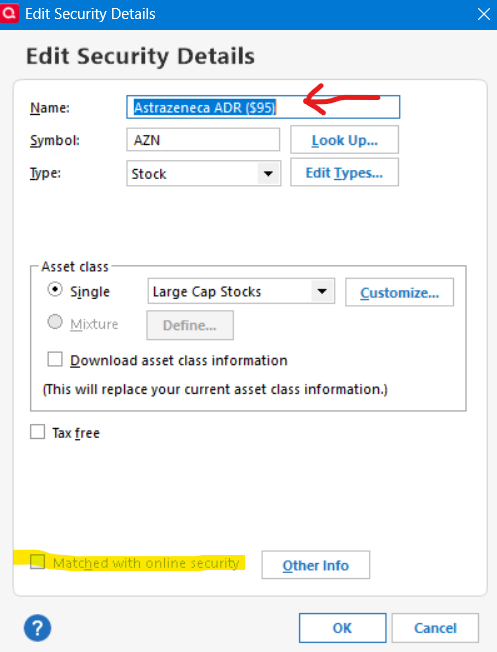
    Strictly speaking, this is not a stock split, as Jim identified, though you may want to treat it that way. Going the stock split route, you would also want to change the ticker (ASTR to AZN), change the name (dropping the ADR suffix), and uncheck the “Matched with online security” box so the the Quicken security can get matched to the new CUSIP. Treating it as a stock split would let Quicken compute and report performance measures in a way that would seem more intuitive.

    The REMOVE & ADD process is more strictly correct.

  • irasend1
    irasend1 Quicken Windows Subscription Member, Windows Beta Beta

    I did this as well and did it as a 1:2 stock split which made the most amount of sense for me. Agree that the REMOVE and ADD are the correct way, but it makes tracking performance rather difficult.

  • denmarfl
    denmarfl Quicken Windows Subscription Member ✭✭✭✭

    I wish I was at the level of the expertise as you guys are when it comes to steps to follow to Manually fixing issues for this Quicken Investment. I kinda understanding what both have written…its the doing the right steps to get it done, and get it done correctly.

    I just don't have the confidence with what has been written that I understand how to proceed to do all the right steps\perform all the right steps to get the right Fix in place…. I have never had to performed any manual activity in my Quicken Investment Registers…. to educate myself in this area. I would need detailed steps to follow and I realize that may be asking too much for someone(s) willing to help…as it would be time consuming to type those steps out…..Thanks

  • denmarfl
    denmarfl Quicken Windows Subscription Member ✭✭✭✭

    Quicken Holdings is now showing ARZ (Astrazeneca) Mis-match shares for the PLC….showing Quicken shows 83.66 shares…reported hares "0". That is an easy fix by using Update Share Balance to "0". Is there an easy fix to add/adjust replace…the ADR (which the share price is updating)…to get the Costs basis shown?

  • Jim_Harman
    Jim_Harman Quicken Windows Subscription SuperUser ✭✭✭✭✭

    @denmarfl You can contact Quicken Support by phone here: https://www.quicken.com/support/quicken-support-options/

    They can share your screen and hopefully they should be able to walk you through the steps required. Be sure to refer them to this discussion so that they do not lead you down the wrong path.

    QWin Premier subscription
  • denmarfl
    denmarfl Quicken Windows Subscription Member ✭✭✭✭
    edited February 5

    Jim; thanks…all due respect….I have had very disappointing experiences with Quicken support…this Community is where I have always received the right answers. I appreciate and respect your advices…but Quicken support agents are not software trained…they are trained to listen to key words describing an issue..and using a data base to maybe get answers…. All I need is the way to enter the Cost basis of ARZ which I know the date and amt, this was a One-time Purchase….going back 2 weeks ago in Holdings…..

    Your operative words "they do not lead you down the wrong path"…that has kept me from reaching out to support…and getting my issues resolved here in this Forum….

    Thanks

  • q_lurker
    q_lurker Quicken Windows Subscription SuperUser ✭✭✭✭✭

    @denmarfl Let's step back a moment. Astrazeneca chose to restructure the way US investors would own an interest in their company. They went away from a structure using American Depository Receipts (ADRs or sometime ADSs) to one where their shares traded directly. In doing so, it took 2 ADR shares to convert to 1 direct company shares.

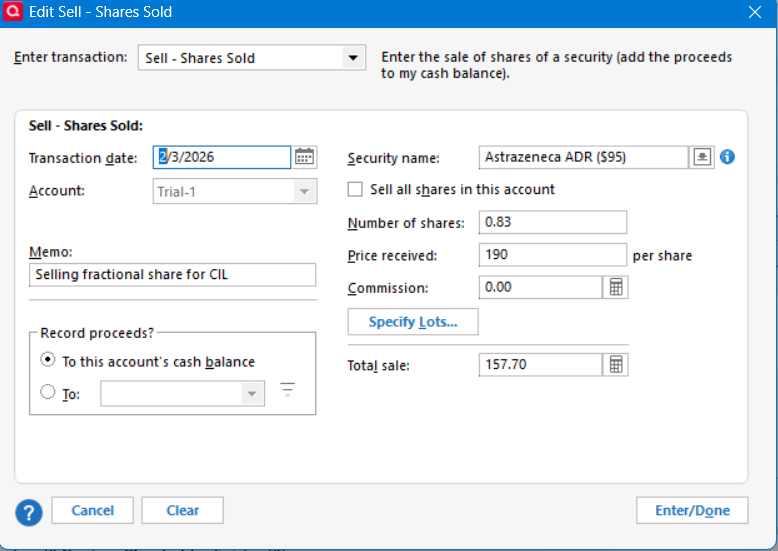
    You had (apparently) 83.66 ADR shares valued perhaps in the $95/share range. By the conversion, you were due 41.83 shares of the actual company. But they are not going to issue fractional shares (the 0.83), so they give you 41 shares (at about $190/shares) plus some cash-in-lieu of the 0.83 fractional share.

    What happened in the real world is that your 83.66 shares of one security went away and 41 shares of a different company appeared along with some cash that may yet be coming to you.

    An accompanying question is how you got the extra 0.66 fractional shares to begin with. Dividend reinvestment plans maybe? That can complicate Quicken recordkeeping. I know you said one purchase but I am doubtful.

    Also, I can't explain the two security names on your prior screen snip. They don't make sense to me, so you need to become clear on what's what. In that same vein, what I am seeing is that the ticker AZN has been used for the older ADR security and is in use now for the newer security.

    In Quicken, you have options — basically 2 options though there can be variations.

    OPTION 1 - Its a 1 for 2 stock split. Note for this example I am starting with a security named "Astrazaneca ADR ($95)" meaning it is the security you have owned priced in that $95 range prior to this event.

    image.png

    You would then follow that up with a sale of the fraction share for the cash-in-lieu amount received.

    image.png

    That brings your holding to 41 shares. From there you would likely want to edit the security name to the newer name and undo the Matched with online security box that a a match to the new CUSIP can be made.

    image.png

    Note that renaming will change the name in all historical transactions. I can't demonstrate unchecking the Matched box since my example is not already matched.

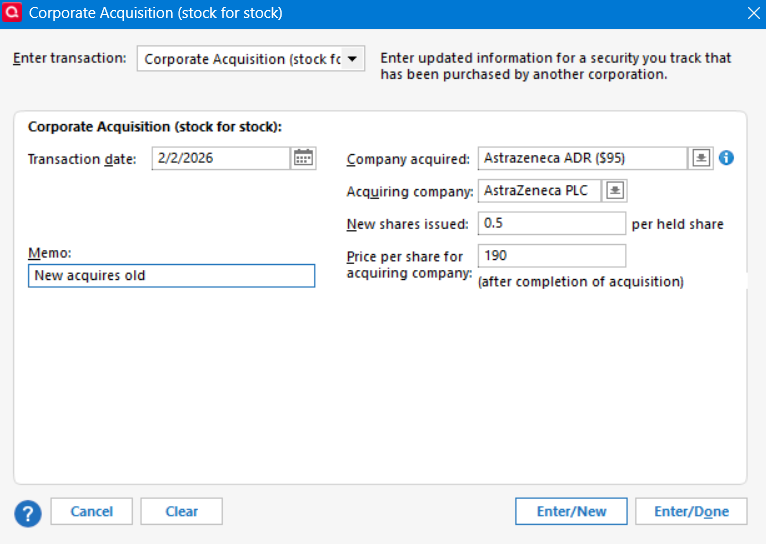
    OPTION 2 - Its a Corporate Acquisition

    This approach recognizes that the before and after securities are in fact different securities. Both securities exist in your current file in some fashion because you have downloaded from the brokerage. You would then use the Corporate Acquisition tool to have the new acquire the old.

    image.png

    This generates the Remove and Add that Jim started suggesting earlier. But if there are a series of other acquisitions, they would be reflected with more than one Add transaction generated.

    As with option 1, you would follow that up with the sale of the fractional share for cash-in-lieu.