Multiple Chase accounts recently quit working

jspoon
jspoon Quicken Windows Subscription Member

(this has been discussed at least since 2022, and has not been resolved for some). Wife and I have 8 accounts with chase. Wife has 3 and I have 5. We each have a separate account/login. We have been using this setup for years. Two days ago ALL the chase accounts had the red circle with the line through it indicating they were not linked anymore.

I did the option to relink my Chase accounts. Once they were linked, quicken warned me about each of my wife accounts indicating they were not found and I may want to unlink them. It then proceeded to unlink them on its own. At this point the sync started working for my accounts. There were no errors presented.

I then started to relink my wife's account. Once I logged into Chase and relinked her accounts, it returned to Quicken and started the update at which time it gave me the warning that my 5 accounts were not found and I may want to unlink then. Again, it then proceeded to unlink them on it own. At this point the sync of my wife's accounts worked with no errors.

However after my wife's sync was over, my 5 chase accounts had the red circle with the line through it indicating they were not linked anymore.

This would go back and forth, so that Quicken would only allow one Chase account to be linked.

As I said, if you search for "Multiple Chase accounts" you can see people have been having this same issue for years. Mine worked great until 2 days ago…

I am running subscription on windows.

Comments

  • jspoon
    jspoon Quicken Windows Subscription Member
    edited February 5

    Oh, I did read that Direct Connect would work for people seeing this issue, but that has been removed.
    When I called support and did not like the response, I asked about escalating the problem and was told there is only one level of support and would not escalate.

  • jspoon
    jspoon Quicken Windows Subscription Member

    I saw a lot of people with this problem, is no one with multiple chase acounts having this problem?

  • Quicken Kristina
    Quicken Kristina Quicken Windows Subscription Moderator mod

    Hello @jspoon,

    Thank you for reaching out. I'm sorry to hear Support wasn't helpful in resolving the issue.

    To help troubleshoot, please provide additional information:

    1. Are you and your wife authorized users on each other's accounts?
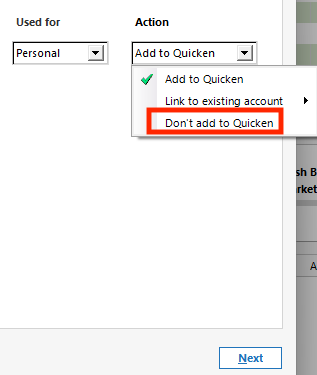
      1. If you are, when you are linking accounts, are you selecting "Do not add to Quicken" for any of your wife's accounts visible under your login and vice versa? Don't add to Quicken Dropdown.png
    2. Do you have your Chase accounts connected in more than one Quicken file?
    3. Was there anything that changed around the same time as this problem started, such as a computer or program update or crash?

    I look forward to your reply!

    Quicken Kristina

    Make sure to sign up for the email digest to see a round up of your top posts.

  • augiboy
    augiboy Quicken Mac Subscription Member ✭✭✭
    edited February 10

    Yes, there is a definite new problem with Chase. I have 6 Chase accounts and none of them will connect.

  • Quicken Kristina
    Quicken Kristina Quicken Windows Subscription Moderator mod

    Hello @augiboy,

    Thank you for joining the discussion. To clarify, are you in the same situation (2 separate groups of accounts with Chase, which have separate login credentials, and authorizing one causes the other to lose connection in Quicken)?

    I look forward to your response!

    Quicken Kristina

    Make sure to sign up for the email digest to see a round up of your top posts.

  • augiboy
    augiboy Quicken Mac Subscription Member ✭✭✭
    edited February 10

    Sorry, I am on Mac with the Chase problem. I posted over there.

  • Robert Chiarulli
    Robert Chiarulli Member ✭✭✭

    I had same issue. I reauthorized and relinked accounts.

  • jspoon
    jspoon Quicken Windows Subscription Member
    edited February 11

    To me it appears that Quicken thinks that all Chase accounts must be associated with one login. I created a new file and then attempted to add our accounts with 2 logins. When I attempted to link my wifes accounts, when I logged into Chase it stated all her accounts were already linked. When I attempted to link my accounts, it said they were already linked. So all 8 of our accounts are linked from a Chase perspective.

    It behaves like Quicken can not handle logging into Chase two times to get both logins. When I sync it finds my accounts and even warns about my wife's "deleted" accounts and disconnects them. This definitely appears to be a bug in how Quicken is handling more than one login to Chase.

  • jspoon
    jspoon Quicken Windows Subscription Member

    sorry, not sure how to reply to a specific post…. Asking Robert Chiarulli a question…

    Did your Chase accounts have more than one login? That is the core issue. Are you saying you got your Chase accounts working?

  • jspoon
    jspoon Quicken Windows Subscription Member

    Quicken needs to organize their sync software by login so in my case they would call Chase twice, once for each login. Right now they are call Chase once and the software thinks the other accounts are closed because they were not in the list returned by Chase.