Unable to link new Fidelity Investment accounts to existing accounts in Quicken
I run Quicken Premier v R65.29 on Windows 11 Pro.
Recently opened 2 new Fidelity cash mgmt accounts that I would like to link to 2 existing checking accounts in my Quicken file.
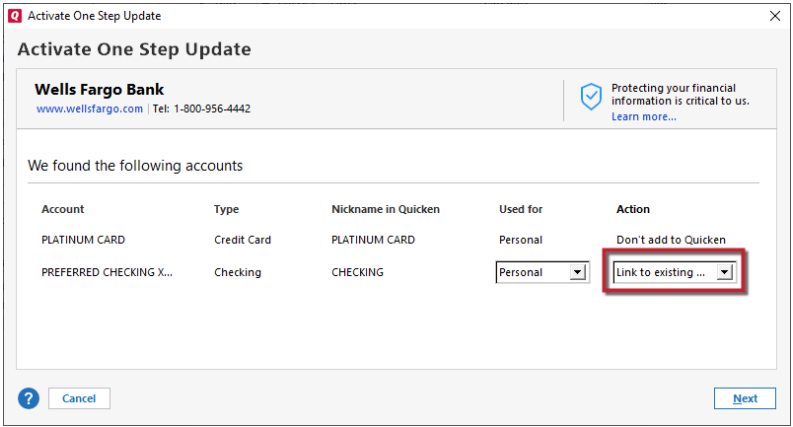
I am able to go through the whole process (including the approvals on the Fidelity website) but once it brings me back to Quicken, when I select the 'Link Account' dropdown in Quicken, the accounts that I want to link them to don't show up in the selection.
I called support and the only advice they could give me was that I should deselect any existing connection services in Quicken for the accounts I want to link to the new Fidelity accounts. I guess that is good advice for a novice user but I've been using Quicken for more than 20 years and that was obviously not the issue.
They could not provide any further guidance except for asking to be able to view my screen which is not going to happen with my financial information.
I've seen a couple of other folks ask about the same issue, and it appears that for them this issue simply 'disappeared' after a while.
Is that my only option now - wait for the issue to 'disappear' or is there anybody who knows what the parameters are that searches on available accounts to link to when you activate online services that would help me debug this?
Comments
-
Same here.
-1 -
Hello @xfrner & @sufferingwindowsuser,
Thank you for letting us know you're encountering this issue. You mentioned these are checking accounts. Are these checking accounts linked to an investment account in your Quicken file? If they are, then you should be able to resolve the issue by doing the following:
- Backup your Quicken file.
- Navigate to Tools>Account List.
- Click the Edit button next to the problem account (the investment account the checking is linked to).
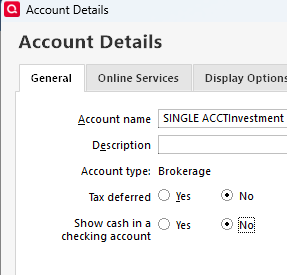
- On the General tab, where it says "Show cash in a checking account", select the "No" radio button, then click OK.
- Once it consolidates the checking account back into the investment account, deactivate the account.
- Repeat steps 3 & 4 for each problem account.
- Navigate to Tools>Add Account, search for your financial institution and follow the prompts.
- On the Add/Link screen, you should now be able to link your accounts.
- Once the accounts are connected and properly linked, you can turn "Show cash in a checking account" back on.
Please let me know how it goes!
Quicken Kristina
Make sure to sign up for the email digest to see a round up of your top posts.
0
Categories
- All Categories
- 49 Product Ideas
- 35 Announcements
- 227 Alerts, Online Banking & Known Product Issues
- 18 Product Alerts
- 506 Welcome to the Community!
- 673 Before you Buy
- 1.4K Product Ideas
- 54.9K Quicken Classic for Windows
- 16.7K Quicken Classic for Mac
- 1K Quicken Mobile
- 825 Quicken on the Web
- 121 Quicken LifeHub