Fidelity download of accounts no longer working

As of the January 15th none of my Fidelity accounts are downloading.
Includes trust and IRA accounts.
Comments
-
Hello @rayseidlinger,
Thank you for letting us know you're encountering this issue. To troubleshoot, please follow these steps from our article on missing transactions/transactions not downloading:
Be sure to follow these steps in order:
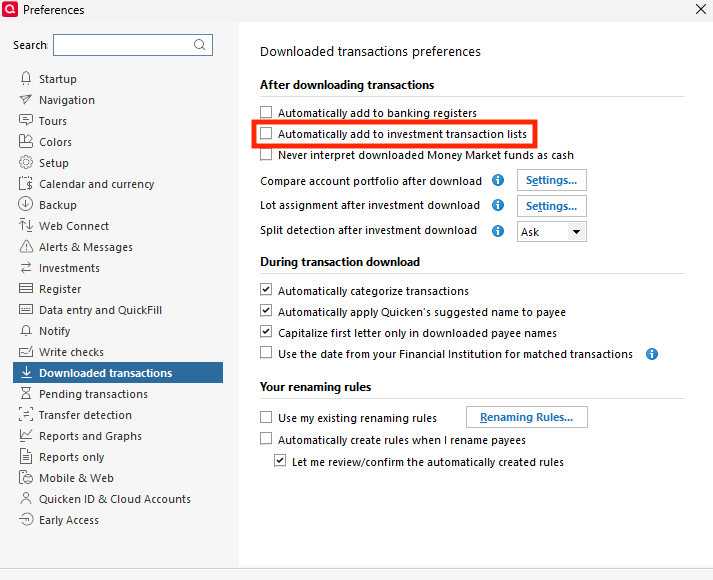
1. Go to Edit > Preferences > Downloaded Transactions. The option Automatically add to investment transaction lists needs to be unchecked.
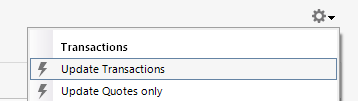
2. Refresh your online account information by clicking the Actions Gear Icon on the upper right of the register, and select Update Transactions. Follow the on-screen instructions to complete the update.
3. Confirm that the Sort Order in your account is by Date; just click the top of the Date column in your account register. It's possible the transactions are in your register, but not where you thought they'd be.

4. Try refreshing your login session: To do this, go to Help > Refresh Sign in. After completing the log-in process, trying running a One Step Update again.
5. Go to Tools > Account List and check Show Hidden Accounts at the bottom left. Confirm the missing transactions haven't been added to a hidden account by clicking on the name of any account that appears with a check mark in the Hidden column.

Please let me know how it goes!
Quicken Kristina
Make sure to sign up for the email digest to see a round up of your top posts.
0 -
@Quicken Kristina I could not locate any information about the Help → Refresh Sign In.
Can you please explain what Quicken does when the Sign In is refreshed?
For example, does it perform the same action as "Sign in as another user" and using the same login info?
Oh, nevermind. Quicken's AI support gave the answer:
Yes, essentially. "Sign in as Different User" completely signs you out and requires you to re-enter credentials. If you use the same Quicken ID and password when signing back in, the end result would be similar to a refresh - you'd be logged in with the same account but with a fresh session.The main difference is that "Sign in as Different User" is a full logout/login cycle, while "Refresh Sign In" (if available) would refresh your current session without the complete sign-out process.Deluxe R66.23, Windows 11 Pro
0 -
Thank you for your reply,
The Refresh Sign In function is similar to "Sign in as another user", but it does not give you the option to login with a different Quicken ID. It will bring up the login screen with your Quicken ID visible, but greyed out. Click continue, and it will bring you to the screen where you can enter your password. Enter your password, and it logs you back into Quicken.
I hope this helps!
Quicken Kristina
Make sure to sign up for the email digest to see a round up of your top posts.
1 -
I am not sure if this is the correct chain to post to.
On 2-19-26 the shares of stock in Quicken matched the shares at Fidelity. (IRA account)
Now on 2-24-26 Quicken reports all of the stocks I hold at Fidelity as 0 shares held at Fidelity. In checking Fidelity against Quicken the shares reported in Quicken as a securities mismatch comparison actually are in for the exact amount compared to the amount of the "mismatch".
I hope this is clear. Please let me know if you this is confusing.
Thank you.
0 -
Hello @rayseidlinger,
Thank you for letting us know you're seeing this issue. To help troubleshoot, please provide more information:
- Is this affecting all of your Fidelity accounts?
- Did any transactions download that would explain the drop to 0?
- Are there any placeholders in the account(s)?
- Is the cash balance correct?
- If not, is it off by the value of the missing securities?
I look forward to your response!
Quicken Kristina
Make sure to sign up for the email digest to see a round up of your top posts.
0 -
I am also having this experience. All of Quicken now shows 0 online shares for all Fidelity holdings. Also, the online Fidelity cash balance shown for each account is $0.00 which is also mismatching. On 2/23/26, the online balance and cash balance showed correctly for all Fidelity accounts. Something is bad broken with the Fidelity connection. I will be reporting this issue. Thank you, @rayseidlinger, for reporting this. I have tried restoring backup files which correctly show the online holdings before the first OSU. Then the online shares are changed to 0 and the cash balances changed to $0.00. I will be reporting this issue. It took me by surprise today. I perform an OSU every day and this issue started today.
Deluxe R66.23, Windows 11 Pro
0 -
I have also lost 95% of the securities in my fidelity account in quicken. If I restore backup from 2/23/26 they are back. then if I re authorize fidelity and update the securities disappear again. This is a major problem and is wasting a lot of my time restoring from backups.
0 -
same here
0 -
I'm seeing the same after doing an OSU this evening. I'm showing the correct # of shares and balances on the Quotes page, but when I go to reconcile shares, most positions, in most accounts, show 0 shares on the Fidelity end. I also got some errors for a short time on the Fidelity site. I suspect this is a Fidelity issue.
0 -
Glad I found this thread. OSU yesterday from Fidelity was fine. Today they are messed up. Today I did OSU and was told there was a new build which I downloaded, R66.18, Build 27.1.66.18. I thought it was the update but see that others are having trouble too. I tried Resetting the Fidelity Accounts and also Deactivating them and setting them up again. When I set them up again, they had the balance right when I was asked to link them to an existing account, but once setup was done, the accounts were missing securities.
0 -
I just had this happen after today's Quicken update and One Step Update. Only my Fisher Managed account at Fidelity is affected; dozens of securities show 0 shares in Quicken. There are no transactions or placeholders that would account for this. Cash Balance is close to correct, off by about $6.00.
0 -
Ditto. It's the same in Quicken Simplifi. Fidelity stinks. I have to fix it almost every time I get dividends. Sometimes it wants cash to be cash and other times it wants it to be SPAXX. It's fickled.
But yep, this time it is as outlined above.
Steve
Quicken Mac since 2017
Quicken Simplifi Safari & iOS since 2021
MS Money/Quicken Windows 1991-20170 -
I ran OSU this morning and everything looks to be back to normal.
0 -
Hello All,
Thank you for reporting this issue, though we apologize that you are experiencing this.
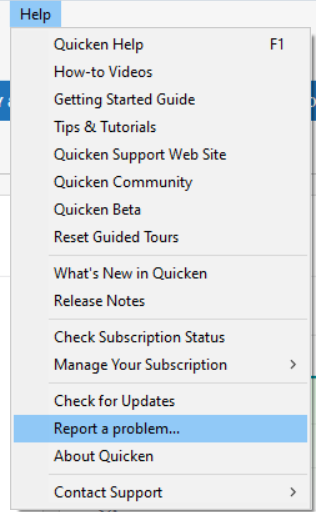
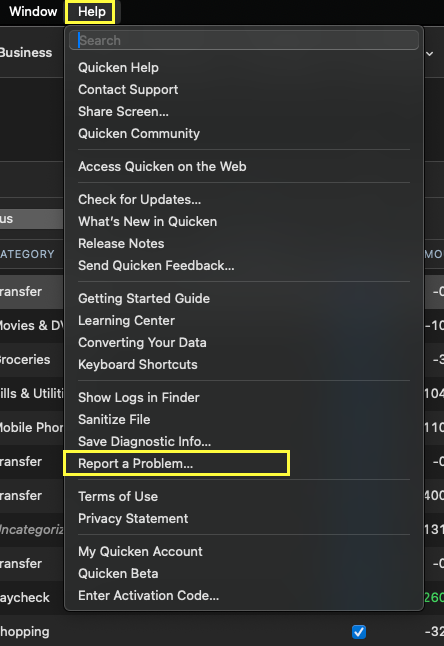
We have received reports of multiple Fidelity issues this morning, and we are working to identify the cause. We will be forwarding this issue to the proper channels to have this further investigated. However, we request that you please navigate to Help > Report a problem within your Quicken program and submit a problem report with log files and screenshots attached in order to contribute to the investigation.
Quicken Windows:
Quicken Mac:
It would also aid the investigation to include a sanitized file when submitting the problem report. A sanitized file is a data file that removes personally identifiable information so you can comfortably share this file with the Quicken team.
While you will not receive a response through this submission, these reports will help our teams in further investigating the issue. The more problem reports we receive, the better.
Please let us know once you have sent them so we can add them to the ticket.
Thank you.
[CBT-1053]
Quicken Alyssa
Make sure to sign up for the email digest to see a round up of your top posts.
0 -
Same for me.
Deluxe R66.23, Windows 11 Pro
1 -
Hello All,
Thank you again for taking the time to report this!
We have forwarded these Fidelity issues along to the proper channels, and our teams are actively investigating.
While we do not have an ETA available on resolution, in the meantime, please refer to this Community Alert for any and all available updates and information.
Thank you!
Quicken Alyssa
Make sure to sign up for the email digest to see a round up of your top posts.
0 -
Hello again All,
We’re currently researching this issue and would really appreciate the opportunity to connect with a few of you directly.
If you’d be willing to participate in a quick call today to help us investigate, please reply here, and I’ll send you a DM with more details.
Thanks in advance for your help!Quicken Alyssa
Make sure to sign up for the email digest to see a round up of your top posts.
0 -
I updated at 9:54 am this morning and i am not receiving a "securities mismatch comparison" report.
When I check the online center and compared several stock shares noted in the center to my Fidelity shares and the shares are the same. My cash balances are the same.
The message when select reconcile shares is " Your quicken account and your brokerage holdings are in agreement. I received the same message when testing reconciliation of my other Fidelity links.
Ray S
1 -
Thank you for following up to let us know this issue is resolved for you.
If you need more help, don't hesitate to reach back out.
Thanks again!
Quicken Alyssa
Make sure to sign up for the email digest to see a round up of your top posts.
0