One Step Update - Navigation Cancelled
Version R65.29. Just upgraded to Windows 11. Downloaded and installed Quicken on new PC.
Context: Trying to update transactions via the Online Update functionality on the Home Screen.
Issue: The button, Update Now on the Home screen, returns a pop-up window (with the quicken icon) titled," Navigation Canceled". On this window, the text reads, "Navigation to the webpage was cancelled. What you can try: Refresh the page."
Clicking on the active link to "Refresh the page" displays another window referencing the web address http://qw.exe and an option to search for this site on Bing. Searching for this file provides no results.
Add'l Info: After several attempts the update process may, or may not, begin.
Any ideas of how l can start using Quicken again to download transactions trouble free?
Thanks.
Comments
-
Hello @20Jk23,
Thank you for reaching out! To help troubleshoot, please provide more information.
There are a few different ways to initiate account updates from the home screen in Quicken. Which one are you using?
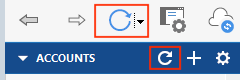
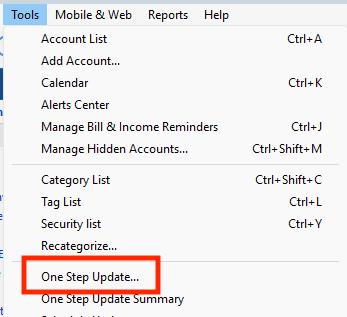
Do you get the same result when attempting to update via any of the other methods? For example, the One Step Update icons near the top of the Accounts bar, the Update Now link on the Dashboard, or Tools>One Step Update?
If you have automatic entry turned off, there is also the One Step Update icon near the upper right of the Downloaded Transactions section.
Since you mentioned you recently installed Quicken, have you tried uninstalling and reinstalling, in case the issue is being caused by something that didn't install properly?
I look forward to your reply!
Quicken Kristina
Make sure to sign up for the email digest to see a round up of your top posts.
0 -
For updating, I usually use the "Update Now" button on the Home screen. When clicking on the Update Now button, it returns the web page, "Navigation Cancelled".
Clicking on the One Step Update, with the revolving circle, I get a drop down menu. On this menu, only the One Step Update is "active" and it looks like will allow for the one-by-one updating of transactions by selecting individual accounts; (I've selected one for a trial with no issues); all other options on this menu seem to be "bricked".
Clicking on the "gear" icon, crashes Quicken, so I avoid that.
As for reinstalling, yes, I've done so but only once.
Thanks for the reference to the One Step Update available through the Tools menu. That seems to work.
0
Categories
- All Categories
- 50 Product Ideas
- 35 Announcements
- 235 Alerts, Online Banking & Known Product Issues
- 18 Product Alerts
- 506 Welcome to the Community!
- 674 Before you Buy
- 1.4K Product Ideas
- 55K Quicken Classic for Windows
- 16.7K Quicken Classic for Mac
- 1K Quicken Mobile
- 826 Quicken on the Web
- 121 Quicken LifeHub