Firstbank of Colorado download issue

GoldenCO1
GoldenCO1 Quicken Windows Subscription Member

I have been having trouble downloading transactions from Firstbank since January 1, 26. My checking and one CC download but two CCs do not. I have spent about an hour on a call with their online support with no results. They said they were going to elevate it but no response for 2 weeks. I have tried resetting, converting to a different method, having them reset, deleting and reinstalling Quicken with no success.


Comments

  • Quicken Laura
    Quicken Laura Quicken Windows Subscription Member, Moderator mod
    edited February 10

    Hi @GoldenCO1

    I apologize for the experience you had with online support. I will share your feedback with the appropriate department so improvements can be made.

    I see that you have tried to reset your FirstBank of Colorado accounts, but it did not work. I have also verified that your accounts were successfully connected this morning. Did you possible receive the FDP-7500 error after reconnecting the accounts or when trying to update them?

    I will be waiting for your reply.

    Quicken Laura

    Quicken Laura

    Make sure to sign up for the email digest to see a round up of your top posts.

  • GoldenCO1
    GoldenCO1 Quicken Windows Subscription Member

    Hi Laura,

    Thank you for the feedback. No, I have not received any error codes when updating. I have been using Quicken since 2011 and this is the first time I have had any issues. I am back trying to use Direct Connect after trying Express Connect. Express Connect worked for all accounts for a couple days but stopped working.

    PNC Bank is taking over Firstbank and I wonder if my problem is related.

    Gary

  • Quicken Laura
    Quicken Laura Quicken Windows Subscription Member, Moderator mod
    edited February 11

    Hi @GoldenCO1,

    Thank you for providing more information.

    Express Web Connect is the recommended connection method for your credit card accounts. Although it previously functioned only for a short period, switching from Direct Connect to Express Web Connect will help us to ensure your accounts remain properly linked in the application. To update the connection method for the affected accounts, please follow the steps below:

    Deactivate 

    1. Open “Tools”
    2. Go to “Account list”
    3. Click on Edit (on the problematic accounts)
    4. Open Online Services 
    5. Deactivate the account.

    After deactivating all the affected accounts, please reactivate them using EWC:

    1. Go to Tools > Add Account.
    2. Select the bank for the deactivated account(s). If prompted, select the connection method (EWC).
    3. Enter your credentials and click Connect.
    4. When the list of located accounts appears, choose LINK next to each account you want to reactivate.
    5. Click Next then Done on the last prompt.

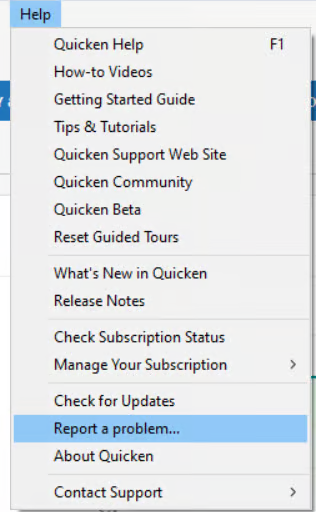
    After reactivating/ updating the First Bank of Colorado accounts, please submit your log files by following these steps:

    1. Help> Report a problem.
    image.png

    We also have an alert for you to reference when updates are provided.

    Please let me know how it goes!

    Quicken Laura

    Make sure to sign up for the email digest to see a round up of your top posts.