This discussion was created from comments split from:
Linking Discover Bank Account after Capital One Merger
.
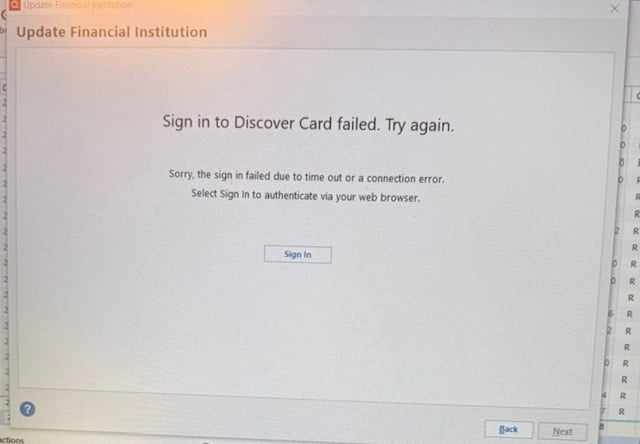
I also cannot download my Discover transactions. Prompt to re-authorize only gives me the attached pictured result. I tried to deactivate account, the reactivate; same result. Help, please?
Hello @JillDDD,
Thank you for letting us know you're encountering this issue. Typically, this error is caused by something interfering with communication between the financial institution and Quicken. To troubleshoot, please follow these steps:
I hope this helps!
Kristina,
Thank you!! It was my browser getting in the way. Fixed and working now! Thanks for your speedy assistance!
Thank you for the follow-up,
I'm glad to hear that it's working now!
If you need further assistance, please feel free to reach out!
I’ve been fighting with Discover reps all day. I was told they are no longer supporting the Quicken connection. So, until the account is moved to the Capital One site, no downloads. No surprise that Capital One would leave us high and dry.
Hello @Ryan.C,
Thank you for sharing your experience. To clarify, what is happening when you try to update your Discover account(s)?
When I check our internal tools, I can see an expired token error. Are you seeing an error message when you try to update the account(s)? If you do, what message/code are you seeing?
I look forward to your reply!
Hello. I don’t remember the code but it was asking for a reauthorization. When I tried I would get technical error notifications from Discover.
So, I tried to deactivate and reactivate with no luck. I received the same technical errors. The Discover site won’t even let me remove the Quicken authorization. And no one there is willing to help. Again, Discover reps told me they are no longer supporting the Quicken connection.
Thank you for your reply,
What is the exact error you are seeing? If you're willing, please post a screenshot of the error message (with any personal information redacted). If needed, please refer to this Community FAQ for instructions on how to attach a screenshot. Alternatively, you can also drag and drop screenshots to your response if you are not given the option to add attachments.
Thank you!
We have experienced technical error. Please try again.
Discover Card account has already moved to Cap One. This error is when I try to connect my bank accounts still on the Discover site.
We're unable to connect your account at this time. Please try again later.
This is a Discover Card account that is still at Discover
Thank you for your replies,
Which connection options have you tried (Discover Card, Capital One Card Services, etc.)? Which web browser do you use? Have you tried using an alternate web browser?
You mentioned one of the cards has been moved to Capital One. Have you set up Capital One credentials for it? Have you tried connecting it in your Quicken using one of the Capital One connection options?
I sent Discover a message about no Quicken connection. Much to my dismay, here is their response. In short, Quicken software is no longer supported by Discover :
Thank you for your being a valued Discover customer. I understand your concern regarding being able to import your transactions using the Quicken or QuickBooks software. Unfortunately, Quicken and QuickBooks software is no longer supported. I apologize for any inconvenience this causes. You are able to access your transactions anytime through your online account center by clicking on your Activity under your account details. You are also able to download the transaction history in an Excel or CSV file. Any questions concerning Quicken or QuickBooks products can be addressed directly to the financial software provider (either www.Quicken.com or www.Intuit.com). If you have questions, click on the Help section of the Account Center online or on the More option in the Discover Mobile App to review our FAQs. You also can reply to this message or call 1-800-347-7000 where you can talk to a real person from our customer service team. Sincerely,
Donovan
Discover Customer Service
Hello @swfour,
Thank you for sharing this information! Did Discover give you any ticket number or reference number for your contact with them? What was the date/time of that response?
I sent you a DM. To view it, please click the envelop icon near the upper right.
The Discover website does not contain any information about connecting to Quicken. I can't connect to Discover through Quicken. I can't refresh the Discover profile in Quicken. I have to download a .csv file from Discover to update transactions in Quicken. It's very frustrating, so I'm probably going to stop using my Discover card.
Discover had stopped supporting Quicken. Discover support told me this. They are no longer concerned with supporting customers still at the discover.com site. Not sure why Quicken won’t post that.
I did not get a case number. They aren’t even trying to resolve. I got the same message as swfour above. They are not going to help with Quicken until all the accounts get moved over to Cap One website.
I forwarded that information to our teams.
With the help of Quicken Support agent I was able to authorize my Discover card and connect for downloads by changing to the Microsoft Edge browser. Previously I always received an error message when using Chrome.
Is your Discover Card account still at discover.com or has it been moved to Capital One site?
@DGugs,
Thank you for letting us know you found success after working with our support team.
If you need more help, you know where to find us!
@Ryan.C,
If you have not been instructed by the financial institution to move your accounts to Capital One, you should still use the Discover instance in Quicken to connect them.
Hope this helps!
I am now able to download my Discover Bank checking and savings account via the old Discover Card (Discover.com) site. Began working yesterday. As Discover Bank is no longer an option, change any Discover Bank accounts to download from the Discover Card site.
@irasend1,
Thank you for chiming in and sharing what worked for you!
This information may be helpful to others, and we appreciate you sharing it.
If you need more help, don't hesitate to reach back out.
Thanks again!
Working now
I'm glad to hear it's working!