Won't dl trans for CMA Checking (66.12)

Just restored backup & updated to R66.12 but not getting trans for checking. Should have 4 days worth. Looks like 66.12 will solve problem with having 2 cash forms (fdic and MM) but no go on downloading to the Checking portion of CMA.
Hope there's a solution, and soon. I've about had it with QW.
Comments
-
Hello @drallop3,
Thank you for letting us know you're seeing this issue with transactions not downloading into your CMA account. To help troubleshoot, please provide more information:
- When did you first notice this issue?
- Which financial institution is this happening with?
- Are you seeing any error messages/codes?
- Does Quicken see the CMA account as an investment account?
- If it does, do you have a linked checking account set up for the cash transactions?
I look forward to your response!
Quicken Kristina
Make sure to sign up for the email digest to see a round up of your top posts.
0 -
Quicken Kristina, Why Fidelity of course, where QW can allow an investment account to emulate a bank's checking acct by showing 'Cash in a checking account' and was working pretty well until 2/11 when QW seemed to decide NOT to accept Fidelity's report of cash balance instead to account for it by recording it's transactions.
Direct answers; 1] 2/11……..2] Fidelity ……3] no errs just goofy adj to Checking balance (see addendum below)……4] yes, "CMA x999" 4a] Yes, "CMA x999-Cash"
- addendum: after attempted d/l I did custom designation of naming both FDIC & FDRXX as cash equivalents. QW then created an adjustment to bring checking balance in agreement to last successful Fidelity d/l but that was from 2/9/26 and so ignored what it failed to d/l since and legitimately still outstanding trans. BTW that adj has as its category the acct itself CMA x999-cash, never seen that before.
Does this help? Hope you can tell how to repair that invisible function between these twins, because I can't. I do know that if I were to uncheck the 'Cash in a checking account' box and then try to redo, QW would create another checking acct 'CMA x999-cash1' , learned that the hard way in the last few days.
Thanks for your attention
-1 -
Additional discovery;
After reauthorizing accounts to connect to Fidelity, I noticed 'CMA x999' Online Services needed to be 'Set Up now'. Okay, I'll do it again. This time, I noticed that the new 66.12 screen is matching the Fidelity CMA x999 to the Q 'CMA x999-Cash' rather than the Q CMA investment account. This new screen does not give the option to "Link to Existing" choice, but just spontaneously picked 'CMA-Cash'.
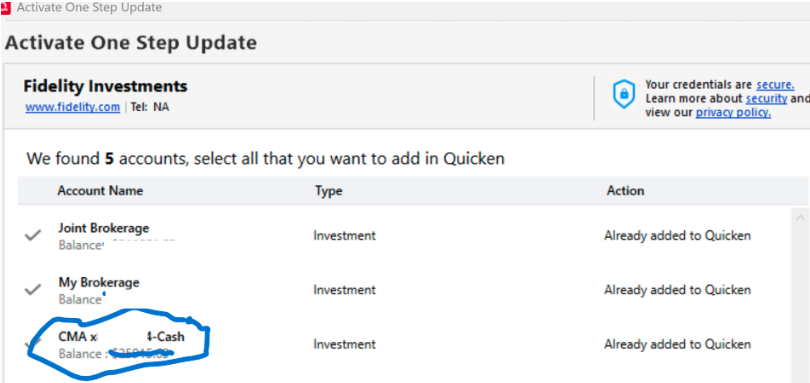
I'm now assuming that this disconnect is why I can't download cash trans, but I can't see how I can correct this. Seems I need the 65.19 flexibility to manually select accounts to connect, but the 66.12 ability to recognize 2 cash equivalents.
This problem has been reported.
[Edit - Readability/Removed Personal Information]
0 -
Clarification:
"Seems I need the 65.19 flexibility to manually 'Link to existing' CMA x999 account (gone in 66.12) but the 66.12 ability to recognize 2 cash equivalents.
0 -
Thank you for your replies,
Based on your description and the screenshot, your CMA account is configured to have a linked checking account in Quicken. There is a known issue where linked checking accounts prevent users from linking their accounts correctly after authorization.
Please backup your Quicken file, then navigate to Tools>Account List, click the Edit button next to the CMA account, and on the General tab, click the radio button to remove the linked checking account.
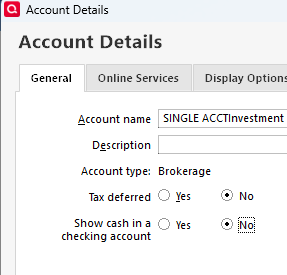
Once that is done, deactivate the problem accounts, then navigate to Tools>Add Account, and follow the prompts. You should now be able to correctly link the accounts to the correct nicknames in Quicken.
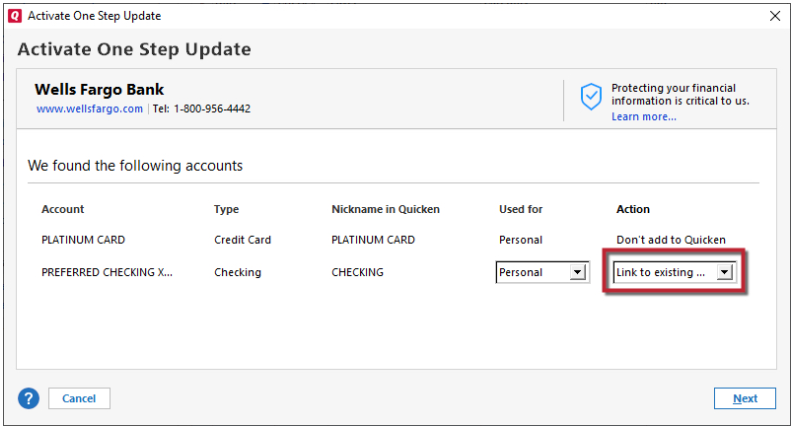
Once the accounts are reconnected, navigate to Tools>Account List, click the Edit button next to the CMA account, and re-enable the linked checking account.
I hope this helps!
Quicken Kristina
Make sure to sign up for the email digest to see a round up of your top posts.
0 -
Ok that worked after at least 90 min of processing leaving me with a balance about 4k overstated and Reconciled Prior balance of $273,311.16. Lots of work to do to straighten this out. All apparently because somebody decided to not accept Fidelity's cash balance but to subclassify it or very mistakenly pulled in their normally hidden cash clearing trans. As a longtime Q user I resent all the work I had to do over the last five months. But to you, thanks, Kristina.
0 -
Thank you for your reply,
I'm glad to hear it corrected the original issue.
If you need further assistance, please feel free to reach out!
Quicken Kristina
Make sure to sign up for the email digest to see a round up of your top posts.
0
