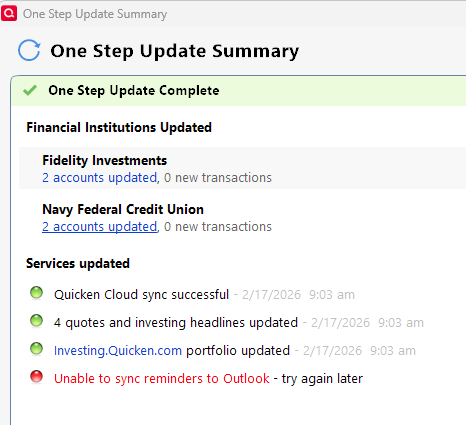
Using Quicken in Windows.
Started years ago.
Issue with Syncing to Windows Outlook.
This occurs every time I run One Step Update.
Per Quicken Help:
This feature works only with older 32-bit desktop versions of Microsoft Outlook, such as Outlook 2007 or 2010.Because Quicken is a 32-bit program, it is not compatible with 64-bit versions of Outlook, including Outlook 365 or Outlook from Microsoft 365 installations.
This feature works only with older 32-bit desktop versions of Microsoft Outlook, such as Outlook 2007 or 2010.
Because Quicken is a 32-bit program, it is not compatible with 64-bit versions of Outlook, including Outlook 365 or Outlook from Microsoft 365 installations.
You can read more about it by going to https://info.quicken.com/win/how-do-i-sync-my-reminders-with-outlook .
Does this answer your question?
Does Quicken intend to fix this for 64-bit devices?
We're other users and have no way of answering this question. Q NEVER pre-announces features until just before they're released.
Quicken is a 32-bit program. Outlook is a 64-bit program. I've heard (and I don't know how true this is) but for Quicken to be able to sync with Outlook would require Quicken to be totally rewritten as a 64-bit program. That would be a major undertaking for a company as small as Quicken is.
I seem to recall there once was a Product Idea submitted to add syncing to 64-bit Outlook but I can't find it. Maybe that idea was declined by the Development Team so the Product Idea was closed and archived?