Continuing PNC download problem

rdclawn
rdclawn Member ✭✭✭

PNC Cash Unlimited credit card transactions will not download automatically to Quicken. Every 3-4 days, I must reset the account to download transactions. All other PNC accounts and other accounts seem to work fine.

Comments

  • Quicken Alyssa
    Quicken Alyssa Quicken Windows Subscription Moderator mod

    Hello @rdclawn,

    Thank you for reporting this issue you are having.

    I have some follow-up questions for you:

    • When did this issue begin?
    • Where is your data file located?
      • You can check this by going to File. The first file listed is the one you are currently in. The file pathway will be displayed there. That's what we are looking for.
    • Is your file being backed up/synced by any third-party services like Carbonite, OneDrive, or Backblaze?

    Please follow the steps below:

    1. Create a backup of your Quicken file first.
    2. Deactivate all PNC accounts in Quicken.
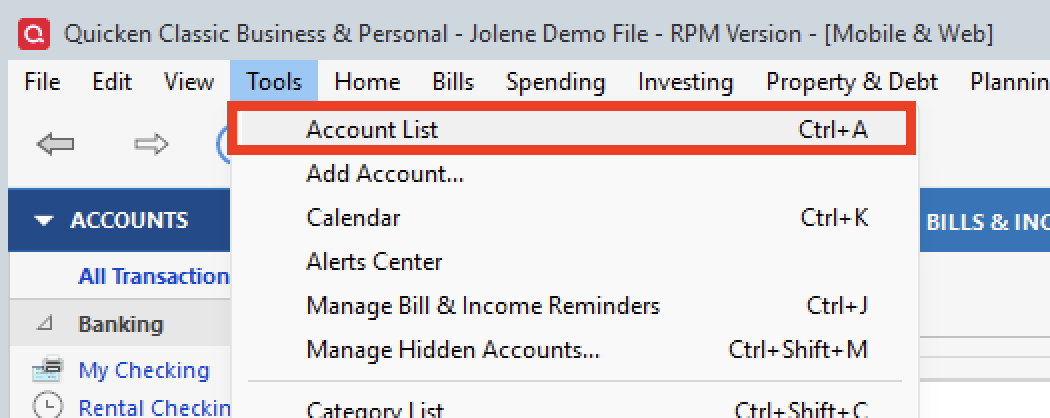
      1. Select the Tools menu and select Account List.... tools>acct list.png
      2. In the Account List, select the account you want to deactivate, and then click Edit.
      3. In the Account Details window, click the Online Services tab.
      4. Click Deactivate next to the service you want to disable. image.png
      5. Click Yes to the message confirming if you want to disable this service. Note: If you do not receive this message, additional information is available below.
      6. Click OK to the confirmation message.
      7. If you have an investment account that is linked to a cash account, you need to deactivate the online services from the investment account, which will automatically deactivate the linked cash account.
      8. Important: If you are deactivating/reactivating an account to fix an issue, you'll need to deactivate all the accounts with the affected financial institution that you have activated in Quicken (including hidden ones). Once they're all deactivated, then you can follow the steps to reactivate.
    3. Revoke Quicken’s third-party access from the PNC website.
    4. Reactivate the accounts in Quicken.
      1. Go to Tools > Add Account. image.png
      2. Select the bank for the deactivated account(s). If prompted, select the connection method.
      3. Enter your credentials and click Connect.
      4. When the list of located accounts appears, choose LINK next to each account you want to reactivate.
      5. Click Next, then Done on the last prompt.

    Let us know if the issue persists!

    Quicken Alyssa

    Make sure to sign up for the email digest to see a round up of your top posts.

  • rdclawn
    rdclawn Member ✭✭✭

    • When did this issue begin? 2026
    • Where is your data file located? Drive C, No changes
      • You can check this by going to File. The first file listed is the one you are currently in. The file pathway will be displayed there. That's what we are looking for.
    • Is your file being backed up/synced by any third-party services like Carbonite, OneDrive, or Backblaze? NO

    I deactivated and reactivated my PNC credit card account. I did not reset my other PNC accounts. This usually creates a lot of duplicates on the checking accounts that need editing. Been there, done that.
    Not positive. I think the credit card account is now working properly.

  • Quicken Alyssa
    Quicken Alyssa Quicken Windows Subscription Moderator mod

    @rdclawn,

    Thank you for following up with additional information.

    I am happy to hear the steps you took seem to have resolved the issue. If you need more help, don't hesitate to reach back out!

    Thanks again!

    Quicken Alyssa

    Make sure to sign up for the email digest to see a round up of your top posts.