Reporting on Return of Capital Transactions
I have noticed that RtrnCap transactions do not have a category thus to get them to show up in a Transactions report you have to select the "Not Categorized" category for the report. However I have also noticed that RtrnCap transactions will sometimes show up under the _DivInc category in the report as in the screen print I attached.
Anyone else seen this and/or know where RtrnCap transactions are supposed to show up in the reports. I am wondering if this is a bug or if my data file has some corruption.

Answers
-
What I think I found but have not reported, confirmed, or documented— if I change (edit) a Div transaction and make it a RtrnCap, then it retains the _Div category. A fresh RtrnCap does not and should not have a _Div category; it would throw off tax related data.
0 -
Generally RtrnCap is not income and is not taxable. It is simply a return of some of the amount you invested so it then reduces your cost basis in the investment.
The income aspect of RtrnCap transactions comes when you sell the security. That reduced cost basis will either increase the Cap Gain or reduce the Cap Loss. Cap Gain/Loss are tax events.
The purchase of a security is not an expense. It is simply a transfer of one asset (from the cash balance of the account or from some other asset source) to the security so there is no change to net worth. Similarly, a RtrnCap transaction should be thought of as a transfer of value from the security back to the cash balance of the account.
Therefore, since a RtrnCap transaction is simply a return of the amount invested and not income it does not nor should have a category.
Regarding the RtrnCap transaction under DivInc: That is an odd one and does not make sense to me. Perhaps it is as @q_lurker mentioned. If you double click on that transaction it should open the Edit transaction popup. Would you be comfortable with taking a snapshot of that popup and then copying/pasting it into this thread?
Quicken Classic Premier (US) Subscription: R65.29 on Windows 11 Home
0 -
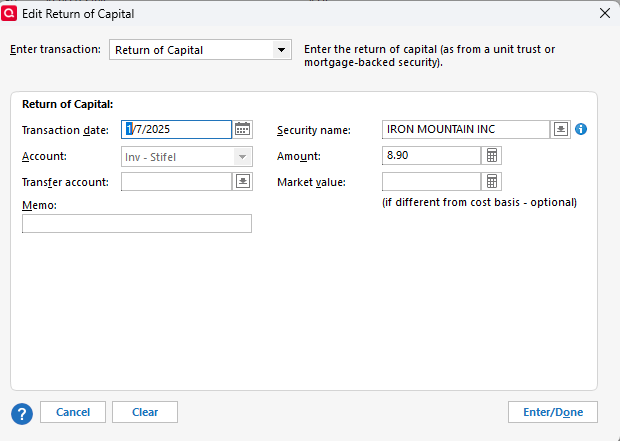
@Boatnmaniac here's the screen print of the RtrnCap transaction that shows up under _DivInc in the report.
Looks just like all the other RtrnCap transactions to me. I will play around with this a little later today to test out what @q_lurker mentioned and I'll report back.
0 -
Thanks. I agree with you that nothing in this transaction seems out of the ordinary. I'm looking forward to see what your testing results will be.
Quicken Classic Premier (US) Subscription: R65.29 on Windows 11 Home
0 -
@Boatnmaniac I finally got around to doing a quick test and @q_lurker is correct. I see exactly the same.
I changed an existing _DivInc transaction, Schlumberger LTD, to a RtrnCap transaction and it showed up in the report under the _DivInc category section.
I then created a new transaction, Amazon Com Inc, as a RtrnCap transaction and it showed up in the report under the Uncategorized section.
So @Quicken Anja I think this is a bug but I also think RtrnCap transactions should have a category of some type not just be uncategorized.
1 -
@cjim - Thanks for posting the results of your test. Good to know that the issue @q_lurker is repeatable. That should help the Dev Team if/when they put a fix into their development plan.
…I also think RtrnCap transactions should have a category of some type not just be uncategorized.
It is my understanding that in order to be categorized a transaction needs to be classified as either an income, an expense or a transfer. RtrnCap is neither an income nor an expense. And since the capital is simply returned to the cash balance of the account it is not a transfer. Unless I'm mistaken about this, I don't see how RtrnCap can have a category assigned to it.
It's kind of the same with Buys and Sells of securities. There is no category for those either (unless there are fees involved and those fees can be categorized). The category comes into play only when the they securities are sold but not for the Sell transaction itself. Instead, the Sell transaction will generate a Cap Gain/Loss. Cap Gain is an income and Cap Loss is an expense so they do have categories, but not the Sell transaction itself.
In the same way, the RtrnCap has no direct category but it does affect Cap Gain/Loss when the security is eventually sold and that is where the category is assigned.
At least this is my perspective of the situation. I would love to hear the logic behind your perspective on this or anyone else's different perspective on this because, contrary to the saying, old dogs can learn new tricks! 😏
Quicken Classic Premier (US) Subscription: R65.29 on Windows 11 Home
0 -
@Boatnmaniac I agree with your logic. Makes perfect sense to me.
I guess I just don't like the idea of any transaction not having a category. So while RtrnCap transactions technically should not have a category I don't see any harm in assigning them a category. It could even be optional. In my case I would probably create and assign them to the RtrnCap category. To me it would make reports look cleaner.
I feel the same about Bought and Sold securities transactions. I don't like to see them all listed as Uncategorized.
By the way I think there is a bug there too because if you uncheck the "Not Categorized" filter when creating a report you still see the Sold transactions in the results, i.e. only the Bought transactions are filtered out.
Anyhow, just personal preferences on my part, nice to have, nothing major.
1
Categories
- All Categories
- 57 Product Ideas
- 34 Announcements
- 237 Alerts, Online Banking & Known Product Issues
- 19 Product Alerts
- 511 Welcome to the Community!
- 678 Before you Buy
- 1.4K Product Ideas
- 55.2K Quicken Classic for Windows
- 16.7K Quicken Classic for Mac
- 1K Quicken Mobile
- 828 Quicken on the Web
- 123 Quicken LifeHub